Python实现抓取百度搜索结果页的网站标题信息
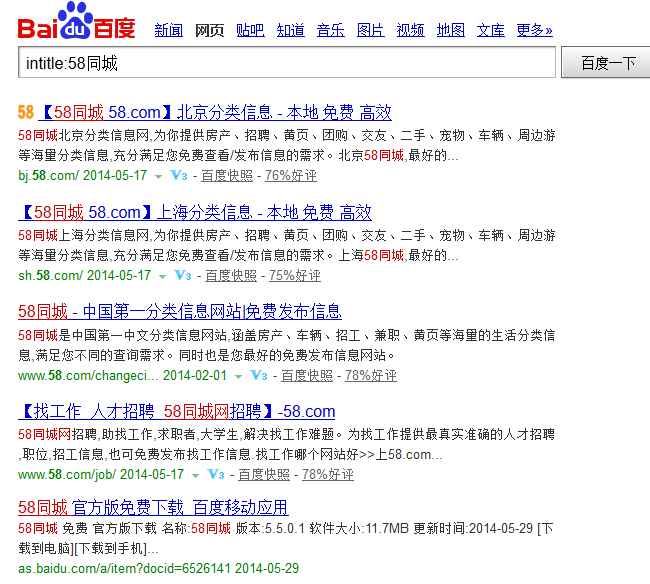
比如,你想采集标题中包含“58同城”的SERP结果,并过滤包含有“北京”或“厦门”等结果数据。
该Python脚本主要是实现以上功能。
其中,使用BeautifulSoup来解析HTML,可以参考我的另外一篇文章:Windows8下安装BeautifulSoup
代码如下:
__author__ = '曾是土木人'
# -*- coding: utf-8 -*-
#采集SERP搜索结果标题
import urllib2
from bs4 import BeautifulSoup
import time
#写文件
def WriteFile(fileName,content):
try:
fp = file(fileName,"a+")
fp.write(content + "\r")
fp.close()
except:
pass
#获取Html源码
def GetHtml(url):
try:
req = urllib2.Request(url)
response= urllib2.urlopen(req,None,3)#设置超时时间
data = response.read().decode('utf-8','ignore')
except:pass
return data
#提取搜索结果SERP的标题
def FetchTitle(html):
try:
soup = BeautifulSoup(''.join(html))
for i in soup.findAll("h3"):
title = i.text.encode("utf-8")
if any(str_ in title for str_ in ("北京","厦门")):
continue
else:
print title
WriteFile("Result.txt",title)
except:
pass
keyword = "58同城"
if __name__ == "__main__":
global keyword
start = time.time()
for i in range(0,8):
url = "http://www.baidu.com/s?wd=intitle:"+keyword+"&rn=100&pn="+str(i*100)
html = GetHtml(url)
FetchTitle(html)
time.sleep(1)
c = time.time() - start
print('程序运行耗时:%0.2f 秒'%(c))