Python下的subprocess模块的入门指引
在熟悉了Qt的QProcess以后,再回头来看python的subprocess总算不觉得像以前那么恐怖了。
和QProcess一样,subprocess的目标是启动一个新的进程并与之进行通讯。
subprocess.Popen
这个模块主要就提供一个类Popen:
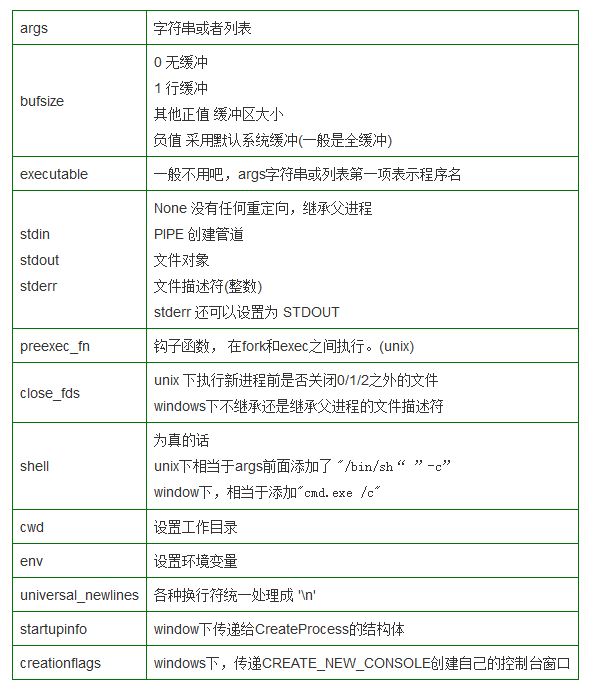
class subprocess.Popen( args,
   bufsize=0,
   executable=None,
   stdin=None,
   stdout=None,
   stderr=None,
   preexec_fn=None,
   close_fds=False,
   shell=False,
   cwd=None,
   env=None,
   universal_newlines=False,
   startupinfo=None,
   creationflags=0)
这堆东西真让人抓狂:
subprocess.Popen(["gedit","abc.txt"])
subprocess.Popen("gedit abc.txt")
这两个之中,后者将不会工作。因为如果是一个字符串的话,必须是程序的路径才可以。(考虑unix的api函数 exec,接受的是字符串列表)
但是下面的可以工作
subprocess.Popen("gedit abc.txt", shell=True)
这是因为它相当于
subprocess.Popen(["/bin/sh", "-c", "gedit abc.txt"])
都成了sh的参数,就无所谓了
在Windows下,下面的却又是可以工作的
subprocess.Popen(["notepad.exe", "abc.txt"])
subprocess.Popen("notepad.exe abc.txt")
这是由于windows下的api函数CreateProcess接受的是一个字符串。即使是列表形式的参数,也需要先合并成字符串再传递给api函数。
类似上面
subprocess.Popen("notepad.exe abc.txt" shell=True)
等价于
subprocess.Popen("cmd.exe /C "+"notepad.exe abc.txt" shell=True)

subprocess.call*
模块还提供了几个便利函数(这本身也算是很好的Popen的使用例子了)
call() 执行程序,并等待它完成
def call(*popenargs, **kwargs):
  return Popen(*popenargs, **kwargs).wait()
check_call() 调用前面的call,如果返回值非零,则抛出异常
def check_call(*popenargs, **kwargs):
  retcode = call(*popenargs, **kwargs)
  if retcode:
    cmd = kwargs.get("args")
    raise CalledProcessError(retcode, cmd)
  return 0
check_output() 执行程序,并返回其标准输出
def check_output(*popenargs, **kwargs):
  process = Popen(*popenargs, stdout=PIPE, **kwargs)
  output, unused_err = process.communicate()
  retcode = process.poll()
  if retcode:
    cmd = kwargs.get("args")
    raise CalledProcessError(retcode, cmd, output=output)
  return output
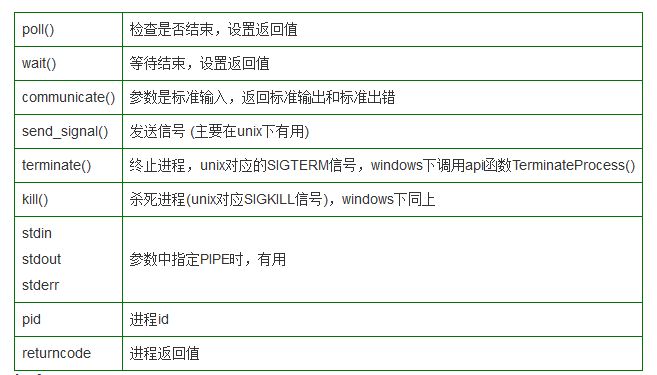
Popen对象
该对象提供有不少方法函数可用。而且前面已经用到了wait()/poll()/communicate()