Python脚本获取操作系统版本信息
查看系统版本信息是一件家常便饭的事情,有时候需要将版本信息录入到资产管理系统中,如果每次手动的去查询这些信息再录入系统那么是一件令人呢头疼的事情,如果采用脚本去完成这件事情,那么情况就有所不同了。
在Python的世界里,获取Windows版本信息和Linux的版本信息都可以采用platform模块,但platform模块也不是万能的,有些特殊的信息(比如Windows的内部版本号)这个模块拿不到,那么只能另辟蹊径了。
在Linux系统中,可以简单的认为一切都是文件,那么就算没有现成的命令可用时,可以用open()文件的方法通过对文件的读写控制它。而在Windows的大部分信息在注册表中都能查到,因此可以从注册表上下手。Windows注册表是一个好东西,拿数据就像在Linux下一切都是文件一样方便,如果想用Python访问注册表,除了权限外就是需要模块了,在Python中_winreg是一个内置模块,通过这一模块可以对注册表进行读写。
本脚本收集了一些获取版本信息的常见方法,除了platform模块外,还有其他的模块可供使用,因为platform模块不是内置模块,因此需要额外安装。Windows下运行脚本需要考虑权限问题和中文字符的问题,解决Python打印中文字符的问题是通过脚本中的get_system_encoding()函数实现的,这个函数取自Django,经过测试这个函数还是非常好用的。
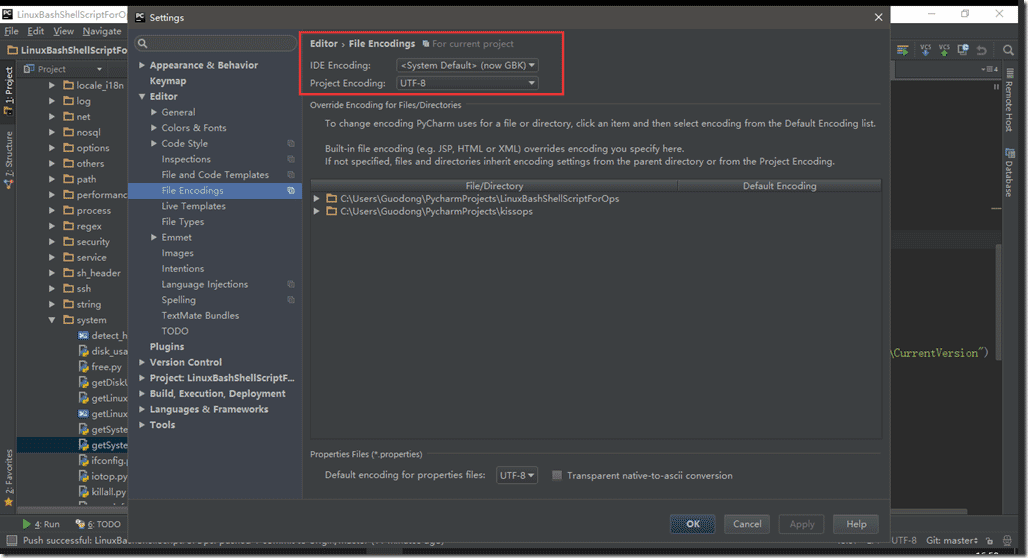
注:在PyCharm中,经常遇到Run窗口打印出的中文显示乱码,代码中没有经过正确转码是一方面,而IDE的编码设置也是一方面。如果是在Windows下开发,那么建议代码用UTF-8编写,IDE的编码则设置为“GBK”,设置方法“File”-->"Settings"-->"Editor"-->"File Encoding"-->"IDE Encoding"选择“<System Default (now GBK)>”, "Project Encoding"选择UTF-8保证代码的编码一致性。
脚本如下:
#!/usr/bin/python
# encoding: utf-8
# -*- coding: utf8 -*-
"""
Created by PyCharm.
File:        LinuxBashShellScriptForOps:getSystemVersion.py
User:        Guodong
Create Date:    2016/12/16
Create Time:    14:51
 """
import sys
import os
import platform
import subprocess
import codecs
import locale


def get_system_encoding():
  """
  The encoding of the default system locale but falls back to the given
  fallback encoding if the encoding is unsupported by python or could
  not be determined. See tickets #10335 and #5846
  """
  try:
    encoding = locale.getdefaultlocale()[1] or 'ascii'
    codecs.lookup(encoding)
  except Exception:
    encoding = 'ascii'
  return encoding


DEFAULT_LOCALE_ENCODING = get_system_encoding()

mswindows = (sys.platform == "win32") # learning from 'subprocess' module
linux = (sys.platform == "linux2")

hidden_hostname = True

if mswindows:
  uname = list(platform.uname())
  if hidden_hostname:
    uname[1] = "hidden_hostname"
  print uname

  import _winreg

  try:
    reg_key = _winreg.OpenKey(_winreg.HKEY_LOCAL_MACHINE, "SOFTWARE\\Microsoft\\Windows NT\\CurrentVersion")
    if reg_key:
      ProductName = _winreg.QueryValueEx(reg_key, "ProductName")[0] or None
      EditionId = _winreg.QueryValueEx(reg_key, "EditionId")[0] or None
      ReleaseId = _winreg.QueryValueEx(reg_key, "ReleaseId")[0] or None
      CurrentBuild = _winreg.QueryValueEx(reg_key, "CurrentBuild")[0] or None
      BuildLabEx = _winreg.QueryValueEx(reg_key, "BuildLabEx")[0][:9] or None
      print (ProductName, EditionId, ReleaseId, CurrentBuild, BuildLabEx)
  except Exception as e:
    print e.message.decode(DEFAULT_LOCALE_ENCODING)

if linux:
  uname = list(platform.uname())
  if hidden_hostname:
    uname[1] = "hidden_hostname"
  print uname

  proc_obj = subprocess.Popen(r'uname -a', shell=True, stdout=subprocess.PIPE,
                stderr=subprocess.STDOUT)
  result = proc_obj.stdout.read().strip().decode(DEFAULT_LOCALE_ENCODING)
  if result:
    print result

  if os.path.isfile("/proc/version"):
    with open("/proc/version", 'r') as f:
      content = f.read().strip()
    if content != "":
      print content

  if os.path.isfile("/etc/issue"):
    with open("/etc/issue", 'r') as f:
      content = f.read().strip()
    if content != "":
      print content
截图如下:
(1)注册表信息获取位置:

(2)Windows环境下的输出:

(3)Linux环境下的输出: