详解Python发送email的三种方式
Python发送email的三种方式,分别为使用登录邮件服务器、使用smtp服务、调用sendmail命令来发送三种方法
Python发送email比较简单,可以通过登录邮件服务来发送,linux下也可以使用调用sendmail命令来发送,还可以使用本地或者是远程的smtp服务来发送邮件,不管是单个,群发,还是抄送都比较容易实现。本米扑博客先介绍几个最简单的发送邮件方式记录下,像html邮件,附件等也是支持的,需要时查文档即可。
一、登录邮件服务器
通过smtp登录第三方smtp邮箱发送邮件,支持 25 和 465端口
vim python_email_1.py
#!/usr/bin/env python
# -*- coding:utf-8 -*-
#
# author: mimvp.com
# 2015.10.05


import smtplib
from email.mime.text import MIMEText

smtpHost = 'smtp.exmail.qq.com'
sender = 'robot@mimvp.com'
password = "mimvp-password"
receiver = 'yanggang@mimvp.com'

content = 'hello mimvp.com'
msg = MIMEText(content)

msg['Subject'] = 'email-subject'
msg['From'] = sender
msg['To'] = receiver

## smtp port 25
smtpServer = smtplib.SMTP(smtpHost, 25)     # SMTP
smtpServer.login(sender, password)
smtpServer.sendmail(sender, receiver, msg.as_string())
smtpServer.quit()
print 'send success by port 25'

## smtp ssl port 465
smtpServer = smtplib.SMTP_SSL(smtpHost, 465)  # SMTP_SSL
smtpServer.login(sender, password)
smtpServer.sendmail(sender, receiver, msg.as_string())
smtpServer.quit()
print 'send success by port 465'
执行命令:
$ python python_email_1.py
send success by port 25
send success by port 465
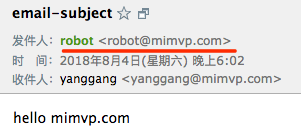
发送结果,会收到两封邮件,截图其中一份邮件如下图:
二、使用smtp服务
测试失败,略过或留言指正
#!/usr/bin/env python
# -*- coding:utf-8 -*-
#
# author: mimvp.com
# 2015.10.05


import smtplib
from email.mime.text import MIMEText
import subprocess

smtpHost = 'smtp.exmail.qq.com'
sender = 'robot@mimvp.com'
password = "mimvp-password"
receiver = 'yanggang@mimvp.com'

content = 'hello mimvp.com'
msg = MIMEText(content)


if __name__ == "__main__":
  p = subprocess.Popen(['/usr/sbin/sendmail', '-t'], stdout=subprocess.PIPE)
  print(str(p.communicate()))
  p_res = str(p.communicate()[0])
  msg = MIMEText(p_res)

  msg["From"] = sender
  msg["To"] = receiver
  msg["Subject"] = "hello mimvp.com"
  s = smtplib.SMTP(smtpHost)
  s.login(sender, password)
  s.sendmail(sender, receiver, msg.as_string())
  s.quit()
  print 'send success'
三、调用sendmail命令
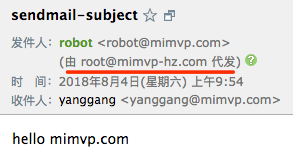
调用本机linux自身sendmail服务发送邮件,不需要启动sendmail后台进程,不需要发送者登录,邮件发送者可以是任意名字,没有限制。
特别注意:sendmail 命令发送邮件,默认用25端口号,由于阿里云、腾讯云等封禁了25端口号,因此本示例需在开通25端口机器上测试
vim python_email_3.py
#!/usr/bin/env python
# -*- coding:utf-8 -*-
#
# author: mimvp.com
# 2015.10.05


from email.mime.text import MIMEText
from subprocess import Popen, PIPE
import commands

import sys
reload(sys)
sys.setdefaultencoding('utf-8')

def send_mail(sender, recevier, subject, html_content):
    msg = MIMEText(html_content, 'html', 'utf-8')
    msg["From"] = sender
    msg["To"] = recevier
    msg["Subject"] = subject
    p = Popen(["/usr/sbin/sendmail", "-t"], stdin=PIPE)
    p.communicate(msg.as_string())


sender = 'robot@mimvp.com'
recevier = 'yanggang@mimvp.com'
subject = 'sendmail-subject'
html_content = 'hello mimvp.com'
send_mail(sender, recevier, subject, html_content)
执行命令:
python python_email_3.py
收件结果:
以上就是本文的全部内容,希望对大家的学习有所帮助,也希望大家多多支持【听图阁-专注于Python设计】。