python实现微信定时每天和女友发送消息
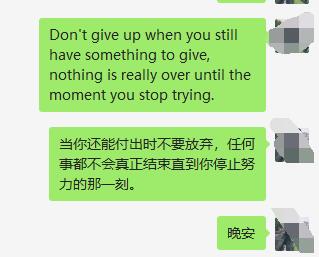
但凡有些事情重复时,我就在想怎么可以用程序来自动化。这里想分享如何每天给女友定时微信发送”晚安“,如果只是晚安,就略显单调,于是爬取金山词霸每日一句,英文和翻译,借此设定定时器进行发送。
准备:
pip install wxpy
pip install requests
实现代码:
from __future__ import unicode_literals
from threading import Timer
from wxpy import *
import requests
import random
bot = Bot()
# linux执行登陆请调用下面的这句
#bot = Bot(console_qr=2,cache_path="botoo.pkl")
def get_news():

 """获取金山词霸每日一句,英文和翻译"""
 url = "http://open.iciba.com/dsapi/"
 r = requests.get(url)
 content = r.json()['content']
 note = r.json()['note']
 return content, note

def send_news():
 try:
 contents = get_news()
 # 你朋友的微信名称,不是备注,也不是微信帐号。
 my_friend = bot.friends().search('fairy')[0]
 my_friend.send(contents[0])
 my_friend.send(contents[1])
 my_friend.send(u"晚安")
 # 每86400秒(1天),发送1次
 t = Timer(86400, send_news)
 # 为了防止时间太固定,于是决定对其加上随机数
 ran_int = random.randint(0,100)
 t = Timer(86400+ran_int,send_news)

 t.start()
 except:

 # 你的微信名称,不是微信帐号。
 my_friend = bot.friends().search('威风大侠')[0]
 my_friend.send(u"今天消息发送失败了")

if __name__ == "__main__":
 send_news()
效果截图:
以上就是本文的全部内容,希望对大家的学习有所帮助,也希望大家多多支持【听图阁-专注于Python设计】。