python机器学习实现决策树
本文实例为大家分享了python机器学习实现决策树的具体代码,供大家参考,具体内容如下
# -*- coding: utf-8 -*-
"""
Created on Sat Nov 9 10:42:38 2019

@author: asus
"""
"""
决策树
目的:
1. 使用决策树模型
2. 了解决策树模型的参数
3. 初步了解调参数
要求:
基于乳腺癌数据集完成以下任务:
1.调整参数criterion,使用不同算法信息熵(entropy)和基尼不纯度算法(gini)
2.调整max_depth参数值,查看不同的精度
3.根据参数criterion和max_depth得出你初步的结论。
"""

import matplotlib.pyplot as plt
import numpy as np
import pandas as pd
import mglearn
from sklearn.model_selection import train_test_split
#导入乳腺癌数据集
from sklearn.datasets import load_breast_cancer
from sklearn.tree import DecisionTreeClassifier


#决策树并非深度越大越好,考虑过拟合的问题
#mglearn.plots.plot_animal_tree()
#mglearn.plots.plot_tree_progressive()

#获取数据集
cancer = load_breast_cancer()
#对数据集进行切片
X_train,X_test,y_train,y_test = train_test_split(cancer.data,cancer.target,
       stratify = cancer.target,random_state = 42)
#查看训练集和测试集数据
print('train dataset :{0} ;test dataset :{1}'.format(X_train.shape,X_test.shape))
#建立模型(基尼不纯度算法(gini)),使用不同最大深度和随机状态和不同的算法看模型评分
tree = DecisionTreeClassifier(random_state = 0,criterion = 'gini',max_depth = 5)
#训练模型
tree.fit(X_train,y_train)
#评估模型
print("Accuracy(准确性) on training set: {:.3f}".format(tree.score(X_train, y_train)))
print("Accuracy(准确性) on test set: {:.3f}".format(tree.score(X_test, y_test)))
print(tree)


# 参数选择 max_depth,算法选择基尼不纯度算法(gini) or 信息熵(entropy)
def Tree_score(depth = 3,criterion = 'entropy'):
 """
 参数为max_depth(默认为3)和criterion(默认为信息熵entropy),
 函数返回模型的训练精度和测试精度
 """
 tree = DecisionTreeClassifier(criterion = criterion,max_depth = depth)
 tree.fit(X_train,y_train)
 train_score = tree.score(X_train, y_train)
 test_score = tree.score(X_test, y_test)
 return (train_score,test_score)

#gini算法,深度对模型精度的影响
depths = range(2,25)#考虑到数据集有30个属性
scores = [Tree_score(d,'gini') for d in depths]
train_scores = [s[0] for s in scores]
test_scores = [s[1] for s in scores]

plt.figure(figsize = (6,6),dpi = 144)
plt.grid()
plt.xlabel("max_depth of decision Tree")
plt.ylabel("score")
plt.title("'gini'")
plt.plot(depths,train_scores,'.g-',label = 'training score')
plt.plot(depths,test_scores,'.r--',label = 'testing score')
plt.legend()


#信息熵(entropy),深度对模型精度的影响
scores = [Tree_score(d) for d in depths]
train_scores = [s[0] for s in scores]
test_scores = [s[1] for s in scores]

plt.figure(figsize = (6,6),dpi = 144)
plt.grid()
plt.xlabel("max_depth of decision Tree")
plt.ylabel("score")
plt.title("'entropy'")
plt.plot(depths,train_scores,'.g-',label = 'training score')
plt.plot(depths,test_scores,'.r--',label = 'testing score')
plt.legend()
运行结果:
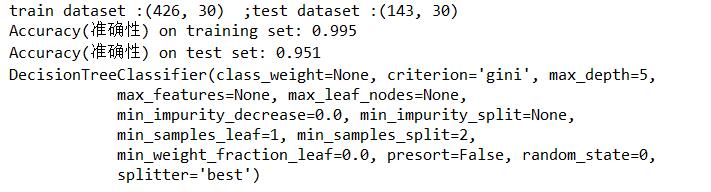


很明显看的出来,决策树深度越大,训练集拟合效果越好,但是往往面对测试集的预测效果会下降,这就是过拟合。
参考书籍: 《Python机器学习基础教程》
以上就是本文的全部内容,希望对大家的学习有所帮助,也希望大家多多支持【听图阁-专注于Python设计】。