python实现的自动发送消息功能详解
本文实例讲述了python实现的自动发送消息功能。分享给大家供大家参考,具体如下:
一个简单的脚本
#-*- coding:utf-8 -*-
from __future__ import unicode_literals
from threading import Timer
import itchat
import requests
# 抓取金山毒霸每日一句,英文和翻译
def get_news():
  url = "http://open.iciba.com/dsapi/"
  r = requests.get(url)
  content = r.json()['content']
  translation = r.json()['translation']
  return content, translation
def send_news():
  try:
    # 把抓取的数据传参
    contents = get_news()
    # 登陆微信账户,扫码登陆
    itchat.auto_login(hotReload=True)
    # 查找你微信号上想要发送人的名称
    my_friend = itchat.search_friends(name=u'loli')
    # 发送消息
    itchat.send(contents[0], toUserName=my_friend)
    itchat.send(contents[1], toUserName=my_friend)
    itchat.send(u"I love you", toUserName=my_friend)
    # 一天循环发送一次
    t = Timer(86400, send_news)
    t.start()
  except:
    my_friend = itchat.search_friends(name=u'loli')
    itchat.send(u"今天消息发送失败了", toUserName=my_friend)
if __name__ == '__main__':
  send_news()
需要安装的包:
pip install requests
pip install itchat
这里以抓取金山毒霸句子为例。
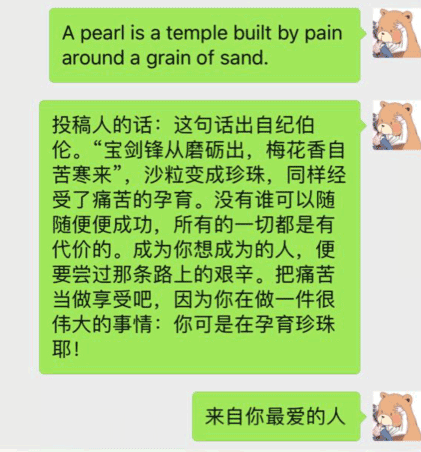
效果图:
参考资料:
https://zhuanlan.zhihu.com/p/36398109
更多关于Python相关内容可查看本站专题:《Python Socket编程技巧总结》、《Python数据结构与算法教程》、《Python函数使用技巧总结》、《Python字符串操作技巧汇总》、《Python入门与进阶经典教程》及《Python文件与目录操作技巧汇总》
希望本文所述对大家Python程序设计有所帮助。