python使用HTMLTestRunner导出饼图分析报告的方法
目录如下:
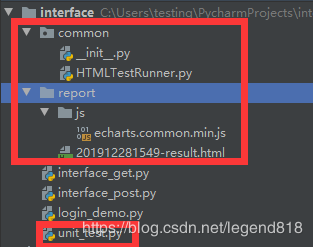
这里有使用
HTMLTestRunner和 echarts.common.min.js文件[见百度网盘,这里给自己留个记录便于查询]
unit_test.py代码如下:
import unittest
import requests
import time
import os.path
from common import HTMLTestRunner


class TestLogin(unittest.TestCase):

 def setUp(self):
  # 获取session对象
  self.session = requests.session()
  # 登录url
  self.url = 'http://XXXXXX/oauth/oauth/token'

 def test_login_success(self):
  data = {
   'grant_type': 'password',
   'username': 'iu',
   'password': '111',
   'client_id': 'web',
   'client_secret': 'web-secret'
  }
  r = self.session.post(url=self.url, data=data)
  try:
   self.assertEqual(r.json()['token_type'])
  except AssertionError as e:
   print(e)


 def test_username_not_exit(self):
  data = {
   'grant_type': 'password',
   'username': '322u',
   'password': '8',
   'client_id': 'web',
   'client_secret': 'web-secret'
  }
  r = self.session.post(url=self.url, data=data)
  try:
   self.assertEqual("用户名或密码错误", r.json()["error_description"])
  except AssertionError as e:
   print(e)

 def test_password_error(self):
  data = {
   'grant_type': 'password',
   'username': '2u',
   'password': '888ssss888',
   'client_id': 'web',
   'client_secret': 'web-secret'
  }
  r = self.session.post(url=self.url, data=data)
  try:
   self.assertEqual("用户名或密码错误", r.json()["error_description"])
  except AssertionError as e:
   print(e)

 def tearDown(self):
  self.session.close()


if __name__ == '__main__':
 # unittest.main()
 test = unittest.TestSuite()
 test.addTest(TestLogin('test_login_success'))
 test.addTest(TestLogin('test_username_not_exit'))
 test.addTest(TestLogin('test_password_error'))

 rq = time.strftime('%Y%m%d%H%M', time.localtime(time.time()))
 file_path = os.path.abspath('.') + '\\report\\' + rq + '-result.html'

 file_result = open(file_path, 'wb')

 runner = HTMLTestRunner.HTMLTestRunner(stream=file_result, title=u'测试报告', description=u'用例执行情况')
 runner.run(test)
 file_result.close()
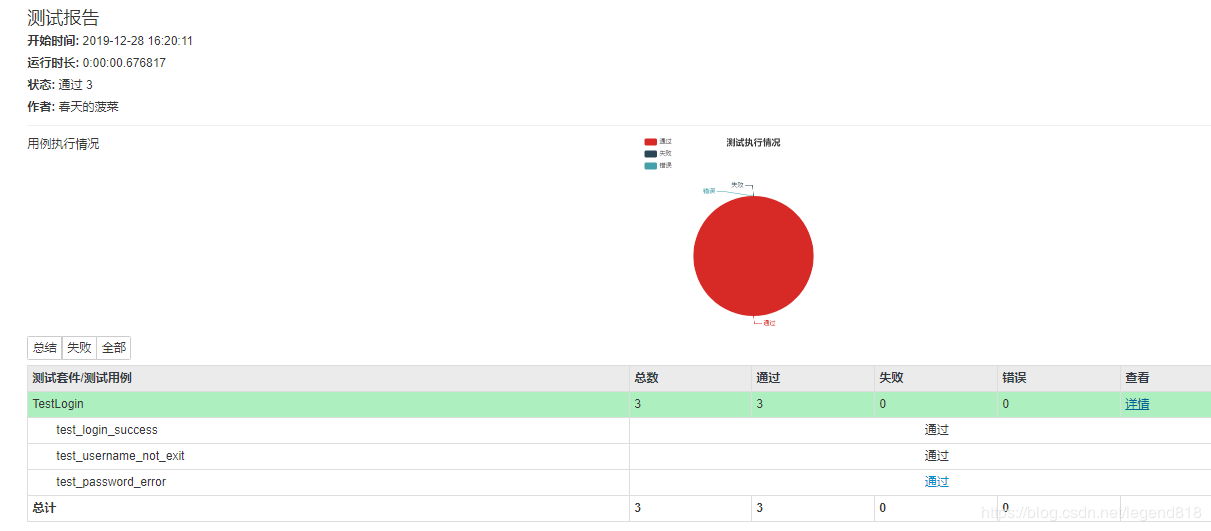
运行产生报告 查看报告:
查看报告:
以上就是本文的全部内容,希望对大家的学习有所帮助,也希望大家多多支持【听图阁-专注于Python设计】。