PHP实现Socket服务器的代码
<?php
ob_implicit_flush();
set_time_limit(0);
$address = "192.40.7.93";//换成你自己的地址
$port = 10000;
if(($socket = socket_create(AF_INET,SOCK_STREAM,SOL_TCP)) == false)
echo "错误(socket_create):".socket_strerror(socket_last_error())."<br />";
if(socket_bind($socket,$address,$port) == false)
echo "错误(socket_bind):".socket_strerror(socket_last_error())."<br />";
if(socket_listen($socket) == false)
echo "错误(socket_listen):".socket_strerror(socket_last_error())."<br />";
/*
After the socket socket has been created using socket_create() and bound to a name with socket_bind(),
it may be told to listen for incoming connections on socket.
*/
while(true){
if(($msgSocket = socket_accept($socket)) == false){
echo "错误(socket_accept):".socket_strerror(socket_last_error())."<br />";
break;
}
/*
this function will accept incoming connections on that socket.
Once a successful connection is made, a new socket resource is returned, which may be used for communication.
If there are multiple connections queued on the socket, the first will be used.
If there are no pending connections, socket_accept() will block until a connection becomes present.
If socket has been made non-blocking using socket_set_blocking() or socket_set_nonblock(), FALSE will be returned.
*/
$msg = "Welcome!<br />";
//socket_write($msg,$msg,strlen($msg));
$command = "";
while(true){
if(($buf = socket_read($msgSocket,2048,PHP_BINARY_READ)) == false){
echo "错误(socket_read):".socket_strerror(socket_last_error())."<br />";
break 2;
}
/*
The function socket_read() reads from the socket resource socket created by the socket_create() or socket_accept() functions.
The maximum number of bytes read is specified by the length parameter.
Otherwise you can use \r, \n, or \0 to end reading (depending on the type parameter, see below).
*/
/*
if(!$buf = trim($buf))
continue; // ????
if($buf == "quit")
break;
if($buf == "shutdown"){
socket_close($msgSocket);
break 2;
}
$tallBack = "You say:$buf\n";
socket_write($msgSocket,$tallBack,strlen($tallBack));
*/
if(ord($buf) != 13)
$command .= $buf;
else{
$command1 = "You Say:$command\r\n";
socket_write($msgSocket,$command1,strlen($command1));
echo "User typed:".$command."<br />";
$command = "";
}
}
socket_close($msgSocket);
}
socket_close($socket);
?>
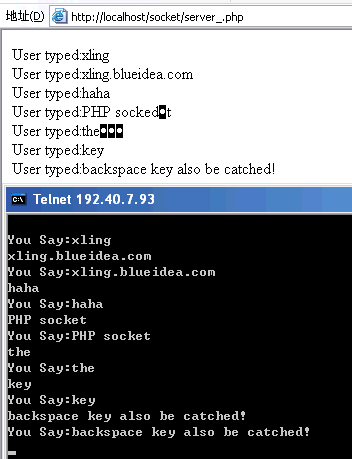
然后打开CMD,输入:telnet 192.40.7.93 10000,自己体验去吧!
注,要把:php_sockets.dll 打开
ob_implicit_flush();
set_time_limit(0);
$address = "192.40.7.93";//换成你自己的地址
$port = 10000;
if(($socket = socket_create(AF_INET,SOCK_STREAM,SOL_TCP)) == false)
echo "错误(socket_create):".socket_strerror(socket_last_error())."<br />";
if(socket_bind($socket,$address,$port) == false)
echo "错误(socket_bind):".socket_strerror(socket_last_error())."<br />";
if(socket_listen($socket) == false)
echo "错误(socket_listen):".socket_strerror(socket_last_error())."<br />";
/*
After the socket socket has been created using socket_create() and bound to a name with socket_bind(),
it may be told to listen for incoming connections on socket.
*/
while(true){
if(($msgSocket = socket_accept($socket)) == false){
echo "错误(socket_accept):".socket_strerror(socket_last_error())."<br />";
break;
}
/*
this function will accept incoming connections on that socket.
Once a successful connection is made, a new socket resource is returned, which may be used for communication.
If there are multiple connections queued on the socket, the first will be used.
If there are no pending connections, socket_accept() will block until a connection becomes present.
If socket has been made non-blocking using socket_set_blocking() or socket_set_nonblock(), FALSE will be returned.
*/
$msg = "Welcome!<br />";
//socket_write($msg,$msg,strlen($msg));
$command = "";
while(true){
if(($buf = socket_read($msgSocket,2048,PHP_BINARY_READ)) == false){
echo "错误(socket_read):".socket_strerror(socket_last_error())."<br />";
break 2;
}
/*
The function socket_read() reads from the socket resource socket created by the socket_create() or socket_accept() functions.
The maximum number of bytes read is specified by the length parameter.
Otherwise you can use \r, \n, or \0 to end reading (depending on the type parameter, see below).
*/
/*
if(!$buf = trim($buf))
continue; // ????
if($buf == "quit")
break;
if($buf == "shutdown"){
socket_close($msgSocket);
break 2;
}
$tallBack = "You say:$buf\n";
socket_write($msgSocket,$tallBack,strlen($tallBack));
*/
if(ord($buf) != 13)
$command .= $buf;
else{
$command1 = "You Say:$command\r\n";
socket_write($msgSocket,$command1,strlen($command1));
echo "User typed:".$command."<br />";
$command = "";
}
}
socket_close($msgSocket);
}
socket_close($socket);
?>
然后打开CMD,输入:telnet 192.40.7.93 10000,自己体验去吧!
注,要把:php_sockets.dll 打开