Python version 2.7 required, which was not found in the registry
安装PIL库的时候,直接提示:Python version 2.7 required, which was not found in the registry。
如图:

大意是说找不到注册表,网上搜索解决方案。
新建一个register.py文件写入代码:
复制代码 代码如下:
import sys
from _winreg import *
# tweak as necessary
version = sys.version[:3]
installpath = sys.prefix
regpath = "SOFTWARE\\Python\\Pythoncore\\%s\\" % (version)
installkey = "InstallPath"
pythonkey = "PythonPath"
pythonpath = "%s;%s\\Lib\\;%s\\DLLs\\" % (
installpath, installpath, installpath
)
def RegisterPy():
try:
reg = OpenKey(HKEY_CURRENT_USER, regpath)
except EnvironmentError as e:
try:
reg = CreateKey(HKEY_CURRENT_USER, regpath)
SetValue(reg, installkey, REG_SZ, installpath)
SetValue(reg, pythonkey, REG_SZ, pythonpath)
CloseKey(reg)
except:
print "*** Unable to register!"
return
print "--- Python", version, "is now registered!"
return
if (QueryValue(reg, installkey) == installpath and
QueryValue(reg, pythonkey) == pythonpath):
CloseKey(reg)
print "=== Python", version, "is already registered!"
return
CloseKey(reg)
print "*** Unable to register!"
print "*** You probably have another Python installation!"
启动命令切到register.py文件目录下执行:
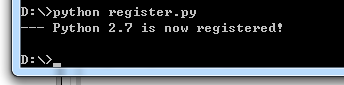
重新安装PIL,错误解决,安装成功。
如果是win7 64位的用户在安装Python 32位程序时,如果选择只为当前用户,以上问题不会出现。如果选择所有用户,就试着使用以上方法解决。
提示其它版本解决方法类似。