Python中使用PIL库实现图片高斯模糊实例
一、安装PIL
PIL是Python Imaging Library简称,用于处理图片。PIL中已经有图片高斯模糊处理类,但有个bug(目前最新的1.1.7bug还存在),就是模糊半径写死的是2,不能设置。在源码ImageFilter.py的第160行:
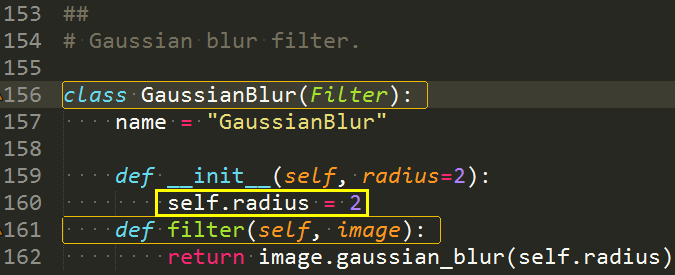
所以,我们在这里自己改一下就OK了。
项目地址:http://www.pythonware.com/products/pil/
二、修改后的代码
代码如下:
复制代码 代码如下:
#-*- coding: utf-8 -*-
from PIL import Image, ImageFilter
class MyGaussianBlur(ImageFilter.Filter):
name = "GaussianBlur"
def __init__(self, radius=2, bounds=None):
self.radius = radius
self.bounds = bounds
def filter(self, image):
if self.bounds:
clips = image.crop(self.bounds).gaussian_blur(self.radius)
image.paste(clips, self.bounds)
return image
else:
return image.gaussian_blur(self.radius)
三、调用
复制代码 代码如下:
simg = 'demo.jpg'
dimg = 'demo_blur.jpg'
image = Image.open(simg)
image = image.filter(MyGaussianBlur(radius=30))
image.save(dimg)
print dimg, 'success'
如果只需要处理某个区域,传入bounds参数即可
四、效果
原图:

处理后的: