讲解Python中的标识运算符
下表列出了所有Python语言支持的标识运算符。
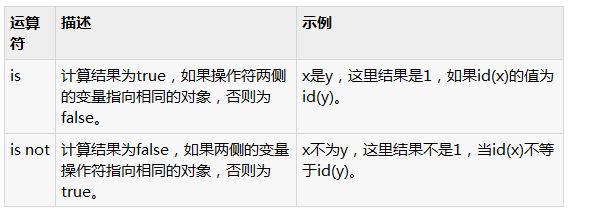
示例:
试试下面的例子就明白了所有Python编程语言提供的标识运算符:
#!/usr/bin/python

a = 20
b = 20

if ( a is b ):
  print "Line 1 - a and b have same identity"
else:
  print "Line 1 - a and b do not have same identity"

if ( id(a) == id(b) ):
  print "Line 2 - a and b have same identity"
else:
  print "Line 2 - a and b do not have same identity"

b = 30
if ( a is b ):
  print "Line 3 - a and b have same identity"
else:
  print "Line 3 - a and b do not have same identity"

if ( a is not b ):
  print "Line 4 - a and b do not have same identity"
else:
  print "Line 4 - a and b have same identity"
当执行上面的程序它会产生以下结果:
Line 1 - a and b have same identity
Line 2 - a and b have same identity
Line 3 - a and b do not have same identity
Line 4 - a and b do not have same identity