Python中pygame的mouse鼠标事件用法实例
本文实例讲述了Python中pygame的mouse鼠标事件用法。分享给大家供大家参考,具体如下:
pygame.mouse提供了一些方法获取鼠标设备当前的状态
'''
pygame.mouse.get_pressed - get the state of the mouse buttons  get the state of the mouse buttons
pygame.mouse.get_pos - get the mouse cursor position  get the mouse cursor position
pygame.mouse.get_rel - get the amount of mouse movement  get the amount of mouse movement
pygame.mouse.set_pos - set the mouse cursor position  set the mouse cursor position
pygame.mouse.set_visible - hide or show the mouse cursor  hide or show the mouse cursor
pygame.mouse.get_focused - check if the display is receiving mouse input  check if the display is receiving mouse input
pygame.mouse.set_cursor - set the image for the system mouse cursor  set the image for the system mouse cursor
pygame.mouse.get_cursor - get the image for the system mouse cursor  get the image for the system mouse cursor
'''
在下面的demo中,主要用到了:
pygame.mouse.get_pressed()
pygame.mouse.get_pos()
展示的效果:
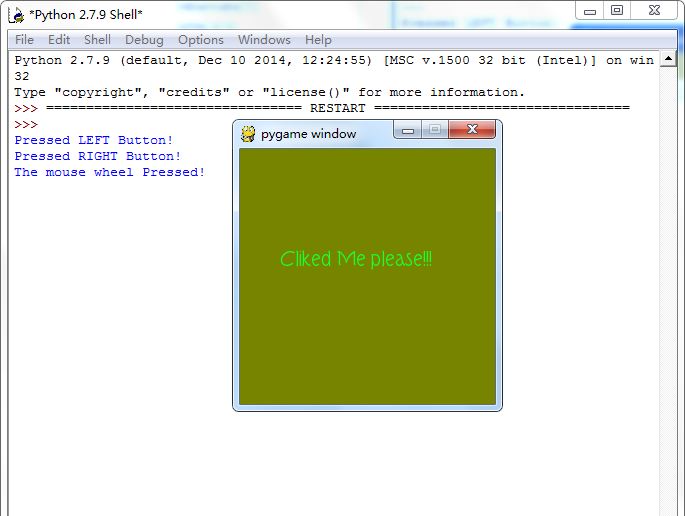
游戏效果:
当鼠标经过窗口的时候,窗口背景颜色会随着鼠标的移动而发生改变,当鼠标点击窗口
会在控制台打印出是鼠标的那个键被点击了:左,右,滚轮
#pygame mouse
import os, pygame
from pygame.locals import *
from sys import exit
from random import *
__author__ = {'name' : 'Hongten',
       'mail' : 'hongtenzone@foxmail.com',
       'Version' : '1.0'}
if not pygame.font:print('Warning, Can not found font!')
pygame.init()
screen = pygame.display.set_mode((255, 255), 0, 32)
screen.fill((255,255,255))
font = pygame.font.Font('data\\font\\TORK____.ttf', 20)
text = font.render('Cliked Me please!!!', True, (34, 252, 43))
mouse_x, mouse_y = 0, 0
while 1:
  for event in pygame.event.get():
    if event.type == QUIT:
      exit()
    elif event.type == MOUSEBUTTONDOWN:
      pressed_array = pygame.mouse.get_pressed()
      for index in range(len(pressed_array)):
        if pressed_array[index]:
          if index == 0:
            print('Pressed LEFT Button!')
          elif index == 1:
            print('The mouse wheel Pressed!')
          elif index == 2:
            print('Pressed RIGHT Button!')
    elif event.type == MOUSEMOTION:
      #return the X and Y position of the mouse cursor
      pos = pygame.mouse.get_pos()
      mouse_x = pos[0]
      mouse_y = pos[1]
  screen.fill((mouse_x, mouse_y, 0))
  screen.blit(text, (40, 100))
  pygame.display.update()
希望本文所述对大家Python程序设计有所帮助。