python爬取w3shcool的JQuery课程并且保存到本地
最近在忙于找工作,闲暇之余,也找点爬虫项目练练手,写写代码,知道自己是个菜鸟,但是要多加练习,书山有路勤为径。各位爷有测试坑可以给我介绍个啊,自动化,功能,接口都可以做。
首先呢,我们明确需求,很多同学呢,有事没事就想看看一些技术,比如我想看看JQuery的语法呢,可是我现在没有网络,手机上也没有电子书,真的让我们很难受,那么别着急啊,你这需求我在这里满足你,首先呢,你的需求是获取JQuery的语法的,那么我在看到这个需求,我有响应的网站那么我们接下来去分析这个网站。http://www.w3school.com.cn/jquery/jquery_syntax.asp 这是语法url, http://www.w3school.com.cn/jquery/jquery_intro.asp 这是简介的url,那么我们拿到很多的url分析到,我们的http://www.w3school.com.cn/jquery是相同的,那么我们在来分析在界面怎么可以获取得到这些,我们可以看到右面有相应的目标栏,那么我们去分析下
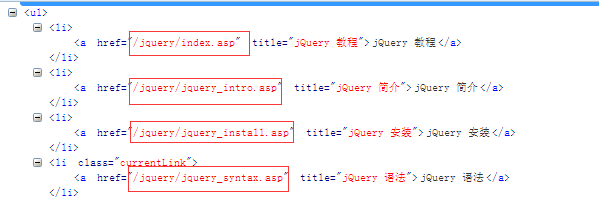
我们来看下这些链接,。我们可以吧这些链接和http://www.w3school.com.cn/拼接到一起。然后组成我们新的url,
上代码
import urllib.request
from bs4 import BeautifulSoup
import time
def head():
 headers={
 'User-Agent':'Mozilla/5.0 (Windows NT 6.1; WOW64; rv:52.0) Gecko/20100101 Firefox/52.0'
 }
 return headers
def parse_url(url):
 hea=head()
 resposne=urllib.request.Request(url,headers=hea)
 html=urllib.request.urlopen(resposne).read().decode('gb2312')
 return html
def url_s():
 url='http://www.w3school.com.cn/jquery/index.asp'
 html=parse_url(url)
 soup=BeautifulSoup(html)
 me=soup.find_all(id='course')
 m_url_text=[]
 m_url=[]
 for link in me:
  m_url_text.append(link.text)
  m=link.find_all('a')
  for i in m:
   m_url.append(i.get('href'))
 for i in m_url_text:
  h=i.encode('utf-8').decode('utf-8')
  m_url_text=h.split('\n')
 return m_url,m_url_text
这样我们使用url_s这个函数就可以获取我们所有的链接。
['/jquery/index.asp', '/jquery/jquery_intro.asp', '/jquery/jquery_install.asp', '/jquery/jquery_syntax.asp', '/jquery/jquery_selectors.asp', '/jquery/jquery_events.asp', '/jquery/jquery_hide_show.asp', '/jquery/jquery_fade.asp', '/jquery/jquery_slide.asp', '/jquery/jquery_animate.asp', '/jquery/jquery_stop.asp', '/jquery/jquery_callback.asp', '/jquery/jquery_chaining.asp', '/jquery/jquery_dom_get.asp', '/jquery/jquery_dom_set.asp', '/jquery/jquery_dom_add.asp', '/jquery/jquery_dom_remove.asp', '/jquery/jquery_css_classes.asp', '/jquery/jquery_css.asp', '/jquery/jquery_dimensions.asp', '/jquery/jquery_traversing.asp', '/jquery/jquery_traversing_ancestors.asp', '/jquery/jquery_traversing_descendants.asp', '/jquery/jquery_traversing_siblings.asp', '/jquery/jquery_traversing_filtering.asp', '/jquery/jquery_ajax_intro.asp', '/jquery/jquery_ajax_load.asp', '/jquery/jquery_ajax_get_post.asp', '/jquery/jquery_noconflict.asp', '/jquery/jquery_examples.asp', '/jquery/jquery_quiz.asp', '/jquery/jquery_reference.asp', '/jquery/jquery_ref_selectors.asp', '/jquery/jquery_ref_events.asp', '/jquery/jquery_ref_effects.asp', '/jquery/jquery_ref_manipulation.asp', '/jquery/jquery_ref_attributes.asp', '/jquery/jquery_ref_css.asp', '/jquery/jquery_ref_ajax.asp', '/jquery/jquery_ref_traversing.asp', '/jquery/jquery_ref_data.asp', '/jquery/jquery_ref_dom_element_methods.asp', '/jquery/jquery_ref_core.asp', '/jquery/jquery_ref_prop.asp'], ['jQuery 教程', '', 'jQuery 教程', 'jQuery 简介', 'jQuery 安装', 'jQuery 语法', 'jQuery 选择器', 'jQuery 事件', '', 'jQuery 效果', '', 'jQuery 隐藏/显示', 'jQuery 淡入淡出', 'jQuery 滑动', 'jQuery 动画', 'jQuery stop()', 'jQuery Callback', 'jQuery Chaining', '', 'jQuery HTML', '', 'jQuery 获取', 'jQuery 设置', 'jQuery 添加', 'jQuery 删除', 'jQuery CSS 类', 'jQuery css()', 'jQuery 尺寸', '', 'jQuery 遍历', '', 'jQuery 遍历', 'jQuery 祖先', 'jQuery 后代', 'jQuery 同胞', 'jQuery 过滤', '', 'jQuery AJAX', '', 'jQuery AJAX 简介', 'jQuery 加载', 'jQuery Get/Post', '', 'jQuery 杂项', '', 'jQuery noConflict()', '', 'jQuery 实例', '', 'jQuery 实例', 'jQuery 测验', '', 'jQuery 参考手册', '', 'jQuery 参考手册', 'jQuery 选择器', 'jQuery 事件', 'jQuery 效果', 'jQuery 文档操作', 'jQuery 属性操作', 'jQuery CSS 操作', 'jQuery Ajax', 'jQuery 遍历', 'jQuery 数据', 'jQuery DOM 元素', 'jQuery 核心', 'jQuery 属性', '', ''])
这是所有链接还有对应链接的所对应的语法模块的名字。那么我们接下来就是去拼接urls,使用的是str的拼接
['http://www.w3school.com.cn///jquery/index.asp', 'http://www.w3school.com.cn///jquery/jquery_intro.asp', 'http://www.w3school.com.cn///jquery/jquery_install.asp', 'http://www.w3school.com.cn///jquery/jquery_syntax.asp', 'http://www.w3school.com.cn///jquery/jquery_selectors.asp', 'http://www.w3school.com.cn///jquery/jquery_events.asp', 'http://www.w3school.com.cn///jquery/jquery_hide_show.asp', 'http://www.w3school.com.cn///jquery/jquery_fade.asp', 'http://www.w3school.com.cn///jquery/jquery_slide.asp', 'http://www.w3school.com.cn///jquery/jquery_animate.asp', 'http://www.w3school.com.cn///jquery/jquery_stop.asp', 'http://www.w3school.com.cn///jquery/jquery_callback.asp', 'http://www.w3school.com.cn///jquery/jquery_chaining.asp', 'http://www.w3school.com.cn///jquery/jquery_dom_get.asp', 'http://www.w3school.com.cn///jquery/jquery_dom_set.asp', 'http://www.w3school.com.cn///jquery/jquery_dom_add.asp', 'http://www.w3school.com.cn///jquery/jquery_dom_remove.asp', 'http://www.w3school.com.cn///jquery/jquery_css_classes.asp', 'http://www.w3school.com.cn///jquery/jquery_css.asp', 'http://www.w3school.com.cn///jquery/jquery_dimensions.asp', 'http://www.w3school.com.cn///jquery/jquery_traversing.asp', 'http://www.w3school.com.cn///jquery/jquery_traversing_ancestors.asp', 'http://www.w3school.com.cn///jquery/jquery_traversing_descendants.asp', 'http://www.w3school.com.cn///jquery/jquery_traversing_siblings.asp', 'http://www.w3school.com.cn///jquery/jquery_traversing_filtering.asp', 'http://www.w3school.com.cn///jquery/jquery_ajax_intro.asp', 'http://www.w3school.com.cn///jquery/jquery_ajax_load.asp', 'http://www.w3school.com.cn///jquery/jquery_ajax_get_post.asp', 'http://www.w3school.com.cn///jquery/jquery_noconflict.asp', 'http://www.w3school.com.cn///jquery/jquery_examples.asp', 'http://www.w3school.com.cn///jquery/jquery_quiz.asp', 'http://www.w3school.com.cn///jquery/jquery_reference.asp', 'http://www.w3school.com.cn///jquery/jquery_ref_selectors.asp', 'http://www.w3school.com.cn///jquery/jquery_ref_events.asp', 'http://www.w3school.com.cn///jquery/jquery_ref_effects.asp', 'http://www.w3school.com.cn///jquery/jquery_ref_manipulation.asp', 'http://www.w3school.com.cn///jquery/jquery_ref_attributes.asp', 'http://www.w3school.com.cn///jquery/jquery_ref_css.asp', 'http://www.w3school.com.cn///jquery/jquery_ref_ajax.asp', 'http://www.w3school.com.cn///jquery/jquery_ref_traversing.asp', 'http://www.w3school.com.cn///jquery/jquery_ref_data.asp', 'http://www.w3school.com.cn///jquery/jquery_ref_dom_element_methods.asp', 'http://www.w3school.com.cn///jquery/jquery_ref_core.asp', 'http://www.w3school.com.cn///jquery/jquery_ref_prop.asp']
那么我们有这个所有的urls,那么我们来分析下,文章正文。
分析可以得到我们的所有的正文都是在一个id=maincontent中,那么我们直接解析每个界面中的id=maincontent的标签,获取响应的text文档,并且保存就好。
所以我们所有的代码如下:
import urllib.request
from bs4 import BeautifulSoup
import time
def head():
 headers={
 'User-Agent':'Mozilla/5.0 (Windows NT 6.1; WOW64; rv:52.0) Gecko/20100101 Firefox/52.0'
 }
 return headers
def parse_url(url):
 hea=head()
 resposne=urllib.request.Request(url,headers=hea)
 html=urllib.request.urlopen(resposne).read().decode('gb2312')
 return html
def url_s():
 url='http://www.w3school.com.cn/jquery/index.asp'
 html=parse_url(url)
 soup=BeautifulSoup(html)
 me=soup.find_all(id='course')
 m_url_text=[]
 m_url=[]
 for link in me:
  m_url_text.append(link.text)
  m=link.find_all('a')
  for i in m:
   m_url.append(i.get('href'))
 for i in m_url_text:
  h=i.encode('utf-8').decode('utf-8')
  m_url_text=h.split('\n')
 return m_url,m_url_text
def xml():
 url,url_text=url_s()
 url_jque=[]
 for link in url:
  url_jque.append('http://www.w3school.com.cn//'+link)
 return url_jque
def xiazai():
 urls=xml()
 i=0
 for url in urls:
  html=parse_url(url)
  soup=BeautifulSoup(html)
  me=soup.find_all(id='maincontent')
  with open(r'%s.txt'%i,'wb') as f:
   for h in me:
    f.write(h.text.encode('utf-8'))
    print(i)
  i+=1
if __name__ == '__main__':
 xiazai()
import urllib.request
from bs4 import BeautifulSoup
import time
def head():
 headers={
 'User-Agent':'Mozilla/5.0 (Windows NT 6.1; WOW64; rv:52.0) Gecko/20100101 Firefox/52.0'
 }
 return headers
def parse_url(url):
 hea=head()
 resposne=urllib.request.Request(url,headers=hea)
 html=urllib.request.urlopen(resposne).read().decode('gb2312')
 return html
def url_s():
 url='http://www.w3school.com.cn/jquery/index.asp'
 html=parse_url(url)
 soup=BeautifulSoup(html)
 me=soup.find_all(id='course')
 m_url_text=[]
 m_url=[]
 for link in me:
  m_url_text.append(link.text)
  m=link.find_all('a')
  for i in m:
   m_url.append(i.get('href'))
 for i in m_url_text:
  h=i.encode('utf-8').decode('utf-8')
  m_url_text=h.split('\n')
 return m_url,m_url_text

def xml():
 url,url_text=url_s()
 url_jque=[]
 for link in url:
  url_jque.append('http://www.w3school.com.cn//'+link)
 return url_jque
def xiazai():
 urls=xml()
 i=0
 for url in urls:
  html=parse_url(url)
  soup=BeautifulSoup(html)
  me=soup.find_all(id='maincontent')
  with open(r'%s.txt'%i,'wb') as f:
   for h in me:
    f.write(h.text.encode('utf-8'))
    print(i)
  i+=1
if __name__ == '__main__':
 xiazai()
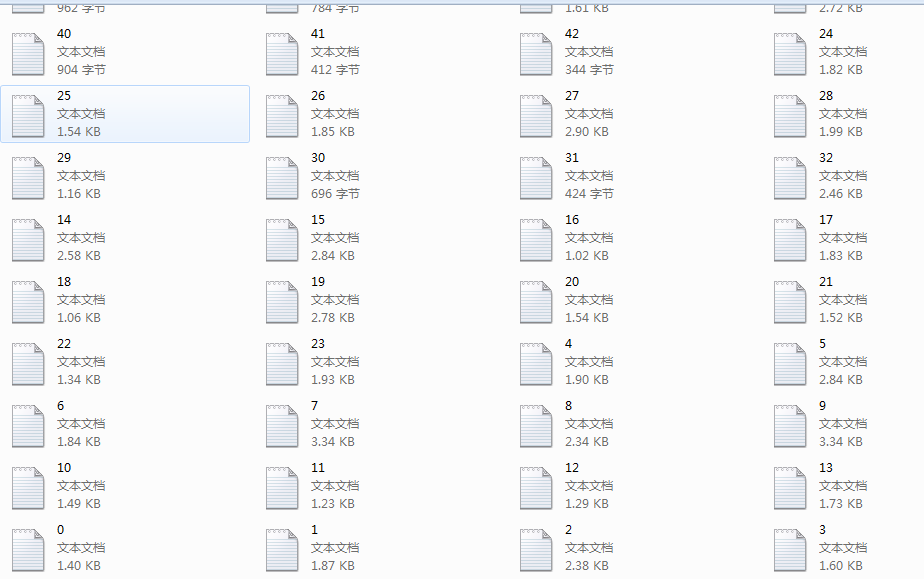
结果
好了至此,我们的爬取工作完成,剩下的就是小修小布,大的内容我们都应该完成了。
其实python的爬虫还是很简单的,只要我们会分析网站的元素,找出所有元素的通项就可以很好的去分析和解决我们的问题
以上就是本文的全部内容,希望本文的内容对大家的学习或者工作能带来一定的帮助,同时也希望多多支持【听图阁-专注于Python设计】!