python将ansible配置转为json格式实例代码
python将ansible配置转为json格式实例代码
ansible的配置文件举例如下,这种配置文件不利于在前端的展现,因此,我们用一段简单的代码将ansible的配置文件转为json格式的:
[webserver]
192.168.204.70
192.168.204.71

[dbserver]
192.168.204.72
192.168.204.73
192.168.204.75

[proxy]
192.168.204.76
192.168.204.77
192.168.204.78

[test]
192.168.204.79
192.168.204.80

[haproxy]
192.168.205.82
192.168.204.83
用python将ansible配置转为json格式,python代码如下:
import ConfigParser
import json
dict_result = {}
cf = ConfigParser.ConfigParser(allow_no_value=True)
cf.read('/etc/ansible/hosts.test')
secs = cf.sections()
for sec in secs:
 dict_result[sec] = cf.options(sec)
print json.dumps(dict_result)
转换结果如下(python版本使用2.7版本的):
/usr/local/python/bin/python /tmp/test.py
{"test": ["192.168.204.79", "192.168.204.80"], "haproxy": ["192.168.205.82", "192.168.204.83"], "webserver": ["192.168.204.70", "192.168.204.71"], "proxy": ["192.168.204.76", "192.168.204.77", "192.168.204.78"], "dbserver": ["192.168.204.72", "192.168.204.73", "192.168.204.75"]}
转换成json文件就方便在前端进行展示了,使用Flask提供json格式的接口如下:
#获取ansible分组
@app.route('/web_test/ansible')
def web_test_ansible():
  dict_result = {}
  cf = ConfigParser.ConfigParser(allow_no_value=True)
  cf.read('/etc/ansible/hosts.test')
  secs = cf.sections()
  for sec in secs:
    dict_result[sec] = cf.options(sec)
  return json.dumps(dict_result)
然后前端代码(使用bootstrap treeview)如下:
<script src="/static/js/bootstrap-treeview.js"></script>
  <script type="text/javascript">
    $(document).ready(function () {

      $('#btn-get-hostgroup').click(function () {
        getAllCheck = $('#hostgrouptree').treeview('getChecked');
        for (var i = 0; i < getAllCheck.length; i++) {
          console.log(getAllCheck[i].text);
        }
      });


      $.ajax({
        url: '/web_test/ansible',
        type: 'GET',
        success: function (data) {
          result = JSON.parse(data);
          nodes = [];
          for (var hostgroup in result) {
            var nodeshostgroup = [];
            hosts = result[hostgroup];
            for (var i = 0; i < hosts.length; i++) {
              nodeshostgroup.push({text: hosts[i], selectable:false});
            }
            nodes.push({text: hostgroup, nodes: nodeshostgroup, selectable:false});
          }
          $('#hostgrouptree').treeview({data: [{text: 'all', nodes: nodes, selectable:false}], showCheckbox: true, showBorder:false});
        }
      });
    });
  </script>
{% endblock %}
{% block page_content %}

  <div class="col-md-4" id="hostgrouptree">

  </div>

  <div class="col-md-6">
    <button id="btn-get-hostgroup" type="button" class="btn btn-default">获取选中的组</button>
  </div>
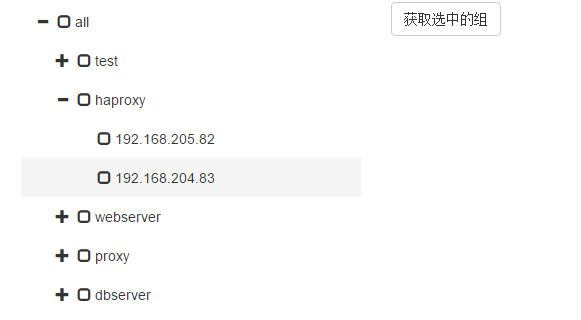
ansible的配置文件在前端的展示如下,获取ansible选中的组,利用ansible命令就可以实现一些简单的自动化操作了:
感谢阅读,希望能帮助到大家,谢谢大家对本站的支持!