Python编程之gui程序实现简单文件浏览器代码
本文主要分享了关于在python中实现一个简单的文件浏览器的代码示例,代码及展示如下。
#!/usr/bin/env python
# -*- coding: UTF-8 -*-
import os
from time import sleep
from Tkinter import *

class DirList(object):
  def __init__(self, initdir=None):
    '''构造函数,说明版本信息'''
    self.top = Tk()
    self.label = Label(self.top,
      text = 'My directory Lister v1.1')
    self.label.pack()
    self.cwd = StringVar(self.top)
    self.dir1 = Label(self.top,
      fg='blue', font=('Helvetica', 22, 'bold'))
    self.dir1.pack()
    self.dirfm = Frame(self.top)
    self.dirsb = Scrollbar(self.dirfm)
    self.dirsb.pack(side=RIGHT, fill=Y)
    self.dirs = Listbox(self.dirfm, height=15,
      width=50, yscrollcommand=self.dirsb.set)
    self.dirs.bind('<Double-1>', self.setDirAndGo)
    self.dirsb.config(command=self.dirs.yview)
    self.dirs.pack(side=LEFT, fill=BOTH)
    self.dirfm.pack()
    self.dirn = Entry(self.top, width=50,
      textvariable=self.cwd)
    self.dirn.bind('<Return>', self.doLS)
    self.dirn.pack()
    self.bfm = Frame(self.top)
    self.clr = Button(self.bfm, text='Clear',
      command = self.clrDir,
      activeforeground = 'white',
      activebackground = 'blue')
    self.ls = Button(self.bfm,
      text = 'List Directory',
      command = self.doLS,
      activeforeground = 'white',
      activebackground = 'green')
    self.quit = Button(self.bfm, text='Quit',
      command=self.top.quit,
      activeforeground='white',
      activebackground='red')
    self.clr.pack(side=LEFT)
    self.ls.pack(side=LEFT)
    self.quit.pack(side=LEFT)
    self.bfm.pack()
    if initdir:
      self.cwd.set(os.curdir)
      self.doLS()
  def clrDir(self, ev=None):
    self.cwd.set('')
  def setDirAndGo(self, ev=None):
    self.last = self.cwd.get()
    self.dirs.config(selectbackground='red')
    check = self.dirs.get(self.dirs.curselection())
    if not check:
      check = os.curdir
    self.cwd.set(check)
    self.doLS()
  def doLS(self, ev=None):
    error = ''
    tdir = self.cwd.get()
    if not tdir: tdir = os.curdir

    if not os.path.exists(tdir):
      error = tdir + ': no such file'
    elif not os.path.isdir(tdir):
      error = tdir + ': not a directory'
    if error:
      self.cwd.set(error)
      self.top.update()
      sleep(2)
      if not (hasattr(self, 'last') \
        and self.last):
        self.last = os.curdir
        self.cwd.set(self.last)
        self.dirs.config(\
          selectbackground='LightSkyBlue')
        self.top.update()
        return
    self.cwd.set(\
      'FETCHING DIRECTORY CONTENTS...')
    self.top.update()
    dirlist = os.listdir(tdir)
    dirlist.sort()
    os.chdir(tdir)
    self.dir1.config(text=os.getcwd())
    self.dirs.delete(0, END)
    self.dirs.insert(END, os.curdir)
    self.dirs.insert(END, os.pardir)
    for eachFile in dirlist:
      self.dirs.insert(END, eachFile)
    self.cwd.set(os.curdir)
    self.dirs.config(\
      selectbackground='LightSkyBlue')
def main():
  d = DirList(os.curdir)
  mainloop()
if __name__ == '__main__':
  main()
结果:
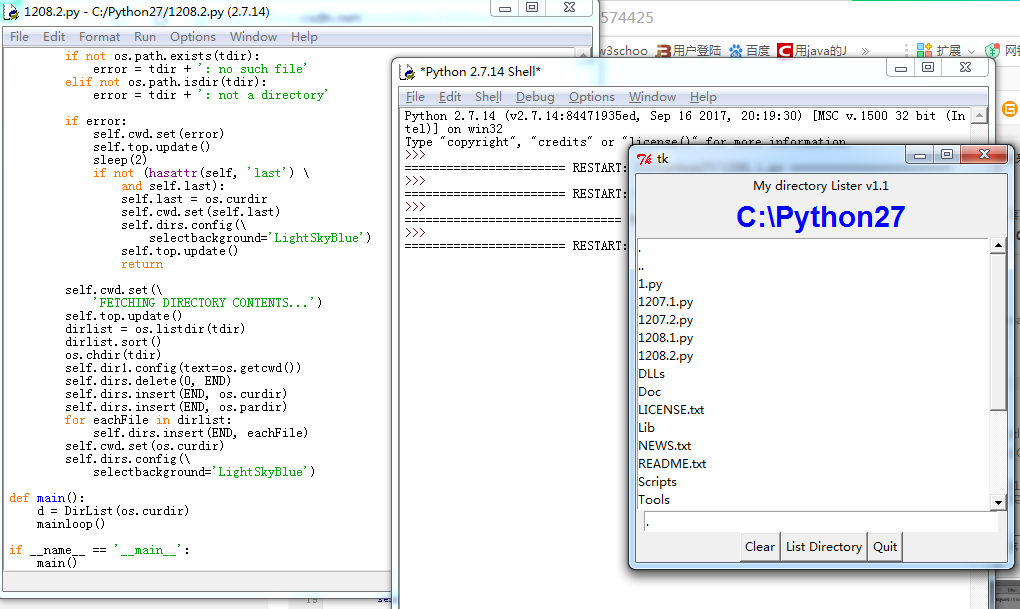
代码实现功能较简单,感兴趣的朋友参考下吧!
以上就是本文关于Python编程之gui程序实现简单文件浏览器代码的全部内容,希望对大家有所帮助。感兴趣的朋友可以继续参阅本站:
如有不足之处,欢迎留言指出。感谢朋友们对本站的支持!