Python使用Turtle模块绘制五星红旗代码示例
在Udacity上课时学到了python的turtle方法,这是一个很经典的用来教小孩儿编程的图形模块,最早起源于logo语言。python本身内置了这个模块,其可视化的方法可以帮助小孩儿对编程的一些基本理念有所理解。
在作业提交的论坛里看到很多turtle画出来的精美图形,想不出什么要画的东西,于是决定拿五星红旗来练练手。
前期准备
五星红旗绘制参数
Turtle官方文档
turtle的基本操作
# 初始化屏幕
window = turtle.Screen()
# 新建turtle对象实例
import turtle
aTurtle = turtle.Turtle()
# 海龟设置
aTurtle.hideturtle() # 隐藏箭头
aTurtle.speed(10)  # 设置速度
# 前进后退,左转右转
aTurtle.fd(100)  # 前进100像素
aTurtle.right(90) # 右转90°
aTurtle.back(100)
aTurtle.left(90)
# 填充颜色
aTurtle.begin_fill()
aTurtle.fillcolor('yellow')
DoSomethinghere()
aTurtle.end_fill()
# 抬起笔和放下笔,这样进行的操作不会留下痕迹
aTurtle.penup()
aTurtle.goto(start_pos)
aTurtle.fd(radius)
aTurtle.pendown()
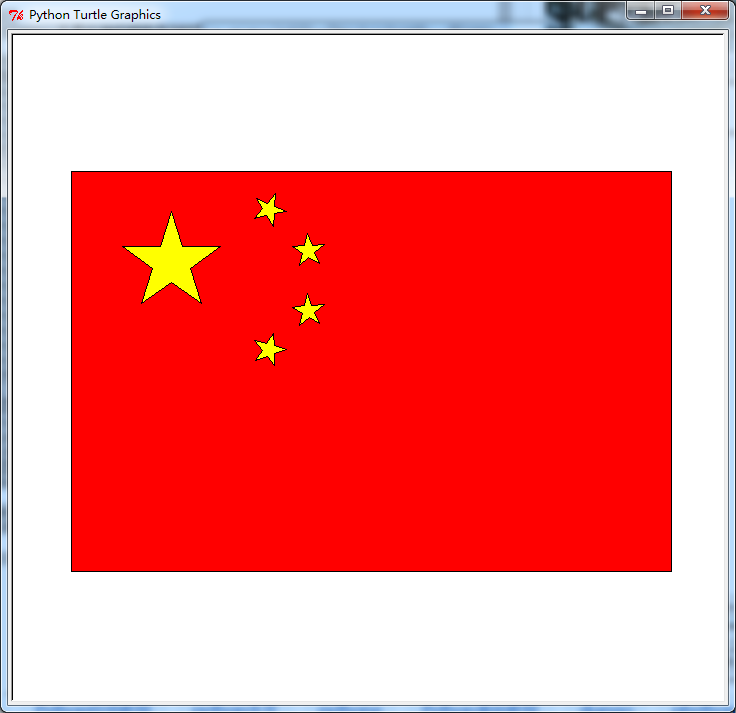
绘制五星红旗代码
github地址:https://gist.github.com/dc11287081ee67075da8
#!/usr/bin/env python
# -*- coding: utf-8 –*-
''' 对于turtle类的一些封装方法,包括画正多边形,正多角形和五星红旗。'''
__author__ = 'Hu Wenchao'

import turtle
import math

def draw_polygon(aTurtle, size=50, n=3):
  ''' 绘制正多边形
  args:
    aTurtle: turtle对象实例
    size: int类型,正多边形的边长
    n: int类型,是几边形
  '''
  for i in xrange(n):
    aTurtle.forward(size)
    aTurtle.left(360.0/n)

def draw_n_angle(aTurtle, size=50, num=5, color=None):
  ''' 绘制正n角形,默认为黄色
  args:
    aTurtle: turtle对象实例
    size: int类型,正多角形的边长
    n: int类型,是几角形
    color: str, 图形颜色,默认不填色
  '''
  if color:
    aTurtle.begin_fill()
    aTurtle.fillcolor(color)
  for i in xrange(num):
    aTurtle.forward(size)
    aTurtle.left(360.0/num)
    aTurtle.forward(size)
    aTurtle.right(2*360.0/num)
  if color:
    aTurtle.end_fill()

def draw_5_angle(aTurtle=None, start_pos=(0,0), end_pos=(0,10), radius=100, color=None):
  ''' 根据起始位置、结束位置和外接圆半径画五角星
  args:
    aTurtle: turtle对象实例
    start_pos: int的二元tuple,要画的五角星的外接圆圆心
    end_pos: int的二元tuple,圆心指向的位置坐标点
    radius: 五角星外接圆半径
    color: str, 图形颜色,默认不填色
  '''
  aTurtle = aTurtle or turtle.Turtle()
  size = radius * math.sin(math.pi/5)/math.sin(math.pi*2/5)
  aTurtle.left(math.degrees(math.atan2(end_pos[1]-start_pos[1], end_pos[0]-start_pos[0])))
  aTurtle.penup()
  aTurtle.goto(start_pos)
  aTurtle.fd(radius)
  aTurtle.pendown()
  aTurtle.right(math.degrees(math.pi*9/10))
  draw_n_angle(aTurtle, size, 5, color)

def draw_5_star_flag(times=20.0):
  ''' 绘制五星红旗
  args:
    times: 五星红旗的规格为30*20, times为倍数,默认大小为10倍, 即300*200
  '''
  width, height = 30*times, 20*times
  # 初始化屏幕和海龟
  window = turtle.Screen()
  aTurtle = turtle.Turtle()
  aTurtle.hideturtle()
  aTurtle.speed(10)
  # 画红旗
  aTurtle.penup()
  aTurtle.goto(-width/2, height/2)
  aTurtle.pendown()
  aTurtle.begin_fill()
  aTurtle.fillcolor('red')
  aTurtle.fd(width)
  aTurtle.right(90)
  aTurtle.fd(height)
  aTurtle.right(90)
  aTurtle.fd(width)
  aTurtle.right(90)
  aTurtle.fd(height)
  aTurtle.right(90)
  aTurtle.end_fill()
  # 画大星星
  draw_5_angle(aTurtle, start_pos=(-10*times, 5*times), end_pos=(-10*times, 8*times), radius=3*times, color='yellow')
  # 画四个小星星
  stars_start_pos = [(-5, 8), (-3, 6), (-3, 3), (-5, 1)]
  for pos in stars_start_pos:
    draw_5_angle(aTurtle, start_pos=(pos[0]*times, pos[1]*times), end_pos=(-10*times, 5*times), radius=1*times, color='yellow')
  # 点击关闭窗口
  window.exitonclick()
if __name__ == '__main__':
    draw_5_star_flag()
结果:
总结
以上就是本文关于Python使用Turtle模块绘制五星红旗代码示例的全部内容,希望对大家有所帮助。感兴趣的朋友可以继续参阅本站其他相关专题,如有不足之处,欢迎留言指出。感谢朋友们对本站的支持!
