python 3.6 +pyMysql 操作mysql数据库(实例讲解)
版本信息:python:3.6 mysql:5.7 pyMysql:0.7.11
#################################################################
#author: 陈月白
#_blogs: http://www.cnblogs.com/chenyuebai/
#################################################################
# -*- coding: utf-8 -*-
class MysqlTools():
 """
 连接mysql
 库、表操作
 """
 def __init__(self,host,dbname,user,passwd,charset="utf8"):
 self.host = host
 self.dbname = dbname
 self.user = user
 self.passwd = passwd
 self.charset = charset

 def connectMysqlDatabase(self):
 """连接db"""
 try:
  #连接db
  connect = pymysql.connect(host=self.host,user=self.user,passwd=self.passwd,db=self.dbname,charset=self.charset)
  cursor = connect.cursor()
  databaseConnectInfo = self.user + "@" + "self.host" + "/" + self.dbname
  print("INFO:connect database %s success."%databaseConnectInfo)
  return connect,cursor
 except:
  traceback.print_exc()
  print("ERROR:FUNCTION connectMysqlDatabase connect mysql database failed.")

 def executeSqlLine(self,sqlLine):
 """执行单条sql语句"""
 if sqlLine and isinstance(sqlLine,str):
  print("INFO:now start connect mysql dababase.")
  connect,cursor = self.connectMysqlDatabase()
  executeResult = ""
  try:
  #游标执行sql
  cursor.execute(sqlLine)
  executeResult = cursor.fetchall() #获取所有执行结果
  cursor.close()    #关闭游标
  connect.commit()   #确认提交
  print("INFO:execute sql sucess. sqlLine = ", sqlLine)
  except Exception as e:
  print("ERROR:execute sql failed.errorInfo =",e)
  print("ERROR:FUNCTION executeSql execute failed.sqlLine =",sqlLine)
  connect.rollback()   #回滚db
  return str(e) + " sqlLine = " + sqlLine
  #断开连接
  connect.close()
  print("INFO:connect closed.\n")
  return executeResult
 else:
  print("ERROR:param sqlLine is empty or type is not str.sqlLine = ",sqlLine)

 def executeBatchSql(self,sqlList):
 """
 批量执行sql
 exp: executeBatchSql([sql_1,
    sql_2,
    sql_3,
    ......
    ])
 """
 finalResultList = []
 if sqlList:
  for sql in sqlList:
  executeResult = self.executeSqlLine(sql)
  finalResultList.append(executeResult)
 else:
  print("ERROR:param sqlList is empty.")
 return finalResultList
测试代码:
# -*- coding: utf-8 -*-
from my_code.work_tools import WorkTools
mysql = WorkTools.MysqlTools("localhost","testdbname","rootuername","passwd")
#执行单行sql
ret1 = mysql.executeSqlLine("show databases")
#批量执行
ret2 = mysql.executeBatchSql([
       "show databases",
       "show tables",
       "update students_info set name = '王大花D' where id = 2",
       "select * from students_info",
       "error sql test"  #异常sql测试
        ])
print("ret1 = ",ret1)
print("---------------------")
for i in ret2:
 print(i)
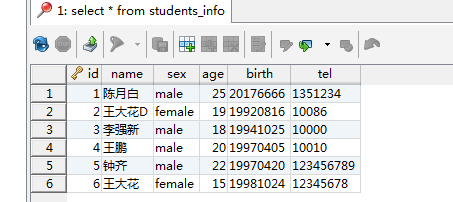
测试表:
执行结果:
ret1 = (('information_schema',), ('mysql',), ('performance_schema',), ('sakila',), ('sys',), ('testdb',), ('world',))
---------------------
(('information_schema',), ('mysql',), ('performance_schema',), ('sakila',), ('sys',), ('testdb',), ('world',))
(('students_info',),)
()
((1, '陈月白', 'male', 25, '20176666', '1351234'), (2, '王大花D', 'female', 19, '19920816', '10086'), (3, '李强新', 'male', 18, '19941025', '10000'), (4, '王鹏', 'male', 20, '19970405', '10010'), (5, '钟齐', 'male', 22, '19970420', '123456789'), (6, '王大花', 'female', 15, '19981024', '12345678'))
(1064, "You have an error in your SQL syntax; check the manual that corresponds to your MySQL server version for the right syntax to use near 'error sql test' at line 1") sqlLine = error sql test
以上这篇python 3.6 +pyMysql 操作mysql数据库(实例讲解)就是小编分享给大家的全部内容了,希望能给大家一个参考,也希望大家多多支持【听图阁-专注于Python设计】。