Python tkinter事件高级用法实例
本文实例讲述了Python tkinter事件高级用法。分享给大家供大家参考,具体如下:
先来看看运行效果:
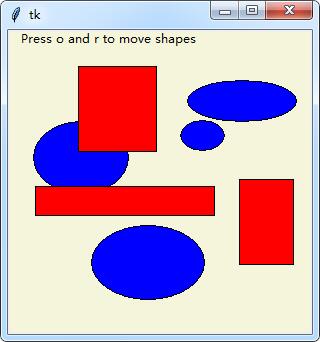
完整实例代码:
# -*- coding:utf-8-*-
#! python3
from tkinter import *
import threading, time
trace = 0
class CanvasEventsDemo:
  def __init__(self, parent=None):
    canvas = Canvas(width=300, height=300, bg='beige')
    canvas.pack()
    canvas.bind('<ButtonPress-1>', self.onStart)   # click
    canvas.bind('<B1-Motion>',   self.onGrow)    # and drag
    canvas.bind('<Double-1>',   self.onClear)   # delete all
    canvas.bind('<ButtonPress-3>', self.onMove)    # move latest
    self.canvas = canvas
    self.drawn = None
    self.kinds = [canvas.create_oval, canvas.create_rectangle]
  def onStart(self, event):
    self.shape = self.kinds[0]
    self.kinds = self.kinds[1:] + self.kinds[:1]   # start dragout
    self.start = event
    self.drawn = None
  def onGrow(self, event):               # delete and redraw
    canvas = event.widget
    if self.drawn: canvas.delete(self.drawn)
    objectId = self.shape(self.start.x, self.start.y, event.x, event.y)
    if trace: print(objectId)
    self.drawn = objectId
  def onClear(self, event):
    event.widget.delete('all')            # use tag all
  def onMove(self, event):
    if self.drawn:                  # move to click spot
      if trace: print(self.drawn)
      canvas = event.widget
      diffX, diffY = (event.x - self.start.x), (event.y - self.start.y)
      canvas.move(self.drawn, diffX, diffY)
      self.start = event
class CanvasEventsDemoTags(CanvasEventsDemo):
  def __init__(self, parent=None):
    CanvasEventsDemo.__init__(self, parent)
    self.canvas.create_text(100, 8, text='Press o and r to move shapes')
    self.canvas.master.bind('<KeyPress-o>', self.onMoveOvals)
    self.canvas.master.bind('<KeyPress-r>', self.onMoveRectangles)
    self.kinds = self.create_oval_tagged, self.create_rectangle_tagged
  def create_oval_tagged(self, x1, y1, x2, y2):
    objectId = self.canvas.create_oval(x1, y1, x2, y2)
    self.canvas.itemconfig(objectId, tag='ovals', fill='blue')
    return objectId
  def create_rectangle_tagged(self, x1, y1, x2, y2):
    objectId = self.canvas.create_rectangle(x1, y1, x2, y2)
    self.canvas.itemconfig(objectId, tag='rectangles', fill='red')
    return objectId
  def onMoveOvals(self, event):
    print('moving ovals')
    self.moveInSquares(tag='ovals')      # move all tagged ovals
  def onMoveRectangles(self, event):
    print('moving rectangles')
    self.moveInSquares(tag='rectangles')
  def moveInSquares(self, tag):         # 5 reps of 4 times per sec
    for i in range(5):
      for (diffx, diffy) in [(+20, 0), (0, +20), (-20, 0), (0, -20)]:
        self.canvas.move(tag, diffx, diffy)
        self.canvas.update()       # force screen redraw/update
        time.sleep(0.25)         # pause, but don't block gui
class CanvasEventsDemoThread(CanvasEventsDemoTags):
  def moveEm(self, tag):
    for i in range(5):
      for (diffx, diffy) in [(+20, 0), (0, +20), (-20, 0), (0, -20)]:
        self.canvas.move(tag, diffx, diffy)
        time.sleep(0.25)           # pause this thread only
  def moveInSquares(self, tag):
    threading.Thread(self.moveEm, (tag,)).start()
if __name__ == '__main__':
  CanvasEventsDemoThread()
  mainloop()
更多关于Python相关内容可查看本站专题:《Python数学运算技巧总结》、《Python正则表达式用法总结》、《Python数据结构与算法教程》、《Python函数使用技巧总结》、《Python字符串操作技巧汇总》及《Python入门与进阶经典教程》
希望本文所述对大家Python程序设计有所帮助。