利用scrapy将爬到的数据保存到mysql(防止重复)
前言
本文主要给大家介绍了关于scrapy爬到的数据保存到mysql(防止重复)的相关内容,分享出来供大家参考学习,下面话不多说了,来一起看看详细的介绍吧。
1.环境建立
1.使用xmapp安装php, mysql ,phpmyadmin
2.安装python3,pip
3.安装pymysql
3.(windows 略)我这边是mac,安装brew,用brew 安装scrapy
2.整个流程
1. 创建数据库和数据库表,准备保存
2.写入爬虫目标URL,进行网络请求
3.对爬返回数据进行处理,得到具体数据
4.对于具体数据保存到数据库中
2.1.创建数据库
首先创建一个数据库叫scrapy,然后创建一个表article,我们这里给body加了唯一索引,防止重复插入数据
--
-- Database: `scrapy`
--

-- --------------------------------------------------------

--
-- 表的结构 `article`
--

CREATE TABLE `article` (
 `id` int(11) NOT NULL,
 `body` varchar(200) CHARACTER SET utf8 COLLATE utf8_bin NOT NULL,
 `author` varchar(50) CHARACTER SET utf8 COLLATE utf8_bin NOT NULL,
 `createDate` datetime NOT NULL
) ENGINE=InnoDB DEFAULT CHARSET=latin1;


--
-- Indexes for table `article`
--
ALTER TABLE `article`
 ADD PRIMARY KEY (`id`),
 ADD UNIQUE KEY `uk_body` (`body`);
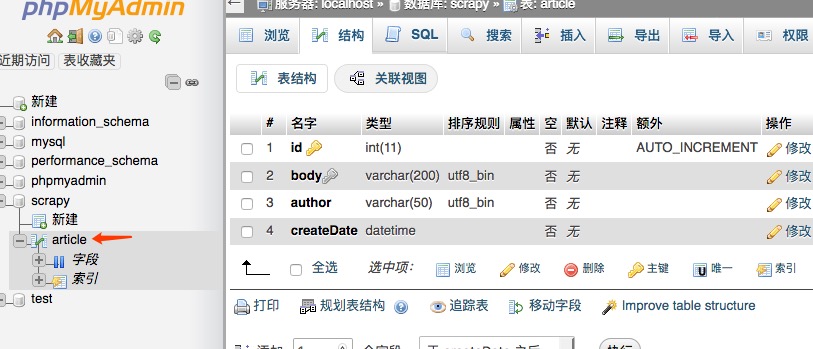
弄好以后是这样的。
2.2 先看下整个爬虫项目的结构
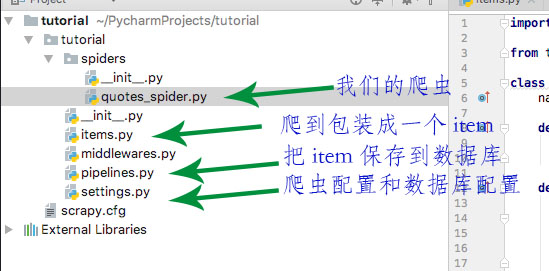
quotes_spider.py是核心,负责对网络请求和对内容进行处理,然后对整理好的内容抛给pipelines进行具体处理,保存到数据库中,这样不会影响速度。
其他的看 图说明
2.2 写入爬虫目标URL,进行网络请求
import scrapy
from tutorial.items import TutorialItem
class QuotesSpider(scrapy.Spider):
 name = "quotes"
 def start_requests(self):
  url = 'http://quotes.toscrape.com/tag/humor/'
  yield scrapy.Request(url)
 def parse(self, response):
  item = TutorialItem()
  for quote in response.css('div.quote'):
   item['body'] = quote.css('span.text::text').extract_first()
   item['author'] = quote.css('small.author::text').extract_first()
   yield item
  next_page = response.css('li.next a::attr("href")').extract_first()
  if next_page is not None:
   yield response.follow(next_page, self.parse)
start_requests 就是要写入具体要爬的URL
parse就是核心的对返回的数据进行处理的地方,然后以item的形式抛出,接下来定义好下一个要爬的内容
2.3 items
# -*- coding: utf-8 -*-
# Define here the models for your scraped items
#
# See documentation in:
# https://doc.scrapy.org/en/latest/topics/items.html
import scrapy
class TutorialItem(scrapy.Item):
 body = scrapy.Field()
 author = scrapy.Field()
 pass
2.4 pipelines
# -*- coding: utf-8 -*-
# Define your item pipelines here
#
# Don't forget to add your pipeline to the ITEM_PIPELINES setting
# See: https://doc.scrapy.org/en/latest/topics/item-pipeline.html
import pymysql
import datetime
from tutorial import settings
import logging
class TutorialPipeline(object):
 def __init__(self):
  self.connect = pymysql.connect(
   host = settings.MYSQL_HOST,
   db = settings.MYSQL_DBNAME,
   user = settings.MYSQL_USER,
   passwd = settings.MYSQL_PASSWD,
   charset = 'utf8',
   use_unicode = True
  )
  self.cursor = self.connect.cursor();
 def process_item(self, item, spider):
  try:
   self.cursor.execute(
    "insert into article (body, author, createDate) value(%s, %s, %s) on duplicate key update author=(author)",
    (item['body'],
     item['author'],
     datetime.datetime.now()
     ))
   self.connect.commit()
  except Exception as error:
   logging.log(error)
  return item
 def close_spider(self, spider):
  self.connect.close();
2.5 配置
ITEM_PIPELINES = {
 'tutorial.pipelines.TutorialPipeline':300
}
MYSQL_HOST = 'localhost'
MYSQL_DBNAME = 'scrapy'
MYSQL_USER = 'root'
MYSQL_PASSWD = '123456'
MYSQL_PORT = 3306
3.启动爬虫
scrapy crawl quotes
总结
以上就是这篇文章的全部内容了,希望本文的内容对大家的学习或者工作具有一定的参考学习价值,如果有疑问大家可以留言交流,谢谢大家对【听图阁-专注于Python设计】的支持。