django启动uwsgi报错的解决方法
uwsgi介绍
uWSGI是一个Web服务器,它实现了WSGI协议、uwsgi、http等协议。Nginx中HttpUwsgiModule的作用是与uWSGI服务器进行交换。
要注意 WSGI / uwsgi / uWSGI 这三个概念的区分。
- WSGI是一种Web服务器网关接口。它是一个Web服务器(如nginx,uWSGI等服务器)与web应用(如用Flask框架写的程序)通信的一种规范。
- uwsgi是一种线路协议而不是通信协议,在此常用于在uWSGI服务器与其他网络服务器的数据通信。
- 而uWSGI是实现了uwsgi和WSGI两种协议的Web服务器。
- uwsgi协议是一个uWSGI服务器自有的协议,它用于定义传输信息的类型(type of information),每一个uwsgi packet前4byte为传输信息类型描述,它与WSGI相比是两样东西。
uwsgi性能非常高
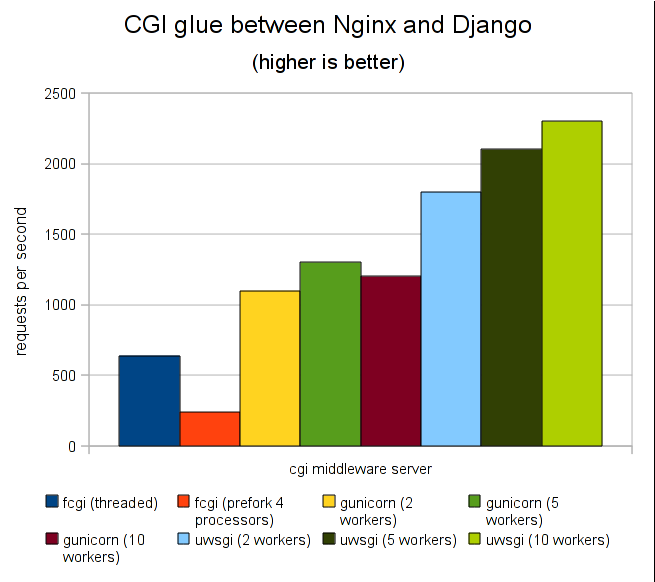
最近在django启动uwsgi报错的时候,发现了一些错误,下面来一起看看吧
查看uwsgi.log
*** Starting uWSGI 2.0.17 (64bit) on [Thu Apr 5 17:46:15 2018] ***
compiled with version: 4.4.7 20120313 (Red Hat 4.4.7-18) on 05 April 2018 02:08:03
os: Linux-2.6.32-642.6.2.el6.x86_64 #1 SMP Wed Oct 26 06:52:09 UTC 2016
nodename: GDJ_DEV
machine: x86_64
clock source: unix
detected number of CPU cores: 1
current working directory: /xxx/xxx/xxx/xxx
writing pidfile to uwsgi.pid
detected binary path: /xxx/xxx/.virtualenvs/h1/bin/uwsgi
!!! no internal routing support, rebuild with pcre support !!!
chdir() to /xxx/xxx/xxx/xxx
your processes number limit is 100000
your memory page size is 4096 bytes
detected max file descriptor number: 100000
lock engine: pthread robust mutexes
thunder lock: disabled (you can enable it with --thunder-lock)
uWSGI http bound on 172.21.0.5:8000 fd 4
uwsgi socket 0 bound to TCP address 127.0.0.1:33522 (port auto-assigned) fd 3
Python version: 3.6.4 (default, Mar 24 2018, 10:32:21) [GCC 4.4.7 20120313 (Red Hat 4.4.7-18)]
Python main interpreter initialized at 0x1ff10d0
python threads support enabled
your server socket listen backlog is limited to 100 connections
your mercy for graceful operations on workers is 60 seconds
mapped 416880 bytes (407 KB) for 8 cores
*** Operational MODE: preforking+threaded ***
failed to open python file xxx/uwsgi.ini
unable to load app 0 (mountpoint='') (callable not found or import error)
*** no app loaded. going in full dynamic mode ***
*** uWSGI is running in multiple interpreter mode ***
spawned uWSGI master process (pid: 4865)
spawned uWSGI worker 1 (pid: 4866, cores: 2)
spawned uWSGI worker 2 (pid: 4867, cores: 2)
spawned uWSGI worker 3 (pid: 4868, cores: 2)
spawned uWSGI worker 4 (pid: 4869, cores: 2)
spawned uWSGI http 1 (pid: 4870)
--- no python application found, check your startup logs for errors ---
[pid: 4869|app: -1|req: -1/1] 118.26.10.242 () {40 vars in 777 bytes} [Thu Apr 5 17:46:31 2018] GET /user/login/ => generated 21 bytes in 0 msecs (HTTP/1.1 500) 2 headers in 83 bytes (0 switches on core 0)
解决第一个报错,注意操作的先后顺序:
1.卸载uwsgi
pip uninstall uwsgi
#注意此时卸载,pip会有缓存留在系统里
2.安装pcre支持库
yum install pcre pcre-devel pcre-static
3.继续安装uwsgi,不走pip缓存
pip install uwsgi -I --no-cache-dir
#启动uwsgi,已经没有“ !!! no internal routing support, rebuild with pcre support !!! ”报错了
解决第二个报错:
需要在你的uwsgi.ini文件中module指定项目下面的wsgi:
module=xxx.wsgi
#注:xxx为项目名称,startproject那个项目名称,这个错误解决后,下面的访问错误自然而然的就解决了!
附:我的uwsgi.ini配置文件
[uwsgi]
#socket=ip:port       #使用nginx代理请求时配置,直接访问uwsgi使用http方式
http=ip:port
chdir=/xxx/xxx       #项目根目录的绝对路径
wsgi-file=xxx/uwsgi.ini  #项目目录下的uwsgi.ini
module=xxx.wsgi      #指向项目下的wsgi模块
processes=4
threads=2
master=True
py-atuo-reload=1
env=DJANGO_SETTINGS_MODULE=xxx.settings
pidfile=uwsgi.pid
daemonize=uwsgi.log
总结
以上就是这篇文章的全部内容了,希望本文的内容对大家的学习或者工作具有一定的参考学习价值,如果有疑问大家可以留言交流,谢谢大家对【听图阁-专注于Python设计】的支持。