python实现简单登陆流程的方法
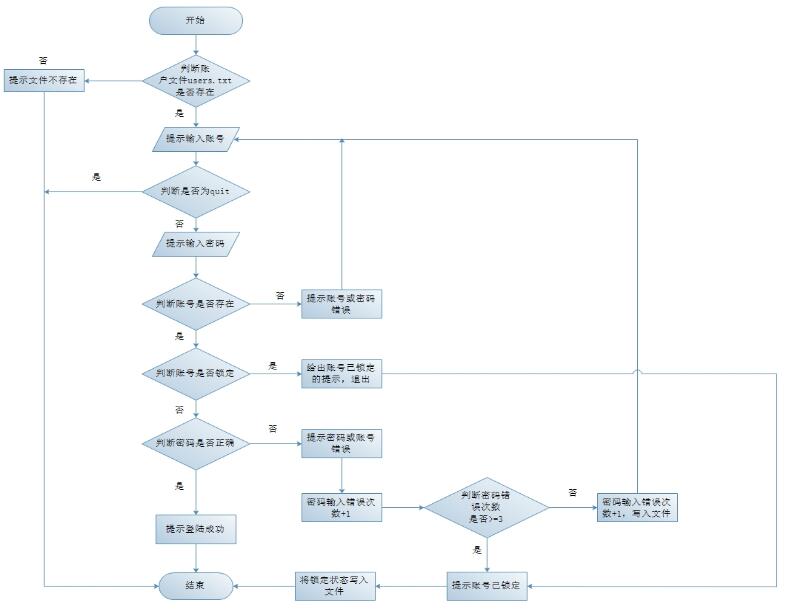
登陆流程图:
代码实现:
#-*- coding=utf-8 -*-
import os,sys,getpass
'''
user.txt 格式
账号 密码 是否锁定 错误次数
jack 123 unlock 0
tom 123 unlock 0
lily 123 unlock 0
hanmeimei 123 unlock 0
lucy 123 unlock 0
'''
# 定义写入文件的函数
def wirte_to_user_file(users,user_file_path):
	user_file = file(user_file_path,'w+')
	for k,v in users.items():
		line = []
		line.append(k)
		line.extend(v)
		user_file.write(' '.join(line)+'\n')
	user_file.close()
# 判断用户文件是否存在,不存在直接退出
user_file_path = 'users.txt'
if os.path.exists(user_file_path):
	user_file = file(user_file_path,'r')
else:
	print 'user file is not exists'
	sys.exit(1)
# 遍历用户文件,将用户包装成字典
users_dic = {}
for user_line in user_file:
	user = user_line.strip().split()
	users_dic[user[0]] = user[1:]
'''
{
	'lucy': ['123', 'unlock', '0'],
	'lily': ['123', 'unlock', '0'],
	'jack': ['123', 'unlock', '0'],
	'hanmeimei': ['123', 'unlock', '0'],
	'tom': ['123', 'unlock', '0']
}
'''
while True:
	# 输入账号
	input_name = raw_input('please input your username,input "quit" or "q" will be exit : ').strip()
	# 判断是否为退出
	if input_name == 'quit' or input_name == 'q':
		sys.exit(0)
	# 输入密码
	password = getpass.getpass('please input your password:').strip()
	# 判断账号是否存在、是否锁定
	if input_name not in users_dic:
		print 'username or password is not right'
		break

	if users_dic[input_name][1] == 'lock':
		print 'user has been locked'
		break

	# 判断密码是否正确,正确,登陆成功
	if str(password) == users_dic[input_name][0]:
		print 'login success,welcome to study system'
		sys.exit(0)
	else:
		# 如果密码错误则修改密码错误次数
		users_dic[input_name][2] = str(int(users_dic[input_name][2])+1)
		# 密码错误次数大于3的时候则锁定,并修改状态

		if int(users_dic[input_name][2]) >= 3:
			print 'password input wrong has 3 times,user will be locked,please connect administrator'
			users_dic[input_name][1] = 'lock'
			wirte_to_user_file(users_dic,user_file_path)
			break

		wirte_to_user_file(users_dic,user_file_path)
以上这篇python实现简单登陆流程的方法就是小编分享给大家的全部内容了,希望能给大家一个参考,也希望大家多多支持【听图阁-专注于Python设计】。