Python使用tkinter库实现文本显示用户输入功能示例
本文实例讲述了Python使用tkinter库实现文本显示用户输入功能。分享给大家供大家参考,具体如下:
#coding:utf-8
from Tkinter import *
class App:
  def __init__(self,root):
    #定义帧
    frame = Frame(root)
    frame.pack()
    self.frame = frame
    w = Label(frame,text = "calculator")
    w.pack()
    self.newinput()
    #调用回调函数
    button1 = Button(frame,text='1',fg="red",command = lambda : self.buttoncb(1))
    button1.pack()
    button2 = Button(frame,text='2',fg="red",command = lambda : self.buttoncb(2))
    button2.pack()
    button = Button(frame,text='Quit',fg="red",command = root.quit)
    button.pack()
  def newinput(self):
    v = StringVar()
    e = Entry(self.frame,textvariable = v)
    self.v = v
    e.pack()
  #定义回调函数
  def buttoncb(self,i):
    #print "button"
    val = self.v.get()
    self.v.set(val+str(i))
root=Tk()
a = App(root)
root.mainloop()
运行结果:
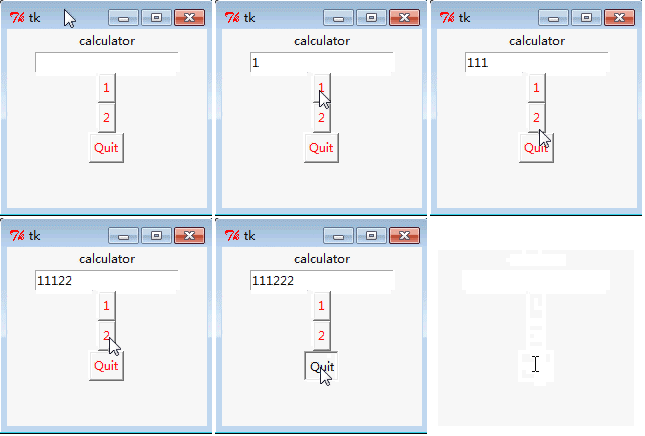
更多关于Python相关内容感兴趣的读者可查看本站专题:《Python数据结构与算法教程》、《Python函数使用技巧总结》、《Python字符串操作技巧汇总》、《Python入门与进阶经典教程》及《Python文件与目录操作技巧汇总》
希望本文所述对大家Python程序设计有所帮助。