Python实现手写一个类似django的web框架示例
本文实例讲述了Python实现手写一个类似django的web框架。分享给大家供大家参考,具体如下:
用与django相似结构写一个web框架。
启动文件代码:
from wsgiref.simple_server import make_server #导入模块
from views import *
import urls
def routers():  #这个函数是个元组
  URLpattern=urls.URLpattern
  return URLpattern #这个函数执行后返回这个元组
def application(environ,start_response):
  print("ok1")
  path=environ.get("PATH_INFO")
  print("path",path)
  start_response('200 OK',[('Content-Type','text/html')])
  urlpattern=routers() #讲函数的返回值元组赋值
  func=None
  for item in urlpattern: #遍历这个元组
    if path==item[0]:  #item[0]就是#路径后面的斜杠内容
      func=item[1]  #item[1]就是对应的函数名
      break
  if func: #如果路径内容存在函数就存在
    return func(environ) #执行这个函数
  else:
    print("ok5")
    return [b"404"] #如果不存在就返回404
if __name__=='__main__':
  print("ok0")
  t=make_server("",9700,application)
  print("ok22")
  t.serve_forever()
urls.py文件代码:
from views import *
URLpattern = (
  ("/login", login),
  ("/alex", foo1),
  ("/egon", foo2),
  ("/auth", auth)
)
views.py文件代码:
def foo1(request): # 定义函数
  f=open("templates/alex.html","rb") #打开html 以二进制的模式
  data=f.read() #读到data里
  f.close() #关闭
  return [data] #返回这个data
def foo2(request):
  f=open("templates/egon.html","rb")
  data=f.read()
  f.close()
  return [data]
def login(request):
  f=open("templates/login.html","rb")
  data=f.read()
  f.close()
  return [data]
def auth(request):
  print("+++",request)
  user_union,pwd_union=request.get("QUERY_STRING").split("&")
  _,user=user_union.split("=")
  _,pwd=pwd_union.split("=")
  if user=='Yuan' and pwd=="123":
    return [b"login,welcome"]
  else:
    return [b"user or pwd is wriong"]
templates目录下的html文件:
alex.html
<!DOCTYPE html>
<html lang="en">
<head>
  <meta charset="UTF-8">
  <meta http-equiv="x-ua-compatible" content="IE=edge">
  <meta name="viewport" content="width=device-width, initial-scale=1">
  <title>Title</title>
</head>
<body>
<div>alex</div>
</body>
</html>
login.html
<!DOCTYPE html>
<html lang="en">
<head>
  <meta charset="UTF-8">
  <title>Title</title>
</head>
<body>
<h2>登录页面</h2>
<form action="http://127.0.0.1:9700/auth">
  <p>姓名:<input type="text" name="user"></p>
  <p>密码:<input type="password" name="pwd"></p>
  <p>
    <input type="submit">
  </p>
</form>
</body>
</html>
下面如图,是目录结构
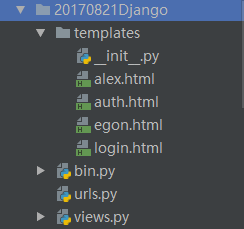
访问ip+prot+路径 即为相应的html,功能简单,只是为了熟悉django
更多关于Python相关内容感兴趣的读者可查看本站专题:《Python Socket编程技巧总结》、《Python URL操作技巧总结》、《Python数据结构与算法教程》、《Python函数使用技巧总结》、《Python字符串操作技巧汇总》及《Python入门与进阶经典教程》
希望本文所述对大家Python程序设计有所帮助。