Python实现获取本地及远程图片大小的方法示例
本文实例讲述了Python实现获取本地及远程图片大小的方法。分享给大家供大家参考,具体如下:
了解过Pillow的都知道,Pillow是一个非常强大的图片处理器,这篇文章主要记录一下Pillow对图片信息的获取:
安装Pillow
pip install pillow
本地图片
# -*- coding:utf-8 -*-
#! python2
import os
from PIL import Image
path = os.path.join(os.getcwd(),"23.png")
img = Image.open(path)
print img.format    # PNG
print img.size     # (3500, 3500)
远程图片
# -*- coding:utf-8 -*-
#! python2
import urllib2
import cStringIO
from PIL import Image
path = "http://h.hiphotos.baidu.com/image/pic/item/c8ea15ce36d3d5397966ba5b3187e950342ab0cb.jpg"
file = urllib2.urlopen(path)
tmpIm = cStringIO.StringIO(file.read())
img = Image.open(tmpIm)
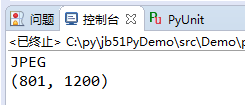
print img.format     # JPEG
print img.size      # (801, 1200)
运行结果如下图:
更多关于Python相关内容可查看本站专题:《Python数学运算技巧总结》、《Python图片操作技巧总结》、《Python数据结构与算法教程》、《Python函数使用技巧总结》、《Python字符串操作技巧汇总》及《Python入门与进阶经典教程》
希望本文所述对大家Python程序设计有所帮助。