python 美化输出信息的实例
如下所示:
# -*- coding: utf-8 -*-
# @Author: xiaodong
# @Date:  just hide
# @Last Modified by:  xiaodong
# @Last Modified time: just hide
# try:
#   from colorama import Fore, Style
# except ImportError:
#   class Temp:
#     def __getattr__(self, x):
#       return ''
#   Fore = Style = Temp()


STYLE = {
    'fore': {
        'black': 30, 'red': 31, 'green': 32, 'yellow': 33,
        'blue': 34, 'purple': 35, 'cyan': 36, 'white': 37,
    },
    'back': {
        'black': 40, 'red': 41, 'green': 42, 'yellow': 43,
        'blue': 44, 'purple': 45, 'cyan': 46, 'white': 47,
    },
    'mode': {
        'bold': 1, 'underline': 4, 'blink': 5, 'invert': 7,
    },
    'default': {
        'end': 0,
    }
}


def use_style(string, mode='', fore='', back=''):
  mode = '%s' % STYLE['mode'][mode] if mode in STYLE['mode'] else ''
  fore = '%s' % STYLE['fore'][fore] if fore in STYLE['fore'] else ''
  back = '%s' % STYLE['back'][back] if back in STYLE['back'] else ''
  style = ';'.join([s for s in [mode, fore, back] if s])
  style = '\033[%sm' % style if style else ''
  end = '\033[%sm' % STYLE['default']['end'] if style else ''
  return '%s%s%s' % (style, string, end)


def gentle_show(seq, *, column=4, fontdict=None):

  if fontdict is None:
    line_color = 'red'
    font_color = 'blue'
  elif isinstance(fontdict, dict):
    line_color = fontdict.get('line_color', 'red')
    font_color = fontdict.get('font_color', 'green')

  seq = list(map(str, seq))
  max_len = len(max(seq, key=len))

  for index, ele in enumerate(seq):
    if index % column == 0:
      print(use_style('-' * max_len * column + '-' * (column - 1), fore=line_color))
      print(use_style(ele.center(max_len, ' '), mode='bold', fore=font_color), end='|')
    else:
      if (index - column + 1) % column == 0:
        print(use_style(ele.center(max_len, ' '), mode='bold', fore=font_color))
      else:
        print(use_style(ele.center(max_len, ' '), mode='bold', fore=font_color), end='|')
  print('\n')


if __name__ == "__main__":
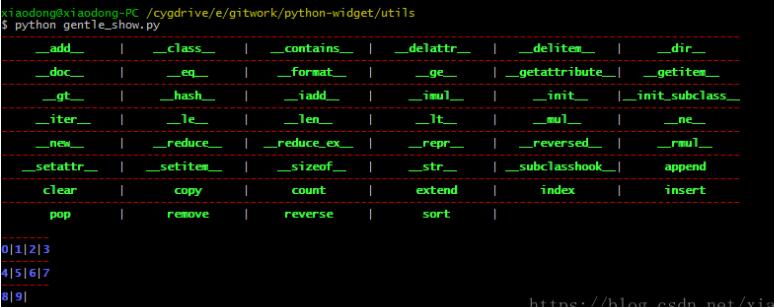
  gentle_show(dir([]), column=6, fontdict={'line_color': 'red', 'font_color': 'green'})
  gentle_show(range(10))


以上这篇python 美化输出信息的实例就是小编分享给大家的全部内容了,希望能给大家一个参考,也希望大家多多支持【听图阁-专注于Python设计】。