用python标准库difflib比较两份文件的异同详解
【需求背景】
有时候我们要对比两份配置文件是不是一样,或者比较两个文本是否异样,可以使用linux命令行工具diff a_file b_file,但是输出的结果读起来不是很友好。这时候使用python的标准库difflib就能满足我们的需求。
下面这个脚本使用了difflib和argparse,argparse用于解析我们给此脚本传入的两个参数(即两份待比较的文件),由difflib执行比较,比较的结果放到了一个html里面,只要找个浏览器打开此html文件,就能直观地看到比较结果,两份文件有差异的地方会高亮显示出来。
【程序正文】
以python2.7为例,compare_two_files.py程序正文:
#!/bin/env python
# -*- coding: utf-8 -*-

# 20180430

import difflib
import sys
import argparse


# 读取建表语句或配置文件
def read_file(file_name):
 try:
  file_desc = open(file_name, 'r')
  # 读取后按行分割
  text = file_desc.read().splitlines()
  file_desc.close()
  return text
 except IOError as error:
  print 'Read input file Error: {0}'.format(error)
  sys.exit()


# 比较两个文件并把结果生成一份html文本
def compare_file(file1, file2):
 if file1 == "" or file2 == "":
  print '文件路径不能为空:第一个文件的路径:{0}, 第二个文件的路径:{1} .'.format(file1, file2)
  sys.exit()
 else:
  print "正在比较文件{0} 和 {1}".format(file1, file2)
 text1_lines = read_file(file1)
 text2_lines = read_file(file2)
 diff = difflib.HtmlDiff() # 创建HtmlDiff 对象
 result = diff.make_file(text1_lines, text2_lines) # 通过make_file 方法输出 html 格式的对比结果
 # 将结果写入到result_comparation.html文件中
 try:
  with open('result_comparation.html', 'w') as result_file:
   result_file.write(result)
   print "0==}==========> Successfully Finished\n"
 except IOError as error:
  print '写入html文件错误:{0}'.format(error)


if __name__ == "__main__":
 # To define two arguments should be passed in, and usage: -f1 fname1 -f2 fname2
 my_parser = argparse.ArgumentParser(description="传入两个文件参数")
 my_parser.add_argument('-f1', action='store', dest='fname1', required=True)
 my_parser.add_argument('-f2', action='store', dest='fname2', required=True)
 # retrieve all input arguments
 given_args = my_parser.parse_args()
 file1 = given_args.fname1
 file2 = given_args.fname2
 compare_file(file1, file2)
【待比较的文件】
两份文件分别是old_ddl_file和new_ddl_file,内容分别是——
old_ddl_file文件内容
CREATE EXTERNAL TABLE raw_tags(
p0 string COMMENT ‘uid',
p3 string COMMENT ‘tag name, e.g. news, games, fairs, shoopingURL',
p4 string COMMENT ‘e.g. 0, Games',
p11 int COMMENT ‘gender',
dt string COMMENT ‘date, like 26/6/2017',
action string COMMENT ‘clickmodule, click_taghead_link, clicklink')
CLUSTERED BY (
dt)
INTO 4 BUCKETS
ROW FORMAT DELIMITED
FIELDS TERMINATED BY ‘,'
STORED AS INPUTFORMAT
‘org.apache.hadoop.mapred.TextInputFormat'
OUTPUTFORMAT
‘org.apache.hadoop.hive.ql.io.HiveIgnoreKeyTextOutputFormat'
LOCATION
‘hdfs://hdfs-ha/apps/hive/warehouse/ksai.db/raw_tags'
TBLPROPERTIES (
‘numFiles'='1',
‘numRows'='0',
‘rawDataSize'='0',
‘totalSize'='70575510',
‘transient_lastDdlTime'='1500469448')

new_ddl_file文件内容
CREATE EXTERNAL TABLE raw_tags(
p0 string COMMENT ‘uid',
p3 string COMMENT ‘tag name, e.g. news, games, fairs, shoopingURL',
p4 string COMMENT ‘e.g. 0, Games',
p11 int COMMENT ‘gender',
dt string COMMENT ‘date, like 26/6/2017',
action string COMMENT ‘clickmodule, click_taghead_link, clicklink')
ROW FORMAT DELIMITED
FIELDS TERMINATED BY ‘,'
STORED AS INPUTFORMAT
‘org.apache.hadoop.mapred.TextInputFormat'
OUTPUTFORMAT
‘org.apache.hadoop.hive.ql.io.HiveIgnoreKeyTextOutputFormat'
LOCATION
‘hdfs://hdfs-ha/apps/hive/warehouse/ksai.db/raw_tags'
TBLPROPERTIES (
‘COLUMN_STATS_ACCURATE'='{\”BASIC_STATS\”:\”true\”}',
‘numFiles'='0',
‘numRows'='0',
‘rawDataSize'='0',
‘totalSize'='0',
‘transient_lastDdlTime'='1521546069')
肉眼很难看出来区别吧?
【执行结果】
那么就使用上面的脚本来比较,在linux命令行的使用方法 python -f1 file1 -f2 file2 也就是:
python compare_two_files.py -f1 old_ddl_file -f2 new_ddl_file
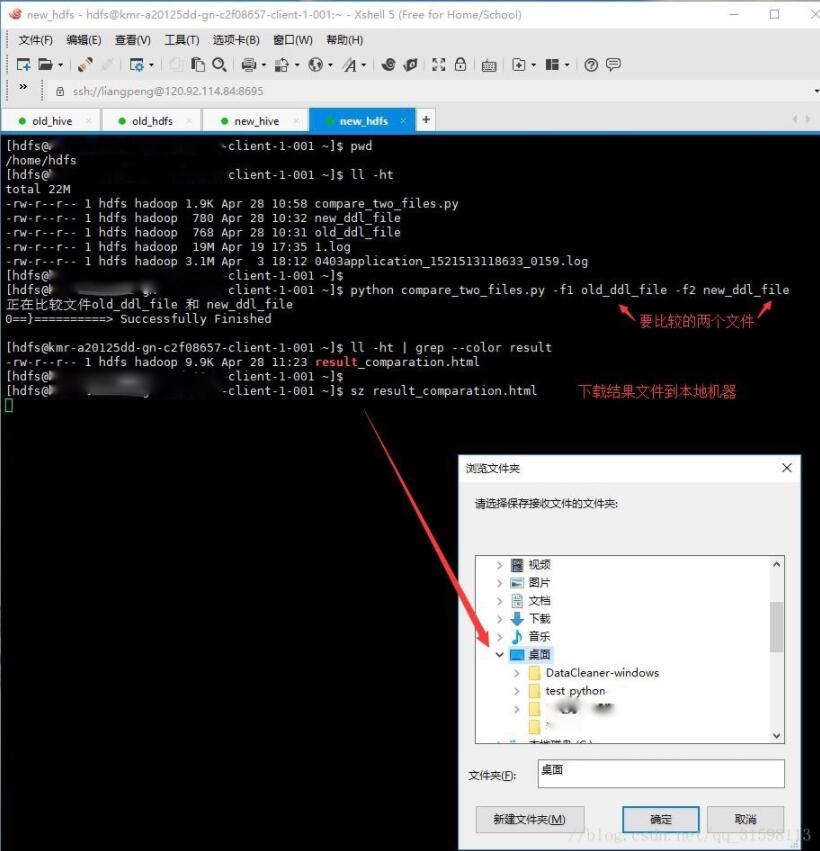
再把运行结果产生的html文件下载到本地,用任一种浏览器打开即可,如截图:
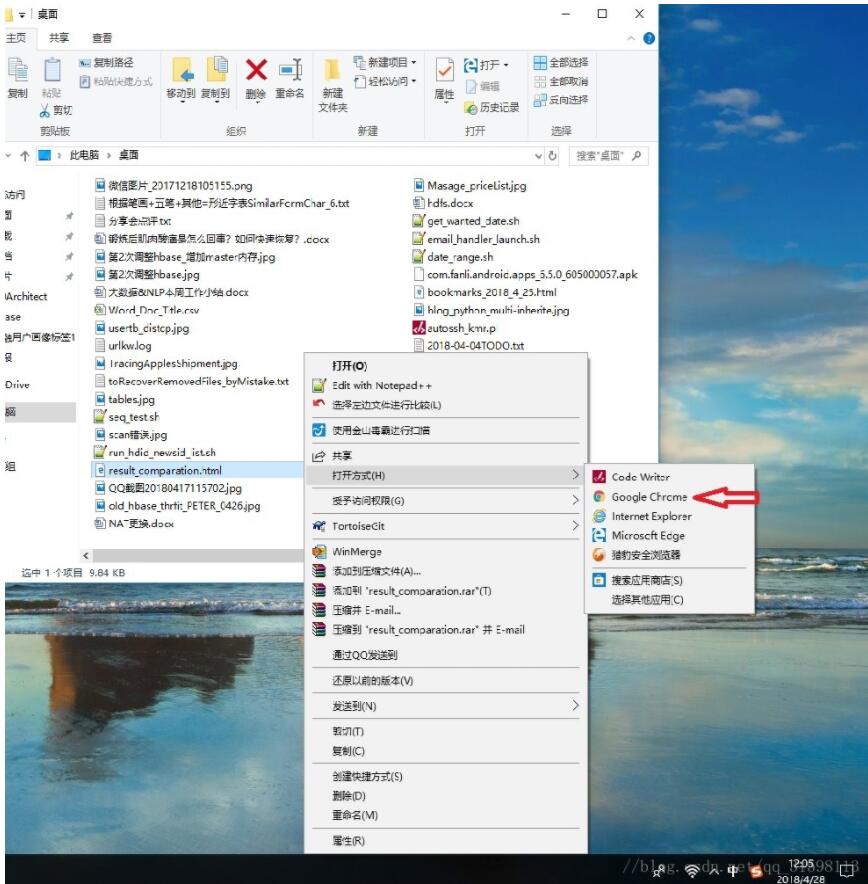
运行结果:
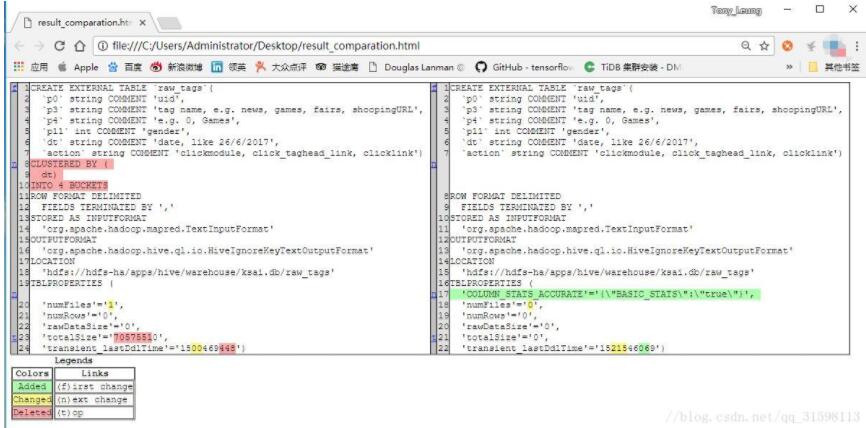
使用浏览器查看html文件,可以看到,里面给出了各种颜色标注的图例说明,一目了然。
以上这篇用python标准库difflib比较两份文件的异同详解就是小编分享给大家的全部内容了,希望能给大家一个参考,也希望大家多多支持【听图阁-专注于Python设计】。