对python中的six.moves模块的下载函数urlretrieve详解
实验环境:windows 7,anaconda 3(python 3.5),tensorflow(gpu/cpu)
函数介绍:所用函数为six.moves下的urllib中的函数,调用如下urllib.request.urlretrieve(url,[filepath,[recall_func,[data]]])。简单介绍一下,url是必填的指的是下载地址,filepath指的是保存的本地地址,recall_func指的是回调函数,下载过程中会调用可以用来显示下载进度。
实验代码:以下载cifar10的dataset和抓取斗鱼首页为例
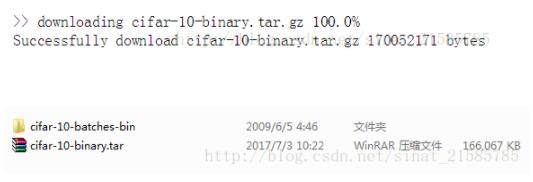
下载cifar10的dataset,并解压
from six.moves import urllib
import os
import sys
import tensorflow as tf
import tarfile
FLAGS = tf.app.flags.FLAGS#提取系统参数作用的变量
tf.app.flags.DEFINE_string('dir','D:/download_html','directory of html')#将下载目录保存到变量dir中,通过FLAGS.dir提取
directory = FLAGS.dir#从FLAGS中提取dir变量
url = 'http://www.cs.toronto.edu/~kriz/cifar-10-binary.tar.gz'
filename = url.split('/')[-1]#-1表示分割后的最后一个元素
filepath = os.path.join(directory,filename)
if not os.path.exists(directory):
 os.makedirs(directory)
if not os.path.exists(filepath):
 def _recall_func(num,block_size,total_size):
 sys.stdout.write('\r>> downloading %s %.1f%%' % (filename,float(num*block_size)/float(total_size)*100.0))
 sys.stdout.flush()
 urllib.request.urlretrieve(url,filepath,_recall_func)
 print()
 file_info = os.stat(filepath)
 print('Successfully download',filename,file_info.st_size,'bytes')
tar = tarfile.open(filepath,'r:gz')#指定解压路径和解压方式为解压gzip
tar.extractall(directory)#全部解压
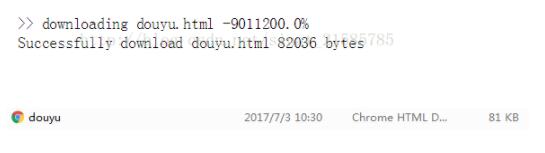
抓取斗鱼首页
from six.moves import urllib
import os
import sys
import tensorflow as tf
FLAGS = tf.app.flags.FLAGS#提取系统参数作用的变量
tf.app.flags.DEFINE_string('dir','D:/download_html','directory of html')#将下载目录保存到变量dir中,通过FLAGS.dir提取
directory = FLAGS.dir#从FLAGS中提取dir变量
url = 'http://www.douyu.com/'
filename = 'douyu.html'#保存成你想要的名字,这里保存成douyu.html
filepath = os.path.join(directory,filename)
if not os.path.exists(directory):
 os.makedirs(directory)
if not os.path.exists(filepath):
 def _recall_func(num,block_size,total_size):
 sys.stdout.write('\r>> downloading %s %.1f%%' % (filename,float(num*block_size)/float(total_size)*100.0))
 sys.stdout.flush()
 urllib.request.urlretrieve(url,filepath,_recall_func)
 print()
 file_info = os.stat(filepath)#获取文件信息
 print('Successfully download',filename,file_info.st_size,'bytes')#.st_size文件的大小,以字节为单位

以上这篇对python中的six.moves模块的下载函数urlretrieve详解就是小编分享给大家的全部内容了,希望能给大家一个参考,也希望大家多多支持【听图阁-专注于Python设计】。