Scrapy框架爬取Boss直聘网Python职位信息的源码
分析
使用CrawlSpider结合LinkExtractor和Rule爬取网页信息
LinkExtractor用于定义链接提取规则,一般使用allow参数即可
LinkExtractor(allow=(), # 使用正则定义提取规则
       deny=(), # 排除规则
       allow_domains=(), # 限定域名范围
       deny_domains=(), # 排除域名范围
       restrict_xpaths=(), # 使用xpath定义提取队则
       tags=('a', 'area'),
       attrs=('href',),
       canonicalize=False,
       unique=True,
       process_value=None,
       deny_extensions=None,
       restrict_css=(), # 使用css选择器定义提取规则
       strip=True):
Rule用于定义CrawlSpider的爬取规则,由Spider内部自动识别,提交请求、获取响应,交给callback指定的回调方法处理response
如果指定了callback,参数follow默认为False;如果callback为None,follow默认为True
Rule(link_extractor, # LinkExtractor对象,必选参数
   callback=None, # 回调方法,可选
   cb_kwargs=None,
   follow=None, # 是否进行深度爬取,True、False
   process_links=None, # 用于处理链接(有些反爬策略是返回假的url)
   process_request=identity)
源码
items.py
class BosszhipinItem(scrapy.Item):
  """Boss直聘Pytho职位爬虫Item"""
  # 职位名称
  position=scrapy.Field()
  # 公司名称
  company=scrapy.Field()
  # 薪资
  salary=scrapy.Field()
  # 工作地点
  location=scrapy.Field()
  # 学历要求
  education=scrapy.Field()
  # 工作时间
  year=scrapy.Field()
spiders/bosszhipin_spider.py
# !/usr/bin/env python
# -*- coding:utf-8 -*-
import scrapy
from scrapy.spider import CrawlSpider,Rule
from scrapy.linkextractors import LinkExtractor
from myscrapy.items import BosszhipinItem
class BosszhipinSpider(CrawlSpider):
  """
  Boss直聘Python职位爬虫Spider
    使用CrawlSpider基类实现
  """
  name = 'bosszhipin'
  allowed_domains=['zhipin.com',]
  start_urls=['http://www.zhipin.com/c100010000/h_100010000/?query=Python&page=1',]
  # 链接提取器对象(规定链接提取规则)
  link_extractor=LinkExtractor(allow=(r'page=\d+'))
  # 链接提取规则对象列表
  # 自动调用callback指定的方法,去取爬取由link_extractor指定的链接提取规则匹配到的url
  # 原理:link_extractor.extract_links(response)返回匹配到的链接
  rules = [
    Rule(link_extractor=link_extractor,callback='parse_page',follow=True),
  ]
  def parse_page(self,response):
    """定义回调方法,用于解析每个response对象"""
    job_list=response.xpath('//div[@class="job-list"]//li')
    for job in job_list:
      position = job.xpath('.//div[@class="info-primary"]//h3[@class="name"]/a/text()')[0].extract()
      salary =job.xpath('.//div[@class="info-primary"]//h3[@class="name"]//span/text()')[0].extract()
      company =job.xpath('.//div[@class="company-text"]//a/text()')[0].extract()
      location =job.xpath('.//div[@class="info-primary"]/p/text()[1]')[0].extract()
      year =job.xpath('.//div[@class="info-primary"]/p/text()[2]')[0].extract()
      education =job.xpath('.//div[@class="info-primary"]/p/text()[3]')[0].extract()
      item=BosszhipinItem()
      item['position']=position
      item['salary']=salary
      item['company']=company
      item['location']=location
      item['year']=year
      item['education']=education
      yield item
pipelines.py
class BosszhipinPipeline(object):
  """Boss直聘Python职位爬虫Item Pipeline"""
  def __init__(self):
    self.f=open('data/bosszhipin.json',mode='wb')
    self.f.write(b'[')
  def process_item(self,item,spider):
    data=json.dumps(dict(item),ensure_ascii=False,indent=4)
    self.f.write(data.encode('utf-8'))
    self.f.write(b',')
    return item
  def close_spider(self,spider):
    self.f.write(b']')
    self.f.close()
settings.py
ITEM_PIPELINES = {
  'myscrapy.pipelines.BosszhipinPipeline': 1,
}
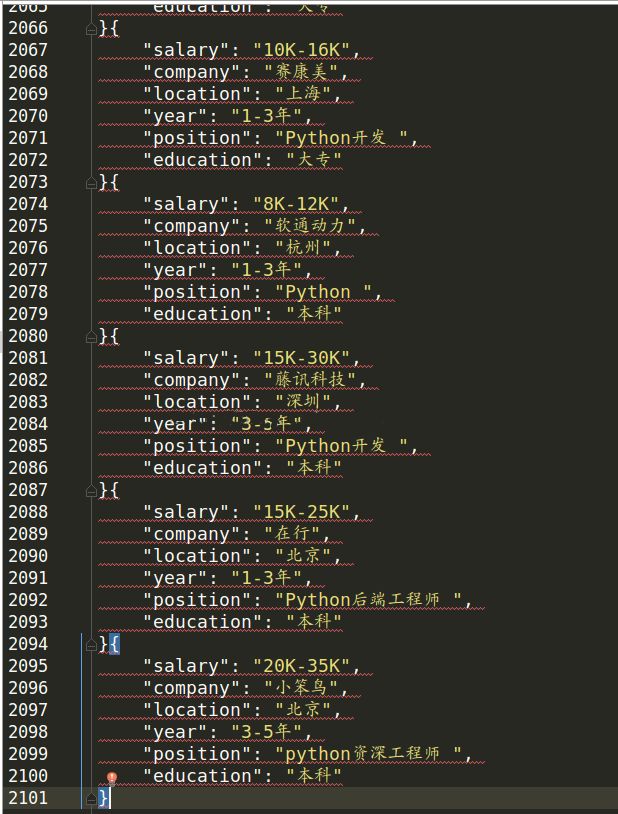
运行结果
总结
以上就是这篇文章的全部内容了,希望本文的内容对大家的学习或者工作具有一定的参考学习价值,谢谢大家对【听图阁-专注于Python设计】的支持。如果你想了解更多相关内容请查看下面相关链接