Python GUI编程完整示例
本文实例讲述了Python GUI编程。分享给大家供大家参考,具体如下:
import os
from time import sleep
from tkinter import *
from tkinter.messagebox import showinfo
class DirList(object):
  def __init__(self, initdir=None):
    self.top = Tk()
    self.label = Label(master=self.top, text='Directory Lister V1.0')
    self.label.pack()
    self.cwd = StringVar(master=self.top)
    self.dirl = Label(self.top, fg='blue', font=('Helvetica', 14, 'bold'))
    self.dirl.pack()
    self.dirfm = Frame(master=self.top)
    self.dirsb = Scrollbar(master=self.dirfm)
    self.dirsb.pack(side=RIGHT,fill=Y)    # fill=Y,垂直填充空间排列
    self.dirs = Listbox(master=self.dirfm, height=15, width=50, yscrollcommand=self.dirsb.set)
    self.dirs.bind('<Double-1>', func=self.setDirAndGo)    # <Double-1>,双击显示路径列表
    self.dirsb.config(command=self.dirs.yview)
    self.dirs.pack(side=LEFT, fill=BOTH)
    self.dirfm.pack()
    self.dirn = Entry(master=self.top, width=50, textvariable=self.cwd)
    self.dirn.bind('<Return>', func=self.doLS)
    self.dirn.pack()
    self.bfm = Frame(master=self.top)
    self.cleer = Button(master=self.bfm, text='清除', command=self.clrDir, activeforeground='white',
             activebackground='blue')
    self.ls = Button(master=self.bfm, text='显示列表', command=self.doLS, activeforeground='white',
             activebackground='green')
    self.quit = Button(master=self.bfm, text='退出', command=self.top.quit, activeforeground='white',
              activebackground='red')
    self.cleer.pack(side=LEFT)
    self.ls.pack(side=LEFT)
    self.quit.pack(side=LEFT)
    self.bfm.pack()
    if initdir:
      self.cwd.set(os.curdir)
      self.doLS()
  def setDirAndGo(self, ev=None):
    self.last = self.cwd.get()
    self.dirs.config(selectbackground='red')
    chek = self.dirs.get(self.dirs.curselection())
    if not chek:
      chek = os.curdir
    self.cwd.set(chek)
    self.doLS()
  def doLS(self, ev=None):
    error = ''
    tdir = self.cwd.get()
    if not tdir:
      tdir = os.curdir
    if not os.path.exists(tdir):
      error = tdir + ':未找到文件,请检查路径!'
    elif not os.path.isdir(tdir):
      error = tdir + ':不是一个路径!'
    if error:
      # self.cwd.set(error)
      showinfo(title='提示',message=error)
      self.top.update()
      # sleep(2)
      if not (hasattr(self, 'last') and self.last):
        self.last = os.curdir
        self.cwd.set(self.last)
        self.dirs.config(selectbackground='LightSkyBlue')
        self.top.update()
        return
    if not os.path.isdir(tdir):
      self.cwd.set('')
    else:
      self.cwd.set('获取目录内容中...')
    self.top.update()
    dirlist = os.listdir(tdir)
    dirlist.sort()
    os.chdir(tdir)
    self.dirl.config(text=os.getcwd())
    self.dirs.delete(0, END)
    self.dirs.insert(END, os.curdir)
    self.dirs.insert(END, os.pardir)
    for eachfile in dirlist:
      self.dirs.insert(END, eachfile)
    self.cwd.set(os.curdir)
    self.dirs.config(selectbackground='LightSkyBlue')
  def clrDir(self, ev=None):
    self.cwd.set('')
if __name__ == '__main__':
  dir = DirList(os.curdir)
  mainloop()
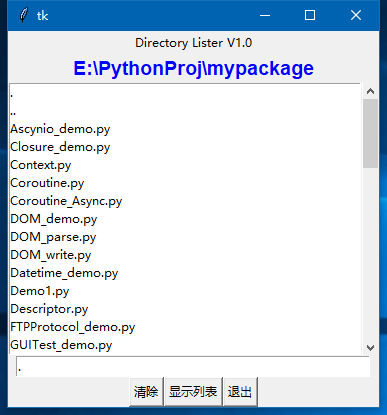
效果如下:
更多关于Python相关内容感兴趣的读者可查看本站专题:《Python数据结构与算法教程》、《Python Socket编程技巧总结》、《Python函数使用技巧总结》、《Python字符串操作技巧汇总》、《Python入门与进阶经典教程》及《Python文件与目录操作技巧汇总》
希望本文所述对大家Python程序设计有所帮助。