GitHub 热门:Python 算法大全,Star 超过 2 万
4 月 27 日,GitHub 趋势榜第 3 位是一个用 Python 编码实现的算法库,Star 数早已达到 26000+

链接:https://github.com/TheAlgorithms/Python
这个库涵盖了多种算法和数据结构的介绍,比如:
- 排序算法(冒泡排序、希尔排序、插入排序、桶排序、合并排序、快速排序、堆排序、选择排序等)、
- 查找算法(线性查找、二分查找、插值查找等)
- 加密算法(凯撒加密、RSA、ROT13 等)
- 机器学习
- 图
- 数字图像处理
- 动态规划
- 常见数据结构(队列、栈、链表、树等)
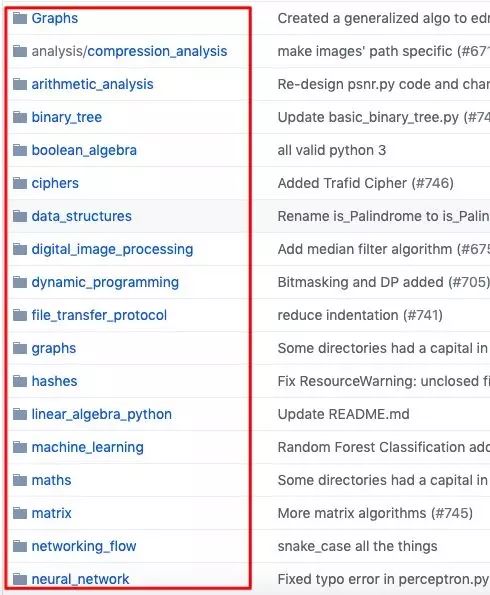
这个库虽然包括的种类很多,但内容其实分了 2 方面:① 算法的原理简介;② 算法的代码实现;
比如:冒泡算法的 Python 实现
from __future__ import print_function
def bubble_sort(collection):
  """Pure implementation of bubble sort algorithm in Python
  :param collection: some mutable ordered collection with heterogeneous
  comparable items inside
  :return: the same collection ordered by ascending
  Examples:
  >>> bubble_sort([0, 5, 3, 2, 2])
  [0, 2, 2, 3, 5]
  >>> bubble_sort([])
  []
  >>> bubble_sort([-2, -5, -45])
  [-45, -5, -2]
  >>> bubble_sort([-23,0,6,-4,34])
  [-23,-4,0,6,34]
  """
  length = len(collection)
  for i in range(length-1):
    swapped = False
    for j in range(length-1-i):
      if collection[j] > collection[j+1]:
        swapped = True
        collection[j], collection[j+1] = collection[j+1], collection[j]
    if not swapped: break # Stop iteration if the collection is sorted.
  return collection
if __name__ == '__main__':
  try:
    raw_input     # Python 2
  except NameError:
    raw_input = input # Python 3
  user_input = raw_input('Enter numbers separated by a comma:').strip()
  unsorted = [int(item) for item in user_input.split(',')]
  print(*bubble_sort(unsorted), sep=',')
感兴趣的童鞋,请收藏:
https://github.com/TheAlgorithms/Python
好了,就给大家介绍到这里吧,希望大家喜欢!