Ubuntu18.04下python版本完美切换的解决方法
ubuntu18.04版本,python版本python2.7,python3.5,python3.6
因为安装一些库会安装到python3.6上,而默认使用的是python2.7,使用python3,默认会使用python3.5,无法调用安装包。
解决方法:
一、使用python xx.py运行程序时,加上版本号。比如python3.6 xx.py
二、1.要以root身份操作
yz@yz-pc:~$ sudo su
2.确认本机下的python默认版本。调出终端,输入python即可查看默认的版本:
root@yz-pc:/home/yz# python
Python 3.6.5 (default, Apr 1 2018, 05:46:30)
[GCC 7.3.0] on linux
Type "help", "copyright", "credits" or "license" for more information.
>>> exit()
root@yz-pc:/home/yz# python2.7
Python 2.7.15rc1 (default, Apr 15 2018, 21:51:34)
[GCC 7.3.0] on linux2
Type "help", "copyright", "credits" or "license" for more information.
>>> exit()
root@yz-pc:/home/yz# python3
Python 3.6.5 (default, Apr 1 2018, 05:46:30)
[GCC 7.3.0] on linux
Type "help", "copyright", "credits" or "license" for more information.
>>> exit()
root@yz-pc:/home/yz# python3.5
3.如何切换这两个版本以及切换默认的python版本:
我们可以使用 update-alternatives 来为整个系统更改Python 版本。以 root 身份登录,首先罗列出所有可用的python 替代版本信息:
#update-alternatives --list python
update-alternatives: error: no alternatives for python
如果出现以上所示的错误信息,则表示 Python 的替代版本尚未被update-alternatives 命令识别。想解决这个问题,我们需要更新一下替代列表,将python2.7 和 python3.6放入其中。
# update-alternatives --install /usr/bin/python python /usr/bin/python2.7 1 update-alternatives: using /usr/bin/python2.7 to provide /usr/bin/python (python) in auto mode # update-alternatives --install /usr/bin/python python /usr/bin/python3.5 2 update-alternatives: using /usr/bin/python3.4 to provide /usr/bin/python (python) in auto mode
--install 选项使用了多个参数用于创建符号链接。最后一个参数指定了此选项的优先级,如果我们没有手动来设置替代选项,那么具有最高优先 级的选项就会被选中。这个例子中,我们为/usr/bin/python3.4 设置的优先级为2,所以update-alternatives 命 令会自动将它设置为默认 Python 版本。
# python --version
Python 3.5.2
接下来,我们再次列出可用的 Python 替代版本。
# update-alternatives --list python
/usr/bin/python2.7
/usr/bin/python3.5
现在开始,我们就可以使用下方的命令随时在列出的 Python 替代版本中任意切换了。
(这一步是最关键的)
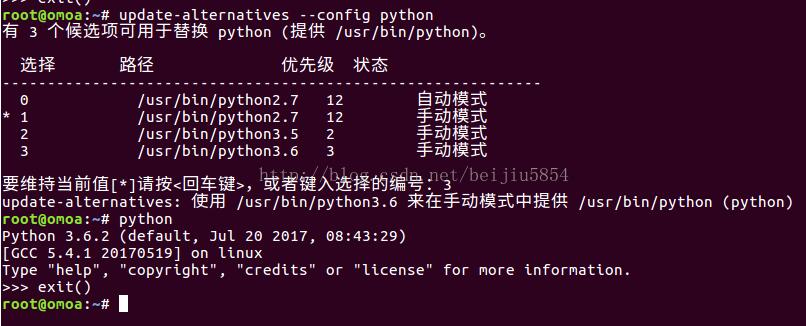
# update-alternatives --config python
下面就简单了,会提示你输入序号,你想用哪个版本为默认,就输入序号就可以了!
结束!
参考文章:ubuntu 16.04下python版本切换的方法
以上就是本文的全部内容,希望对大家的学习有所帮助,也希望大家多多支持【听图阁-专注于Python设计】。