详解程序意外中断自动重启shell脚本(以Python为例)
我们经常需要在后台运行一些python脚本,来监控系统或者做一些其他事情;但是 由于各种各样的原因,排除python脚本代码的问题,脚本运行过程中会挂掉。为了不天天耗在上面等重启,可以制作shell脚本对程序予以监控,对于意外中断的程序自动重启。
以控制 python自动重启的shell脚本为例:
cd Desktop
vim run.sh #新建名为run的shell脚本
写入(此处以名为run的Python脚本为例)
#!/bin/bash
while [ 1 ];do
 python run.py
done
chmod 777 run.sh #设置shell脚本权限
./run.sh   #运行shell脚本
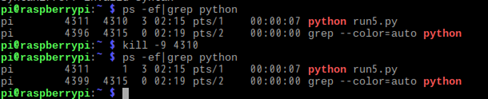

可见Python脚本意外中断(被kill)后,由于shell脚本的循环语句,实现了自动重启。

在测试完确保能够正常运行后,切换为后台运行:关于后台运行命令原理,点此查看。
nohup ./run5.py &

此外,做爬虫项目时,我们需要考虑一个爬虫在爬取时会遇到各种情况(网站验证,ip封禁),导致爬虫程序中断,这时我们已经爬取过一些数据,再次爬取时这些数据就可以忽略,所以我们需要在爬虫项目中设置一个中断重连的功能,使其在重新运行时从之前断掉的位置重新爬取数据。此代码参见自 匡虐博客
import os
class UrlManager(object):
 def __init__(self):						#建立两个数组的文件
  with open('new_urls.txt','r+') as new_urls:
   self.new_urls = new_urls.read()
  with open('old_urls.txt','r+') as old_urls:
   self.old_urls = old_urls.read()

 def add_new_url(self, url): 				 #添加url到new_ulrs文件中
  if url is None:
   return
  if url not in self.new_urls and url not in self.old_urls:
   with open('new_urls.txt', 'a') as new_urls:
    new_urls.write(url)
  else:
   print('url had done')

 def add_new_urls(self, urls):				#添加多个url到new_ulrs文件中
  # if urls is None or (len(url) == 0 for url in urls):
  if urls is None:
   print('url is none')
   return
  for url in urls:
   if urls is None:
    print('url is none')
    return
   else:
    self.add_new_url(url)

 def has_new_url(self):
  return len(self.new_urls) != 0

 def get_new_url(self):
  new_url = get_last_line('new_urls.txt') 	#读取new_urls文件中最后一个url
  del_last_url('new_urls.txt',new_url)		#删除new_urls文件中最后一个url
  add_old_urls('old_urls.txt',new_url)		#将读取出来的url添加入old_urls数组中
  return new_url

	def get_last_line(inputfile):
	 filesize = os.path.getsize(inputfile)
	 blocksize = 1024
	 dat_file = open(inputfile, 'rb')

	 last_line = b""
	 lines = []
	 if filesize > blocksize:
	  maxseekpoint = (filesize // blocksize) # 这里的除法取的是floor
	  maxseekpoint -= 1
	  dat_file.seek(maxseekpoint * blocksize)
	  lines = dat_file.readlines()
	  while ((len(lines) < 2) | ((len(lines) >= 2) & (lines[1] == b'\r\n'))): # 因为在Windows下,所以是b'\r\n'
	   # 如果列表长度小于2,或者虽然长度大于等于2,但第二个元素却还是空行
	   # 如果跳出循环,那么lines长度大于等于2,且第二个元素肯定是完整的行
	   maxseekpoint -= 1
	   dat_file.seek(maxseekpoint * blocksize)
	   lines = dat_file.readlines()
	 elif filesize: # 文件大小不为空
	  dat_file.seek(0, 0)
	  lines = dat_file.readlines()
	 if lines: # 列表不为空
	  for i in range(len(lines) - 1, -1, -1):
	   last_line = lines[i].strip()
	   if (last_line != b''):
	    break # 已经找到最后一个不是空行的
	 dat_file.close()
	 return last_line

	def del_last_url(fname,part):
	 with open(fname,'rb+') as f:
	  a = f.read()
	 a = a.replace(part,b'')
	 with open(fname,'wb+') as f:
	  f.write(a)

	def add_old_urls(fname,new_url):
	 line = new_url + b'\r'
	 with open(fname,'ab') as f:
	  f.write(line)
以上就是本文的全部内容,希望对大家的学习有所帮助,也希望大家多多支持【听图阁-专注于Python设计】。
