python利用re,bs4,requests模块获取股票数据
今天闲来无聊无意间看到了百度股票,就想着用python爬一下数据,于是就找到了东方财经网,结合这两个网站,写了一个小爬虫,数据保存在文件中,比较简单的示例,就当做用来练习正则表达式和BeautifulSoupl了。
首先页面分析,打开东方财经网股票列表页,
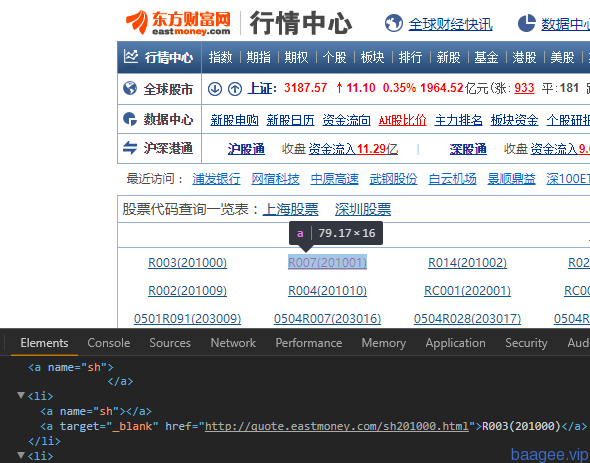
和百度股票详情页 ,右键查看网页源代码,
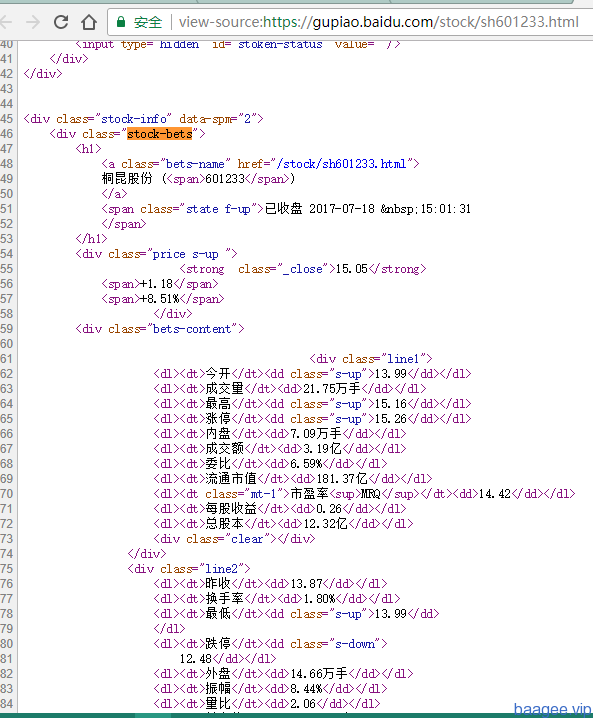
网址后面的代码就是股票代码,所以打算先获取股票代码,然后获取详情,废话少说,直接上代码吧:
import re
import requests
from bs4 import BeautifulSoup

#获取html
def getHtml(url):
	try:
		req=requests.get(url)
		req.raise_for_status()
		req.encoding=req.apparent_encoding
		return req.text
	except :
		print('getHtml失败')

#获取股票代码
def getStockList(lst,stockUrl):
	html=getHtml(stockUrl)
	soup=BeautifulSoup(html,'html.parser')
	a=soup.find_all('a')
	for i in a:
		try:
			href=i.attrs['href']
			lst.append(re.findall(r'[s][hz]\d{6}',href)[0])
		except:
			continue

#获取股票详情
def getStockInfo(lst,stockUrl,fpath):
	count=0
	for stock in lst:
		url=stockUrl+stock+'.html'
		html=getHtml(url)
		try:
			if html=='':
				continue
			infoDict={}
			soup=BeautifulSoup(html,'html.parser')
			stockInfo=soup.find('div',attrs={'class':'stock-bets'})
			name=stockInfo.find_all(attrs={'class':'bets-name'})[0]
			infoDict.update({'股票名称':name.text.split()[0]})
			keyList=stockInfo.find_all('dt')
			valueList=stockInfo.find_all('dd')
			for i in range(len(keyList)):
				key=keyList[i].text
				val=valueList[i].text
				infoDict[key]=val
			with open(fpath,'a',encoding='utf-8') as f:
				f.write(str(infoDict)+'\n')
				count+=1
				print('\r当前速度:{:.2f}%'.format(count*100/len(lst)),end='')
		except:
			count+=1
			print('\r当前速度e:{:.2f}%'.format(count*100/len(lst)),end='')
			continue


def main():
	stockListUrl='http://quote.eastmoney.com/stocklist.html'
	stockInfotUrl='https://gupiao.baidu.com/stock/'
	outPutFile='D:\python\shuju\stockInfo.txt'
	slist=[]
	getStockList(slist,stockListUrl)
	getStockInfo(slist,stockInfotUrl,outPutFile)

main()
以上就是本文的全部内容,希望对大家的学习有所帮助,也希望大家多多支持【听图阁-专注于Python设计】。