django 微信网页授权登陆的实现
一、准备工作
0x00 开发前准备
- 服务号!!!
- 微信认证。
- 备案过的域名。
- 服务器。
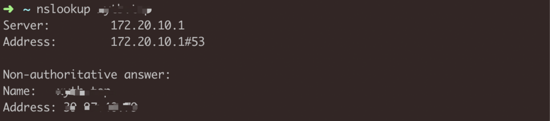
0x01 手动触发dns更新
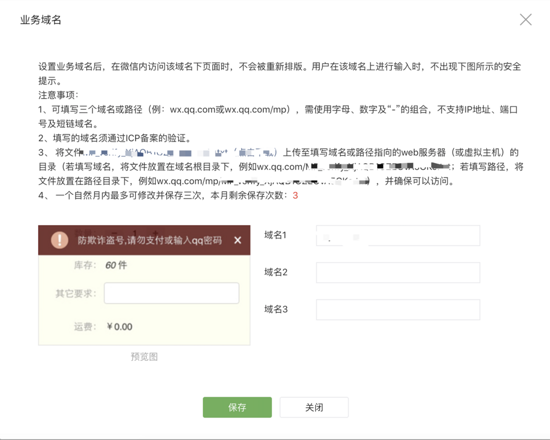
0x02 配置业务域名
0x03 将服务器请求转发到本地
修改服务器的 /etc/ssh/sshd_config 加入 GatewayPorts yes
ssh -R 0.0.0.0:80:localhost:8080 user@server_host
二、微信网页授权
0x01 授权流程
用户同意授权,获取 code
想办法让用户页面跳转到微信的授权链接(比如在修饰器中进行跳转):
def get_wx_authorize_url(appid : str, state: str = None):
  if state is None:
    state = "".join([random.choice(string.ascii_letters + string.digits) for _ in range(20)])
  redirect_url = 'your callback url' # 回调链接,在这里面进行用户信息入库的操作
  response_type = 'code'
  scope = 'snsapi_userinfo'
  wx_url = f"https://open.weixin.qq.com/connect/oauth2/authorize?appid={appid}&redirect_uri={redirect_url}&response_type={response_type}&scope={scope}&state={state}#wechat_redirect"
  return wx_url
通过 code 换取 access_token 和 openid
def request_access_token(appid : str, secret : str, code: str):
  secret = settings.WX_SECRET
  api = f"https://api.weixin.qq.com/sns/oauth2/access_token?appid={appid}&secret={secret}&code=[code]&grant_type=authorization_code"
  r = requests.get(api)
  return r.json()
通过 access_token 换取 用户信息
def request_userinfo(access_token: str, openid: str):
  api = f"https://api.weixin.qq.com/sns/userinfo?access_token={access_token}&openid={openid}&lang=zh_CN"
  r = requests.get(api)
  return r.json()
用户信息入库
需要注意的是:微信返回的数据编码格式为 ISO-8859-1 ,需要转换成 utf-8 。
def convert_string_encoding(s: str, from_encoding: str, to_encoding: str) -> str:
  """先根据 from_encoding 转换成bytes,然后在 decode 为 to_encoding 的字符串
  """
  return bytes(s, encoding=from_encoding).decode(to_encoding)
nickname = convert_string_encoding(resp['nickname'], 'ISO-8859-1', 'utf-8')
跳转回原来访问的链接
我的实现方式是在数据库保存一条记录,以 state 为 key 。
from app.models import WXUser, RedirectUrl
from utils import get_wx_authorize_url, get_random_string
from django.shortcuts import redirect

def login_required(func):
  def wrapper(request, *args, **kwargs):
    openid = request.openid
    try:
      user = WXUser.objects.get(openid=openid)
      request.wxuser = user
    except WXUser.DoesNotExist:
      state = get_random_string()
      redirect_url = get_wx_authorize_url(state=state)

      # 存储跳转链接
      try:
        r = RedirectUrl.objects.get(state=state)
      except RedirectUrl.DoesNotExist:
        r = RedirectUrl()
        r.state = state
      origin_url = request.get_raw_uri()
      r.url = origin_url
      r.save()

      return redirect(redirect_url)
    return func(request, *args, **kwargs)

  return wrapper
然后在我们设置的回调接口(会带上 code 和 state )里面,就可以通过 state 从数据库里获取原链接。
class RedirectUrl(BaseModel):
  state = models.TextField(unique=True)
  url = models.TextField()
0x02 中间件
这个中间件使用 jwt 作为认证手段,为什么不使用 session ,那可以讲另一个故事了,这里不赘述了。
从 HTTP_AUTHORIZATION (请求头中的 Authorization 字段)或者 key 为 jwttoken 的 cookie 中抽取出 jwt token ,从中解析出 openid ,添加到 request 变量中,之后就可以在后续的 views里面通过 request.openid 直接获取 openid 了。
def jwt_decode(token: Union[str, bytes]) -> tuple:
  """
  :param token : 可以是 bytes 也可以是 str,如果是 str,会先 encode 转成 bytes
  :return: 第一个参数为 payload,第二个参数为异常类型
  """
  if isinstance(token, str):
    token = token.encode()
  secret = settings.JWT_SECRET
  try:
    return jwt.decode(token, secret, algorithms=["HS256"]), None
  except Exception as e:
    # 统一捕捉异常:
    # jwt.exceptions.DecodeError
    # jwt.exceptions.InvalidSignatureError
    # jwt.exceptions.ExpiredSignatureError
    return None, e


class JWTAuthMiddleware(object):
  """
  小程序认证中间件
  """

  def __init__(self, get_response=None):
    self.get_response = get_response

  def __call__(self, request, *args, **kws):
    token = self.get_authorization_header(request)

    payload, error = jwt_decode(token)
    if not error:
      openid = payload['openid']
      request.openid = openid
    else:
      request.openid = None

    response = self.get_response(request, *args, **kws)
    return response

  def get_authorization_header(self, request):
    """
    从 AUTHORIZATION 请求头或者cookie 中获取 jwt code
    cookie 的 jwt code 的 key 为 jwtcode
    :param request:
    :return: rawtoken
    """

    auth_header = request.META.get('HTTP_AUTHORIZATION', '')
    cookie = request.COOKIES

    rawtoken = None
    if auth_header != "":
      try:
        rawtoken = auth_header.split(" ")[1]
      except IndexError as e:
        pass
    if 'jwttoken' in cookie:
      rawtoken = cookie['jwttoken']
    return rawtoken
以上就是本文的全部内容,希望对大家的学习有所帮助,也希望大家多多支持【听图阁-专注于Python设计】。