Python一键查找iOS项目中未使用的图片、音频、视频资源
前言
在iOS项目开发的过程中,如果版本迭代开发的时间比较长,那么在很多版本开发以后或者说有多人开发参与以后,工程中难免有一些垃圾资源,未被使用却占据着api包的大小!
这里我通过Python脚本来查找项目中未被使用的图片、音频、视频资源,然后删除掉;以达到减小APP包大小的目的!
代码
先查找项目中所以的资源文件存到你数组里面
def searchAllResName(file_dir):
 global _resNameMap
 fs = os.listdir(file_dir)
 for dir in fs:
  tmp_path = os.path.join(file_dir, dir)
  if not os.path.isdir(tmp_path):
   if isResource(tmp_path) == True and '/Pods/' not in tmp_path and '.appiconset' not in tmp_path and '.launchimage' not in tmp_path:
    imageName = tmp_path.split('/')[-1].split('.')[0]
    _resNameMap[imageName] = tmp_path
    conLog.info_delRes('[FindRes OK] ' + tmp_path)
  elif os.path.isdir(tmp_path) and tmp_path.endswith('.imageset') and '/Pods/' not in tmp_path:
   imageName = tmp_path.split('/')[-1].split('.')[0]
   _resNameMap[imageName] = tmp_path
   conLog.info_delRes('[FindRes OK] ' + tmp_path)
  else:
   searchAllResName(tmp_path)
遍历查询项目的所以代码,查找工程中所引用的资源文件
# 查询项目的所以代码
def searchProjectCode(file_dir):
 global _projectPbxprojPath
 fs = os.listdir(file_dir)
 for dir in fs:
  tmp_path = os.path.join(file_dir, dir)
  if tmp_path.endswith('project.pbxproj'):
   _projectPbxprojPath = tmp_path
  if not os.path.isdir(tmp_path):
   if '/Pods/' not in tmp_path:
    try:
     findResNameAtFileLine(tmp_path)
     conLog.info_delRes('[ReadFileForRes OK] ' + tmp_path)
    except Exception as e:
     pass
     # conLog.error_delRes('[ReadFileForRes Fail] [' + str(e) + ']' + tmp_path)
  else:
   searchProjectCode(tmp_path)
# 查找工程中所引用的资源文件
def findResNameAtFileLine(tmp_path):
 global _resNameMap
 Ropen = open(tmp_path,'r')
 for line in Ropen:
  lineList = line.split('"')
  for item in lineList:
   # bar@2x barimg.png
   if item in _resNameMap or item.split('.')[0] in _resNameMap or item + '@1x' in _resNameMap or item + '@2x' in _resNameMap or item + '@3x' in _resNameMap:
    del _resNameMap[item]

 Ropen.close()
删除垃圾资源文件,这里垃圾资源文件删除分为两部分一部分是Assets.xcassets里面的,一部分是直接导入工程目录中的资源,如果是Assets.xcassets垃圾资源直接删除就行了,但是如果是直接导入到工程目录里面的资源,那就先删除project.pbxproj中的引用,再删除本地资源文件;
# 删除无用的资源文件
def delAllRubRes():
 global _resNameMap, _hadDelMap
 # .imageset类型的资源图片直接删除
 for resName in list(_resNameMap.keys()):
  tmp_path = _resNameMap[resName]
  if tmp_path.endswith('.imageset'):
   if os.path.exists(tmp_path) and os.path.isdir(tmp_path):
    try:
     # 已删除的元素
     _hadDelMap[resName] = tmp_path
     # 删除.imageset文件夹
     delImagesetFolder(tmp_path)
     # 字典移除
     del _resNameMap[resName]
     conLog.info_delRes('[DelRubRes OK] ' + tmp_path)
    except Exception as e:
     conLog.error_delRes('[DelRubRes Fail] [' + str(e) + ']' + tmp_path)
   else:
    conLog.error_delRes('[DelRubRes Fail] [not exists] ' + tmp_path)
 delResAtProjectPbxproj()
def delImagesetFolder(rootdir):
 filelist = []
 filelist = os.listdir(rootdir)
 for f in filelist:
  filepath = os.path.join( rootdir, f )
  if os.path.isfile(filepath):
   os.remove(filepath)
  elif os.path.isdir(filepath):
   shutil.rmtree(filepath,True)
 shutil.rmtree(rootdir,True)
# 直接导入到工程中的图片需要删除project.pbxproj中的引用,再移除本地文件
def delResAtProjectPbxproj():
 global _projectPbxprojPath, _resNameMap, _hadDelMap
 if _projectPbxprojPath != None:
  # 先把需要删除的资源名先保存一份
  _needDelResName = []
  file_data = ''
  Ropen = open(_projectPbxprojPath,'r')
  for line in Ropen:
   idAdd = True
   for resName in _resNameMap:
    if resName in line:
     idAdd = False
     if resName not in _needDelResName:
      _needDelResName.append(resName)
   if idAdd == True:
    file_data += line
  Ropen.close()
  Wopen = open(_projectPbxprojPath,'w')
  Wopen.write(file_data)
  Wopen.close()
  # 已经清理过project.pbxproj中的引用的资源文件,开始从_resNameMap中移除已被处理过的资源文件
  # 并删除本地的对应的资源文件
  for item in _needDelResName:
   tmp_path = _resNameMap[item]
   if os.path.exists(tmp_path) and not os.path.isdir(tmp_path):
    # 已删除的元素
    _hadDelMap[item] = tmp_path
    # 删除文件
    os.remove(tmp_path)
    # 字典移除
    del _resNameMap[item]
    conLog.info_delRes('[DelRubRes OK] ' + tmp_path)
   else:
    pass
总的调用函数
# 开始清理无用的垃圾资源文件
def startCleanRubRes(file_dir, ignoreList = []):
 global _resNameMap, _hadDelMap,_isCleaing
 if _isCleaing == True:
  return
 _isCleaing = True
 initData()
 conLog.info('-' * 30 + '开始清理资源文件' + '-' * 30)
 searchAllResName(file_dir)
 conLog.info_delRes('-' * 20 + '全部的资源文件列表' + '-' * 20)
 conLog.info_delRes(_resNameMap)
 for item in ignoreList:
  if item in list(_resNameMap.keys()):
   del _resNameMap[item]
 conLog.info_delRes('-' * 20 + '忽略删除的资源文件' + '-' * 20)
 conLog.info_delRes(ignoreList)
 searchProjectCode(file_dir)
 conLog.info_delRes('-' * 20 + '需要删除的资源文件' + '-' * 20)
 conLog.info_delRes(_resNameMap)
 delAllRubRes()
 conLog.info_delRes('-' * 20 + '删除成功的资源文件' + '-' * 20)
 conLog.info_delRes(_hadDelMap)
 conLog.info_delRes('-' * 20 + '删除失败的资源文件' + '-' * 20)
 conLog.info_delRes(_resNameMap)
 _isCleaing = False
软件
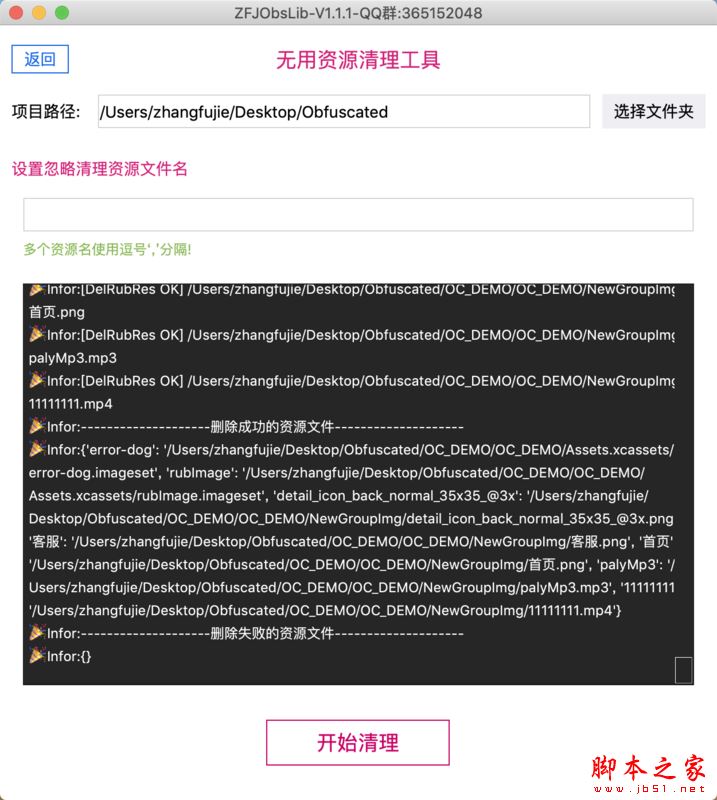
鉴于有些iOS开发程序员没有Python基础,这里做了一个图形化操作界面,欢迎大家下载使用!
下载地址:
https://gitee.com/zfj1128/ZFJ...
软件截图:
总结
以上所述是小编给大家介绍的Python一键查找iOS项目中未使用的图片、音频、视频资,希望对大家有所帮助,如果大家有任何疑问请给我留言,小编会及时回复大家的。在此也非常感谢大家对【听图阁-专注于Python设计】网站的支持!
如果你觉得本文对你有帮助,欢迎转载,烦请注明出处,谢谢!