Python Django Cookie 简单用法解析
home.html:
<!DOCTYPE html>
<html lang="en">
<head>
  <meta charset="UTF-8">
  <title>个人信息页面</title>
</head>
<body>
<p>个人信息页面</p>
</body>
</html>
只有返回一串字符串
login.html:
<!DOCTYPE html>
<html lang="en">
<head>
  <meta charset="UTF-8">
  <title>登录页面</title>
</head>
<body>
<p>登录页面</p>
<form action="/login/" method="post">
  {% csrf_token %}
  <p>
    账号:
    <input type="text" name="user">
  </p>
  <p>
    密码:
    <input type="text" name="pwd">
  </p>
  <p>
    <input type="submit" value="登录">
  </p>
</form>
</body>
</html>
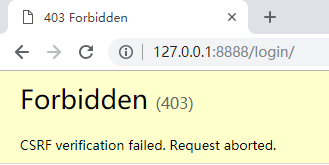
要考虑加上 csrf_token,不然会 403
login 函数:
from django.shortcuts import render, redirect
from app01 import models
def login(request):
  if request.method == "POST":
    username = request.POST.get("user")
    password = request.POST.get("pwd")
    if username == "admin" and password == "admin":
      rep = redirect("/home/") # 得到一个响应对象
      rep.set_cookie("login", "success") # 设置 cookie
      return rep
  return render(request, "login.html")
set_cookie() 中的第一个参数为 key,第二个参数为 value
home 函数:
from django.shortcuts import render, redirect
from app01 import models
def home(request):
  ret = request.COOKIES.get("login") # 获取 cookie 的 value
  if ret == "success":
    # cookie 验证成功
    return render(request, "home.html")
  else:
    return redirect("/login/")
输入账号、密码:admin,cookie 验证成功

给 cookie 加盐:
login 函数:
from django.shortcuts import render, redirect
from app01 import models
def login(request):
  if request.method == "POST":
    username = request.POST.get("user")
    password = request.POST.get("pwd")
    if username == "admin" and password == "admin":
      rep = redirect("/home/") # 得到一个响应对象
      # rep.set_cookie("login", "success") # 设置 cookie
      rep.set_signed_cookie("login", "success", salt="whoami") # 设置 cookie 并加盐
      return rep
  return render(request, "login.html")
home 函数:
from django.shortcuts import render, redirect
from app01 import models
def home(request):
  # ret = request.COOKIES.get("login") # 获取 cookie 的 value
  ret = request.get_signed_cookie("login", salt="whoami") # 获取加盐后 cookie 的 value
  if ret == "success":
    # cookie 验证成功
    return render(request, "home.html")
  else:
    return redirect("/login/")
输入账号、密码:admin,cookie 验证成功

以上就是本文的全部内容,希望对大家的学习有所帮助,也希望大家多多支持【听图阁-专注于Python设计】。