浅析PyTorch中nn.Linear的使用
查看源码
Linear 的初始化部分:
class Linear(Module):
 ...
 __constants__ = ['bias']

 def __init__(self, in_features, out_features, bias=True):
   super(Linear, self).__init__()
   self.in_features = in_features
   self.out_features = out_features
   self.weight = Parameter(torch.Tensor(out_features, in_features))
   if bias:
     self.bias = Parameter(torch.Tensor(out_features))
   else:
     self.register_parameter('bias', None)
   self.reset_parameters()
 ...
需要实现的内容:
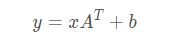
计算步骤:
@weak_script_method
  def forward(self, input):
    return F.linear(input, self.weight, self.bias)
返回的是:input * weight + bias
对于 weight
weight: the learnable weights of the module of shape
  :math:`(\text{out\_features}, \text{in\_features})`. The values are
  initialized from :math:`\mathcal{U}(-\sqrt{k}, \sqrt{k})`, where
  :math:`k = \frac{1}{\text{in\_features}}`
对于 bias
bias:  the learnable bias of the module of shape :math:`(\text{out\_features})`.
    If :attr:`bias` is ``True``, the values are initialized from
    :math:`\mathcal{U}(-\sqrt{k}, \sqrt{k})` where
    :math:`k = \frac{1}{\text{in\_features}}`
实例展示
举个例子:
>>> import torch
>>> nn1 = torch.nn.Linear(100, 50)
>>> input1 = torch.randn(140, 100)
>>> output1 = nn1(input1)
>>> output1.size()
torch.Size([140, 50])
张量的大小由 140 x 100 变成了 140 x 50
执行的操作是:
[140,100]×[100,50]=[140,50]
以上就是本文的全部内容,希望对大家的学习有所帮助,也希望大家多多支持【听图阁-专注于Python设计】。