pyqt5 QScrollArea设置在自定义侧(任何位置)
本例设置为垂直左侧scroll
主要思想是利用一个长度为0的mid_frame,高度为待设置qwidget的高度,用mid_frame的moveEvent事件驱动qwidget的move
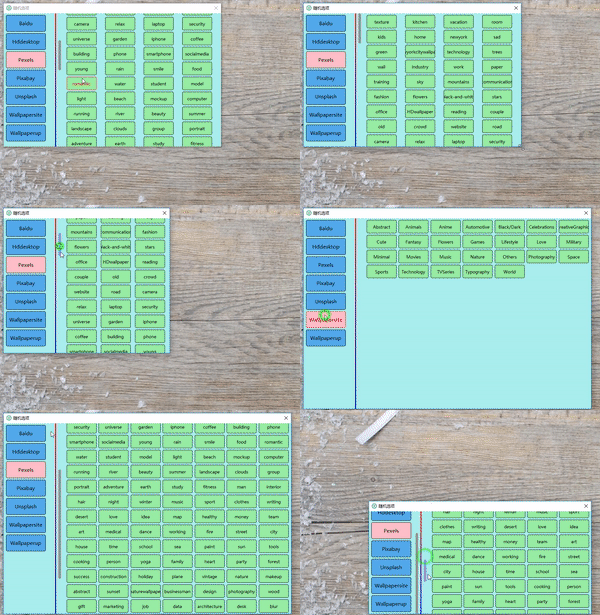
我项目的效果图:
代码及注释
from PyQt5.Qt import *
from sys import argv


# 主窗口
class Main(QMainWindow):
  def __init__(self):
    super().__init__(None)
    self.setGeometry(500, 500, 500, 500)

    # 实例化
    self.main = MainFrame(self)
    self.scroll = ScrollFrame(self, self.main, 40)

    self.show()

  def resizeEvent(self, e):
    # resize改变scroll窗口的高度使其与自己相同
    self.scroll.resize(self.scroll.width(), self.height())

 #需要配备scroll的窗口
class MainFrame(QFrame):
  def __init__(self, father):
    super().__init__(father)
    self.father = father
    self.setGeometry(50, 50, 100, 1500)

    # 测试按钮
    for i in range(15):
      b = QPushButton(str(i), self)
      b.setGeometry(0, i*100, 100, 100)

  # 自定义滚轮事件
  def wheelEvent(self, e):
    if e.angleDelta().y() > 0:
      self.move(self.x(), self.y() + 60)
    else:
      self.move(self.x(), self.y() - 60)
    # 改变scroll的值
    self.father.scroll.bar.setValue(abs(self.y()))

  def resizeEvent(self, e):
    # resize改变mid_frame的高度使其与自己相同
    self.father.scroll.mid_frame.setGeometry(0, 0, 0, self.height())


# 承载scrollarea的窗口
class ScrollFrame(QFrame):
  def __init__(self, father, parent, pos_x):
    super().__init__(father)
    self.parent_, self.father, self.pox_x = parent, father, pos_x

    self.mid_frame = MidFrame(self)
    self.mid_frame.setGeometry(0, 0, 0, self.parent_.height())

    self.scroll = QScrollArea()
    # 实例化verticalbar以供改变scroll的值
    self.bar = self.scroll.verticalScrollBar()
    # 绑定中间窗口
    self.scroll.setWidget(self.mid_frame)
    # 自动隐藏和出现
    self.scroll.setVerticalScrollBarPolicy(Qt.ScrollBarAsNeeded)

    # 加入到承载frame
    layout = QGridLayout(self)
    layout.addWidget(self.scroll, 0, 0)
    self.setLayout(layout)

    # 设置承载fram的size和scrollarea一样
    self.setGeometry(pos_x, 0, 20, self.father.height())

  def resizeEvent(self, e):
    # resize改变scroll的s高度使其与自己一样
    self.scroll.setGeometry(0, 0, 20, self.height())


# 接受scroll事件的中间窗口
class MidFrame(QFrame):
  def __init__(self, father):
    super().__init__(father)
    self.father = father

  def moveEvent(self, e):
    # move事件绑定实际滚动窗口的move
    self.father.parent_.move(self.father.parent_.x(), e.pos().y())


app = QApplication(argv)
main = Main()
app.exec_()
本例效果:

以上就是本文的全部内容,希望对大家的学习有所帮助,也希望大家多多支持【听图阁-专注于Python设计】。