python使用 request 发送表单数据操作示例
本文实例讲述了python使用 request 发送表单数据操作。分享给大家供大家参考,具体如下:
# !/usr/bin/env python
# -*- coding: utf-8 -*-
import urllib2
import urllib
import cookielib
import json
import httplib
import re
import requests
import os
import time
import requests, requests.utils, pickle
try:
  import cookielib # 兼容Python2
except:
  import http.cookiejar as cookielib
s=requests.session()
print s.headers
from requests.packages.urllib3.exceptions import InsecureRequestWarning
requests.packages.urllib3.disable_warnings(InsecureRequestWarning)
# with open('cook.txt', 'r') as f:
#  cookies = json.loads(f.read())
# print cookies
# try:
#   with open("cookies.txt", "r") as f:
#     load_cookies = json.loads(f.read())
#   s.cookies = requests.utils.cookiejar_from_dict(load_cookies)
#   print s.get('https://fms.lvchengcaifu.com/welcome').content
# except:
#
url = "https://oauth2.lvchengcaifu.com/login"
headers={
  'User-Agent': 'Mozilla/5.0 (Windows NT 6.1; Win64; x64; rv:54.0) Gecko/20100101 Firefox/54.0',
  'Accept': 'text/html,application/xhtml+xml,application/xml;q=0.9,*/*;q=0.8',
}
r= s.get(url,headers=headers,verify=False)
r=r.text
print r
print type(r)
r = r.encode('unicode-escape')
print type(r)
p = re.compile('.*_csrf"\s+value="(.*?)".*')
m = p.match(r)
token = m.group(1)
print token
headers={
  'User-Agent': 'Mozilla/5.0 (Windows NT 6.1; Win64; x64; rv:54.0) Gecko/20100101 Firefox/54.0',
  'Accept': 'text/html,application/xhtml+xml,application/xml;q=0.9,*/*;q=0.8',
  'csrf_token': token
}
imgurl='https://oauth2.lvchengcaifu.com/Kaptcha.jpg'
r = s.get(imgurl)
r = r.content
# print s
print type(r)
print r
filename = 'E:\image.jpg'
local = open(filename, 'wb')
local.write(r)
local.close()
print "登录二维码已经下载到本地" + "[" + filename + "]"
 ##打开图片
os.system("start %s" % filename);
code = raw_input('输入验证码: ')
print code
print len(code)
## <input type="hidden" id="_csrf" name="_csrf" value="6f772fd9-14da-40c4-b317-e8d9a4336203" />
login_url='https://oauth2.lvchengcaifu.com/login/form'
data = {'username': '11111', 'password': '2222@', '_csrf': token,'validCode':code}
response = s.post(login_url, data=data,headers=headers)
print response.content
aa=s.cookies
print '-------------------------------------'
print aa
# print s.get('https://oauth2.lvchengcaifu.com/oauth/authorize?scope=info_read&response_type=code&redirect_uri=https%3A%2F%2Ffms.lvchengcaifu.com%2Foauthclient%2FoauthCallback&client_id=client-fms').content
print s.get('https://fms.lvchengcaifu.com/welcome', allow_redirects=False).content
cookies = requests.utils.dict_from_cookiejar(s.cookies)
with open("cookies.txt",'w') as fp:
  json.dump(cookies, fp)
print(cookies)
url2='https://fms.lvchengcaifu.com/welcome'
r= s.get(url2,headers=headers,verify=False)
r= r.text
##<input type="hidden" id="csrf_token" name="csrf_token" value="a9c21ac8-8412-4853-ae50-98689b2822ac"/>
r = r.encode('unicode-escape')
print type(r)
p = re.compile('.*csrf_token"\s+value="(.*?)".*')
m = p.match(r)
token = m.group(1)
print token
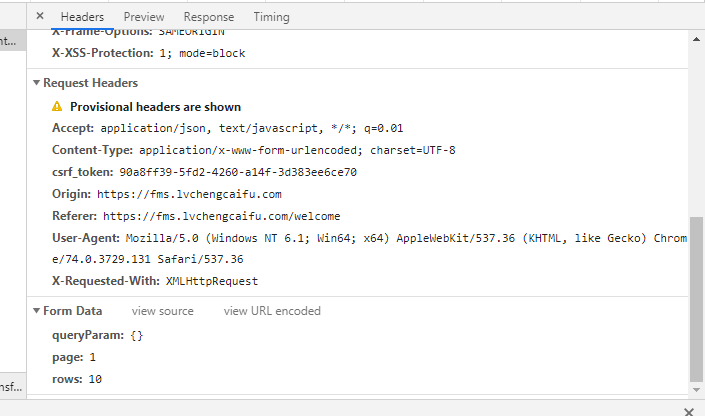
headers={
  'User-Agent': 'Mozilla/5.0 (Windows NT 6.1; Win64; x64; rv:54.0) Gecko/20100101 Firefox/54.0',
  'Accept': 'text/html,application/xhtml+xml,application/xml;q=0.9,*/*;q=0.8',
  'csrf_token': token,
  'Content-Type': 'application/x-www-form-urlencoded; charset=UTF-8',
  'X-Requested-With':'XMLHttpRequest',
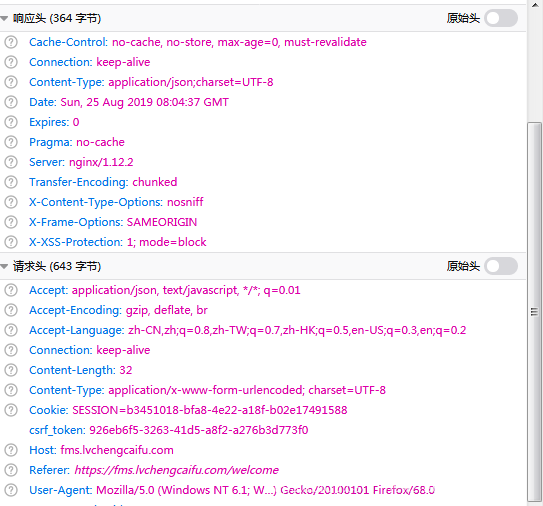
'Accept':'application/json, text/javascript, */*; q=0.01'
}
url3='https://fms.lvchengcaifu.com/productOrder/queryComPdAmountOrderInfoList'
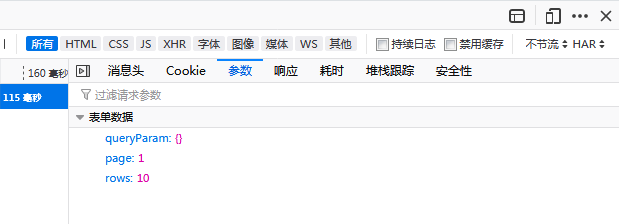
data = {'queryParam': {},'page':1,'rows':10}
response = s.post(url3, data=data,headers=headers)
print response.content
print response.status_code
更多关于Python相关内容可查看本站专题:《Python Socket编程技巧总结》、《Python数据结构与算法教程》、《Python函数使用技巧总结》、《Python字符串操作技巧汇总》、《Python入门与进阶经典教程》及《Python文件与目录操作技巧汇总》
希望本文所述对大家Python程序设计有所帮助。