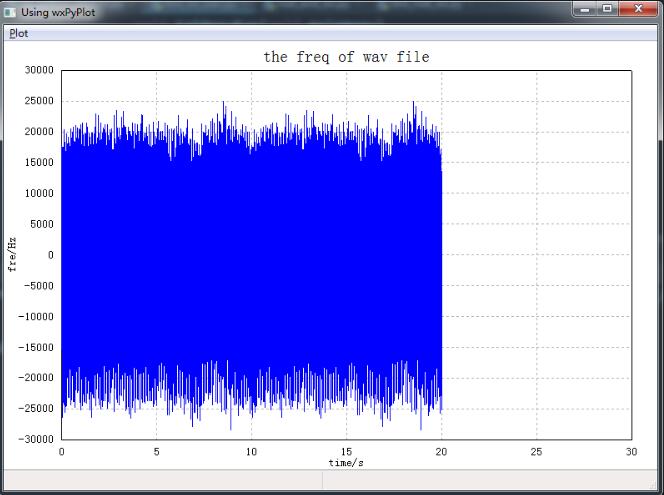
wxpython绘制音频效果
本文实例为大家分享了wxpython绘制音频的具体代码,供大家参考,具体内容如下
#-*- coding: utf-8 -*-

################################################################################
## 使用wxPython的绘图模块wxPyPlot,需要数据可视化的时候,无需再借用其他的库或模块了
################################################################################
import numpy as np
import wx
import wx.lib.plot as wxPyPlot # 导入绘图模块,并命名为wxPyPlot
import wave
import pylab as pl
# 需要把数据封装进入MyDataObject中
def MyDataObject():
 # 50 个点的sin函数,用蓝色圆点表示
 data1 = 2.*np.pi*np.arange(100)/100.
 data1.shape = (50, 2)
 data1[:, 1] = np.sin(data1[:, 0])
 print ("debug:", data1.shape)
 markers = wxPyPlot.PolyMarker(data1, legend='Green Markers', colour='blue', marker='circle', size=1)
 # 50个点的cos函数,用红色表示
 data2 = 2.*np.pi*np.arange(100)/100.
 data2.shape = (50, 2)
 print ("debug: data2", len(data2))
 data2[:, 1] = np.cos(data2[:, 0])
 lines = wxPyPlot.PolySpline(data2, legend='Red Line', colour='red')
 GraphTitle = "Plot Data(Sin and Cos)"

 return wxPyPlot.PlotGraphics([markers, lines], GraphTitle, "X Axis", "Y Axis")
# 解析wav数据
def MyWavData(wav_filename=""):
 print('working')
 # 打开wav文档
 file = wave.open("mic4.wav", "r")
 # 读取格式信息
 # (nchannels, sampwidth,framerate, nframes, comptype, compname)
 params = file.getparams()
 nchannels, sampwidth, framerate, nframes = params[:4]
 print (nchannels, sampwidth, framerate, nframes)
 # 读取波形数据
 str_data = file.readframes(nframes)
 # 文件使用完毕,关闭文件
 file.close()
 # 将波形数据装换成数组
 wave_data = np.fromstring(str_data, dtype=np.short)
 wave_data.shape = (-1, 2)
 wave_data = wave_data.T # 矩阵转置
 time = np.arange(0, nframes) * (1.0 / framerate)
 # print ("debug: time:", len(time))
 # print ("debug: wave_data:", len(wave_data[0][0:len(time)]))
 # print ("debug: time:", time)
 # print ("debug: wave:", wave_data)
 time_and_wav = np.asarray([time, wave_data[0][0:len(time)]]).T
 print ("debug: len of time and wav: ", len(time_and_wav))
 print ("debug: time and wav: ", time_and_wav.shape)
 lines = wxPyPlot.PolySpline(time_and_wav, legend='Blue Line', colour='blue')
 GraphTitle = "the freq of wav file"
 return wxPyPlot.PlotGraphics([lines, ], GraphTitle, "time/s", "fre/Hz")
class TestFrame1(wx.Frame):
 def __init__(self, parent=None, id=wx.ID_ANY, title="Using wxPyPlot"):
  wx.Frame.__init__(self, parent, id, title, size=(800, 600))
  # 创建菜单栏
  self.mainmenu = wx.MenuBar()
  # 创建菜单
  menu = wx.Menu()
  menu.Append(100, 'Draw1', 'Draw plots1')
  self.Bind(wx.EVT_MENU, self.OnPlotDraw1, id=100)
  menu.Append(200, 'Draw_wav', 'Draw wav')
  self.Bind(wx.EVT_MENU, self.OnPlotDraw_wav, id=200)
  # 添加菜单到菜单栏
  self.mainmenu.Append(menu, '&Plot')
  # 设置菜单Bar
  self.SetMenuBar(self.mainmenu)
  # 创建状态栏,显示信息
  self.CreateStatusBar(2)
  self.pc = wxPyPlot.PlotCanvas(self) # 此处导入绘图面板

 def OnPlotDraw1(self, event):    # 绘图函数
  self.pc.Draw(MyDataObject())
 def OnPlotDraw_wav(self, event):
  self.pc.Draw(MyWavData())
def main():
 app = wx.App()
 # MyWavData()
 tf = TestFrame1()
 tf.Show()
 app.MainLoop()
# 测试wxPyPlot的代码
if __name__ == '__main__':
 main()
以上就是本文的全部内容,希望对大家的学习有所帮助,也希望大家多多支持【听图阁-专注于Python设计】。