python实现超市商品销售管理系统
本文实例为大家分享了python超市商品销售管理系统的具体代码,供大家参考,具体内容如下
class Goods(object):
 def __init__(self, id, name, price):
  self.id = id
  self.name = name
  self.price = price

 def __str__(self):
  info = "编号:%s\t商品名称:%s\t\t价格:%d" % (self.id, self.name, self.price)
  return info
class ShopManager(object):

 def __init__(self, path):
  # path:表示读取文件的路径 shopdic:表示存放内存的容器
  self.path = path
  self.shopdic = self.readFileToDic()

 def readFileToDic(self):
  # 读取文件,写入到字典中
  f = open(self.path, 'r', encoding='utf-8')
  clist = f.readlines()
  f.close()
  index = 0
  shopdic = {}
  while index < len(clist):
   # 将每一行的字符串进行分割,存放到新的列表中
   ctlist = clist[index].replace('\n', "").split("|")
   # 将每行的内容存放到一个对象中
   good = Goods(ctlist[0], ctlist[1], int(ctlist[2]))
   # 将对向存放到集合中
   shopdic[good.id] = good
   index = index + 1
  return shopdic

 def writeContentFile(self):
  # 将内存当中的信息写入到文件当中
  str1 = ''
  for key in self.shopdic.keys():
   good = self.shopdic[key]
   ele = good.id + "|" + good.name + "|" + str(good.price) + "\n"
   str1 = str1 + ele
  f = open(self.path, 'w', encoding='utf-8')
  f.write(str1)
  f.close()

 def addGoods(self):
  # 添加商品的方法
  id = input("请输入添加商品编号:>")
  if self.shopdic.get(id):
   print("商品编号已存在,请重新选择!")
   return
  name = input("请输入添加商品名称:>")
  price = int(input("请输入添加商品价格:>"))
  good = Goods(id, name, price)
  self.shopdic[id] = good
  print("添加成功!")

 def deleteGoods(self):
  # 删除商品的方法
  id = input("请输入删除商品编号:>")
  if self.shopdic.get(id):
   del self.shopdic[id]
   print("删除成功!")
  else:
   print("商品编号不存在!")

 def showGoods(self):
  # 展示所有商品信息
  print("=" * 40)
  for key in self.shopdic.keys():
   good = self.shopdic[key]
   print(good)
  print("=" * 40)

 def adminWork(self):
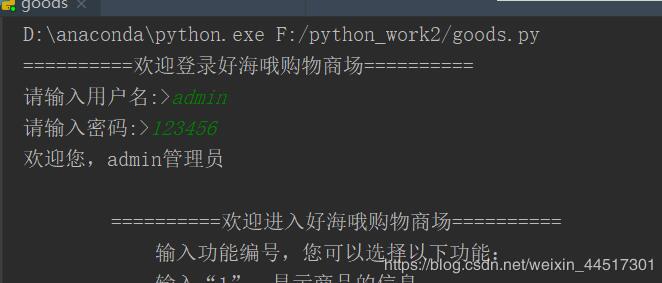
  info = """
  ==========欢迎进入好海哦购物商场==========
   输入功能编号,您可以选择以下功能:
   输入“1”:显示商品的信息
   输入“2”:添加商品的信息
   输入“3”:删除商品的信息
   输入“4”:退出系统功能
  ==========================================
  """
  print(info)
  while True:
   code = input("请输入功能编号:>")
   if code == "1":
    self.showGoods()
   elif code == "2":
    self.addGoods()
   elif code == "3":
    self.deleteGoods()
   elif code == "4":
    print("感谢您的使用,正在退出系统!!")
    self.writeContentFile()
    break
   else:
    print("输入编号有误,请重新输入!!")

 def userWork(self):
  print(" ==============欢迎进入好海哦购物商场==============")
  print("您可输入编号和购买数量选购商品,输入编号为n则结账")
  self.showGoods()
  total = 0
  while True:
   id = input("请输入购买商品编号:>")
   if id == "n":
    print("本次购买商品共消费%d元,感谢您的光临!" % (total))
    break
   if self.shopdic.get(id):
    good = self.shopdic[id]
    num = int(input("请输入购买数量:>"))
    total = total + good.price * num
   else:
    print("输入商品编号有误,请核对后重新输入!")

 def login(self):
  # 登录功能
  print("==========欢迎登录好海哦购物商场==========")
  uname = input("请输入用户名:>")
  password = input("请输入密码:>")
  if uname == "admin":
   if password == "123456":
    print("欢迎您,admin管理员")
    self.adminWork()
   else:
    print("管理员密码错误,登录失败!")
  else:
   print("欢迎你,%s用户" % (uname))
   # 执行用户的购买功能
   self.userWork()
if __name__ == '__main__':
 shopManage = ShopManager("shop.txt")
 shopManage.login()
更多学习资料请关注专题《管理系统开发》。
以上就是本文的全部内容,希望对大家的学习有所帮助,也希望大家多多支持【听图阁-专注于Python设计】。