Python实现图像去噪方式(中值去噪和均值去噪)
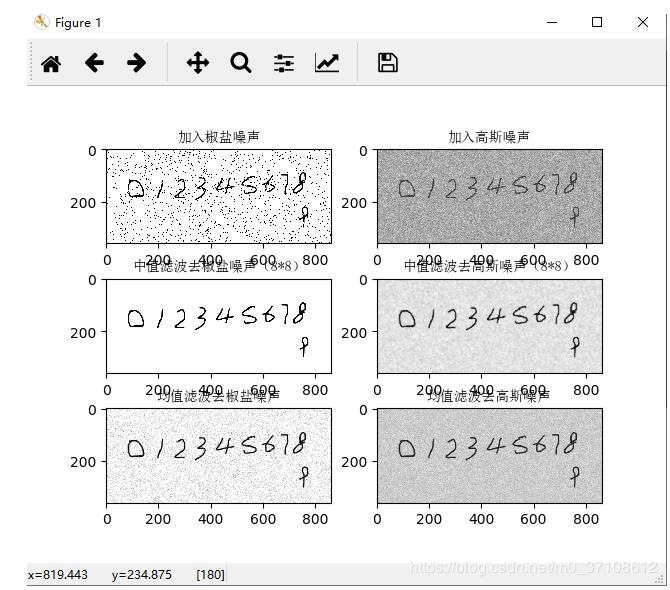
实现对图像进行简单的高斯去噪和椒盐去噪。
代码如下:
import numpy as np
from PIL import Image
import matplotlib.pyplot as plt
import random
import scipy.misc
import scipy.signal
import scipy.ndimage
from matplotlib.font_manager import FontProperties
font_set = FontProperties(fname=r"c:\windows\fonts\simsun.ttc", size=10)

def medium_filter(im, x, y, step):
  sum_s = []
  for k in range(-int(step / 2), int(step / 2) + 1):
    for m in range(-int(step / 2), int(step / 2) + 1):
      sum_s.append(im[x + k][y + m])
  sum_s.sort()
  return sum_s[(int(step * step / 2) + 1)]


def mean_filter(im, x, y, step):
  sum_s = 0
  for k in range(-int(step / 2), int(step / 2) + 1):
    for m in range(-int(step / 2), int(step / 2) + 1):
      sum_s += im[x + k][y + m] / (step * step)
  return sum_s


def convert_2d(r):
  n = 3
  # 3*3 滤波器, 每个系数都是 1/9
  window = np.ones((n, n)) / n ** 2
  # 使用滤波器卷积图像
  # mode = same 表示输出尺寸等于输入尺寸
  # boundary 表示采用对称边界条件处理图像边缘
  s = scipy.signal.convolve2d(r, window, mode='same', boundary='symm')
  return s.astype(np.uint8)


def convert_3d(r):
  s_dsplit = []
  for d in range(r.shape[2]):
    rr = r[:, :, d]
    ss = convert_2d(rr)
    s_dsplit.append(ss)
  s = np.dstack(s_dsplit)
  return s


def add_salt_noise(img):
  rows, cols, dims = img.shape
  R = np.mat(img[:, :, 0])
  G = np.mat(img[:, :, 1])
  B = np.mat(img[:, :, 2])

  Grey_sp = R * 0.299 + G * 0.587 + B * 0.114
  Grey_gs = R * 0.299 + G * 0.587 + B * 0.114

  snr = 0.9

  noise_num = int((1 - snr) * rows * cols)

  for i in range(noise_num):
    rand_x = random.randint(0, rows - 1)
    rand_y = random.randint(0, cols - 1)
    if random.randint(0, 1) == 0:
      Grey_sp[rand_x, rand_y] = 0
    else:
      Grey_sp[rand_x, rand_y] = 255
  #给图像加入高斯噪声
  Grey_gs = Grey_gs + np.random.normal(0, 48, Grey_gs.shape)
  Grey_gs = Grey_gs - np.full(Grey_gs.shape, np.min(Grey_gs))
  Grey_gs = Grey_gs * 255 / np.max(Grey_gs)
  Grey_gs = Grey_gs.astype(np.uint8)

  # 中值滤波
  Grey_sp_mf = scipy.ndimage.median_filter(Grey_sp, (7, 7))
  Grey_gs_mf = scipy.ndimage.median_filter(Grey_gs, (8, 8))

  # 均值滤波
  Grey_sp_me = convert_2d(Grey_sp)
  Grey_gs_me = convert_2d(Grey_gs)

  plt.subplot(321)
  plt.title('加入椒盐噪声',fontproperties=font_set)
  plt.imshow(Grey_sp, cmap='gray')
  plt.subplot(322)
  plt.title('加入高斯噪声',fontproperties=font_set)
  plt.imshow(Grey_gs, cmap='gray')

  plt.subplot(323)
  plt.title('中值滤波去椒盐噪声(8*8)',fontproperties=font_set)
  plt.imshow(Grey_sp_mf, cmap='gray')
  plt.subplot(324)
  plt.title('中值滤波去高斯噪声(8*8)',fontproperties=font_set)
  plt.imshow(Grey_gs_mf, cmap='gray')

  plt.subplot(325)
  plt.title('均值滤波去椒盐噪声',fontproperties=font_set)
  plt.imshow(Grey_sp_me, cmap='gray')
  plt.subplot(326)
  plt.title('均值滤波去高斯噪声',fontproperties=font_set)
  plt.imshow(Grey_gs_me, cmap='gray')
  plt.show()


def main():
  img = np.array(Image.open('E:/pycharm/GraduationDesign/Test/testthree.png'))
  add_salt_noise(img)


if __name__ == '__main__':
  main()
效果如下
以上这篇Python实现图像去噪方式(中值去噪和均值去噪)就是小编分享给大家的全部内容了,希望能给大家一个参考,也希望大家多多支持【听图阁-专注于Python设计】。