PHP连接数据库实现注册页面的增删改查操作
本文实例为大家分享了PHP连接数据库实现注册页面的增删改查操作的方法,供大家参考,具体内容如下
1.连接数据库
<?php
 //本地测试
 $host = '127.0.0.1';
 $port = 3306;
 $user = "root";
 $pwd = "";
 $link = @mysql_connect("{$host}:{$port}",$user,$pwd,true);
 if(!$link) {
  die("Connect Server Failed: " . mysql_error());
 }
 //选择连接的数据库库名
 mysql_select_db("my");
 //设置字符编码utf8
 mysql_set_charset('utf8');
?>
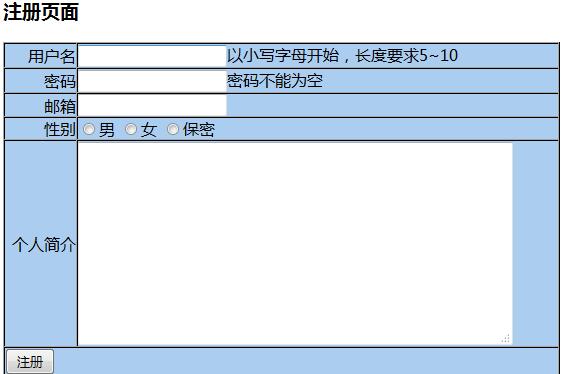
2.注册页面(html页面)
<!DOCTYPE html PUBLIC "-//W3C//DTD XHTML 1.0 Transitional//EN" "http://www.w3.org/TR/xhtml1/DTD/xhtml1-transitional.dtd">
<html xmlns="http://www.w3.org/1999/xhtml" xml:lang="en">
<head>
 <meta http-equiv="Content-Type" content="text/html;charset=UTF-8" />
 <title>Document</title>
</head>
<body>
<h3>注册页面</h3>
 <form action="add.php" method='post'>
  <table border='1' cellpadding='0' cellspacing='0' width='80%' bgcolor='#ABCDEF'>
   <tr>
    <td align='right'>用户名</td>
    <td><input type="text" name="username" id=""/>以小写字母开始,长度要求5~10</td>
   </tr>
   <tr>
    <td align='right'>密码</td>
    <td><input type="password" name="password" id=""/>密码不能为空</td>
   </tr>
   <tr>
    <td align='right'>邮箱</td>
    <td><input type="text" name="email" id="" /></td>
   </tr>
   <tr>
    <td align='right'>性别</td>
    <td>
     <input type="radio" name="sex" id="" value='1' />男
     <input type="radio" name="sex" id="" value='2' />女
     <input type="radio" name="sex" id="" value='3' />保密
    </td>
   </tr>
   <tr>
    <td align='right'>个人简介</td>
    <td>
     <textarea name="txt" id="" cols="50" rows="10"></textarea>
    </td>
   </tr>
   <tr>
    <td colspan='2'><input type="submit" name='act' value='注册' /></td>
   </tr>
  </table>
 </form>

</body>
</html>
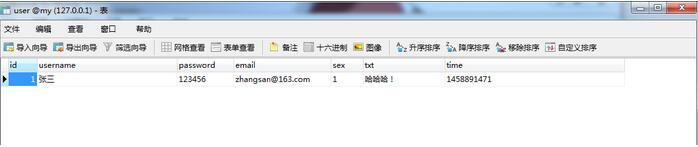
3.将注册数据显示在数据库
//往数据库中添加数据

<?php
header("Content-type:text/html; charset=utf-8");
//-----------------------连接数据库---------------------------
include_once "connect.php";
//-------------------------将数据连接到数据库------------------
$time=time();
$sql="insert into user (username,password,email,sex,txt,`time`) value('{$_POST['username']}','{$_POST['password']}','{$_POST['email']}','{$_POST['sex']}','{$_POST['txt']}','{$time}')";
$res=mysql_query($sql);
header("location:hello.php");
?>
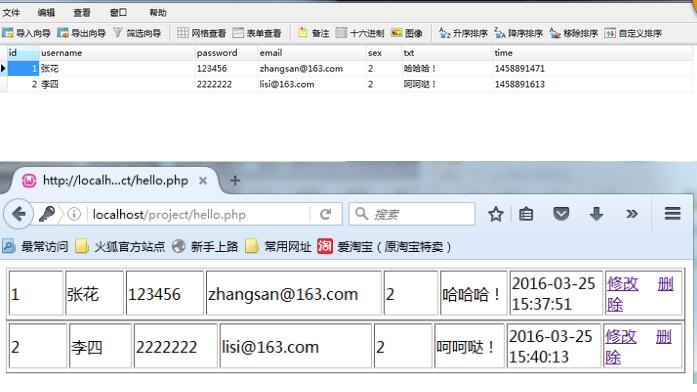
4.返回后台界面
<?php
header("Content-type:text/html; charset=utf-8");
//-----------------------连接数据库------------------------------
include_once "connect.php";
//--------------------查询数据库--------------------------------
$query="select * from user";
$result=mysql_query($query);
if(!$result)
{
 die("could not to the database<br/>".mysql_error());
}
//-------------------封装函数-----------------------------
//该函数将数据库的数据写成数组形式
function result2Arr($result){
 while($result_row=mysql_fetch_assoc($result)){
  $arr[] = $result_row;
 }
 return $arr;
}
$arr = result2Arr($result);
foreach($arr as $key=>$value){
 echo "<table border='1px'>";
 echo "<table border='1px' >";
 echo "<tr> ";
 echo "<td width='100px'>".$value['id']."</td>";
 echo "<td width='100px'>".$value['username']."</td>";
 echo "<td width='100px'>".$value['password']."</td>";
 echo "<td width='200px'>".$value['email']."</td>";
 echo "<td width='100px'>".$value['sex']."</td>";
 echo "<td width='100px'>".$value['txt']."</td>";
 echo "<td width='100px'>".date('Y-m-d H:i:s',$value['time'])."</td>";
 echo "<td width='100px'><a href='update1.php?id=$value[id]'>修改</a>    <a href='delete.php?id=$value[id]'>删除</a></td>";
 echo "<tr/>";
 echo "</table>";
}
?>

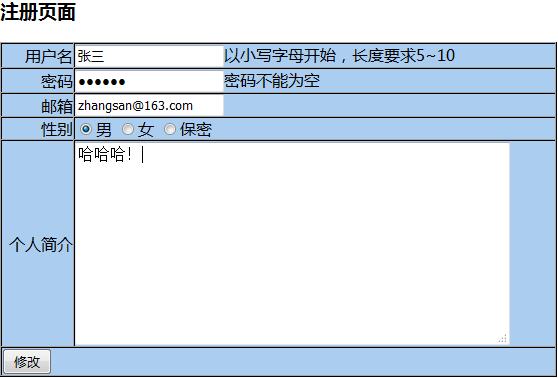
5.修改数据
//当用户要修改信息时,返回页面,页面中包含之前填写的信息

<!DOCTYPE html PUBLIC "-//W3C//DTD XHTML 1.0 Transitional//EN" "http://www.w3.org/TR/xhtml1/DTD/xhtml1-transitional.dtd">
<html xmlns="http://www.w3.org/1999/xhtml" xml:lang="en">
<head>
 <meta http-equiv="Content-Type" content="text/html;charset=UTF-8" />
 <title>Document</title>
</head>
<body>
<div>

<?php
 include_once "connect.php";
 $sql="select * from user where id='".$_GET['id']."'";
 //echo "sql:".$sql;(显示出修改哪一行)
 $result=mysql_query($sql,$link);
 $arr = result2Arr($result);
 //print_r($arr);
 $row = $arr[0];

function result2Arr($result){
 while($result_row=mysql_fetch_assoc($result)){
  $arr[] = $result_row;
 }
 return $arr;
}
?>
  <h3>注册页面</h3>
  <form action="update.php" method='post'>
   <input type="hidden" name="id" id="" value="<?php echo $row['id']?>"/>
   <table border='1' cellpadding='0' cellspacing='0' width='80%' bgcolor='#ABCDEF'>
    <tr>
     <td align='right'>用户名</td>
     <td><input type="text" name="username" id="" value="<?php echo $row['username']?>"/>以小写字母开始,长度要求5~10</td>
    </tr>
    <tr>
     <td align='right'>密码</td>
     <td><input type="password" name="password" id=""value="<?php echo $row['password']?>"/>密码不能为空</td>
    </tr>
    <tr>
     <td align='right'>邮箱</td>
     <td><input type="text" name="email" id="" value="<?php echo $row['email']?>"/></td>
    </tr>
    <tr>
     <td align='right'>性别</td>
     <td>
      <input type="radio" name="sex" id="" value='1' <?php if($row['sex']=='1'){ echo 'checked';}?>/>男
      <input type="radio" name="sex" id="" value='2' <?php if($row['sex']=='2'){ echo 'checked';}?>/>女
      <input type="radio" name="sex" id="" value='3' <?php if($row['sex']=='3'){ echo 'checked';}?>/>保密
     </td>
    </tr>
    <tr>
     <td align='right'>个人简介</td>
     <td>
      <textarea name="txt" id="" cols="50" rows="10"><?php echo $row['txt']?></textarea>
     </td>
    </tr>
    <tr>
     <td colspan='2'><input type="submit" name='act' value='修改' /></td>
    </tr>
   </table>
  </form>
</div>
</body>
</html>
//将修改的信息存入数据库

<?php
header("Content-type:text/html; charset=utf-8");
//通过post获取页面提交数据信息
$data = $_POST;
//print_r($data);
include_once "connect.php";
$sql = "update `user` set username='{$data['username']}',password='{$data['password']}', email='{$data['email']}',sex='{$data['sex']}',txt='{$data['txt']}' where id='{$data['id']}'";
echo $sql;
$res = mysql_query($sql,$link);
if($res){
 header("Location:hello.php");
 //echo "alert('修改成功')";
}else{
 header("Location:update1.php?id=".$data['id']);
 //echo "alert('修改失败')";
}
?>
6.删除数据
//删除数据库里的数据

<?php
header("Content-type:text/html; charset=utf-8");
include_once 'connect.php';
$sql = "delete from user where id='".$_GET['id']."'";
$sus=mysql_query($sql,$link);
if($sus){
 header("location:hello.php");
}else{
 echo "alert('删除失败')";
}
?>
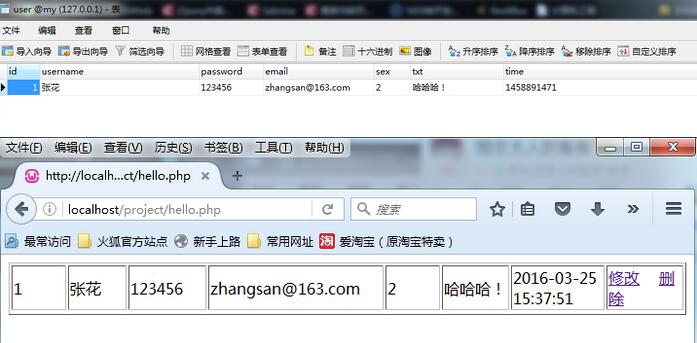
//若要删除李四,点击删除后,会自动跳转到后台页面,数据库里数据也删除
以上就是本文的全部内容,希望对大家的学习有所帮助。