python3爬取torrent种子链接实例
本文环境是python3,采用的是urllib,BeautifulSoup搭建。
说下思路,这个项目分为管理器,url管理器,下载器,解析器,html文件生产器。各司其职,在管理器进行调度。最后将解析到的种子连接生产html文件显示。当然也可以保存在文件。最后效果如图。
首先在管理器SpiderMain()这个类的构造方法里初始化下载器,解析器,html生产器。代码如下。
def__init__(self):

  self.urls = url_manager.UrlManager()
  self.downloader = html_downloader.HtmlDownloader()
  self.parser = html_parser.HtmlParser()
  self.outputer = html_outputer.HtmlOutputer()
然后在主方法里写入主连接并开始下载解析和输出。
if __name__ == '__main__':
  url = "http://www.btany.com/search/桃谷绘里香-first-asc-1"
  # 解决中文搜索问题 对于:?=不进行转义
  root_url = quote(url,safe='/:?=')
  obj_spider = SpiderMain()
  obj_spider.parser(root_url)
用下载器进行下载,解析器解析下载好的网页,最后输出。管理器的框架逻辑就搭建完毕
def parser(self, root_url):
  html = self.downloader.download(root_url)
  datas = self.parser.parserTwo(html)
  self.outputer.output_html3(datas)
downloader下载器代码如下:
def download(self, chaper_url):

  if chaper_url is None:
    return None
  headers = {'User-Agent': 'Mozilla/5.0 (Windows NT 6.1; WOW64; rv:23.0) Gecko/20100101 Firefox/23.0'}
  req = urllib.request.Request(url=chaper_url, headers=headers)
  response = urllib.request.urlopen(req)
  if response.getcode() != 200:
    return None

  return response.read()
headers是模仿浏览器的请求头。不然下载不到html文件。
解析器代码如下:
# 解析种子文件
def parserTwo(self,html):
  if html is None:
    return
  soup = BeautifulSoup(html,'html.parser',from_encoding='utf-8')
  res_datas = self._get_data(soup)
  return res_datas

# 将种子文件的标题,磁力链接和迅雷链接进行封装
def _get_data(self,soup):
  res_datas = []
  all_data = soup.findAll('a',href=re.compile(r"/detail"))
  all_data2 = soup.findAll('a', href=re.compile(r"magnet"))
  all_data3 = soup.findAll('a',href=re.compile(r"thunder"))
  for i in range(len(all_data)):
    res_data = {}
    res_data['title'] = all_data[i].get_text()
    res_data['cl'] = all_data2[i].get('href')
    res_data['xl'] = all_data3[i].get('href')
    res_datas.append(res_data)
  return res_datas
通过分析爬下来的html文件,种子链接在a标签下。然后提取magnet和thunder下的链接。
最后输出器输出html文件,代码如下:
def __init__(self):
  self.datas = []

def collect_data(self, data):
  if data is None:
    return
  self.datas.append(data)
#输出表单
def output_html3(self,datas):
  fout = open('output.html', 'w', encoding="utf-8")

  fout.write("<html>")
  fout.write("<head><meta http-equiv=\"content-type\" content=\"text/html;charset=utf-8\"></head>")
  fout.write("<body>")
  fout.write("<table border = 1>")

  for data in datas:
    fout.write("<tr>")
    fout.write("<td>%s</td>" % data['title'])
    fout.write("<td>%s</td>" % data['cl'])
    fout.write("<td>%s</td>" % data['xl'])
    fout.write("</tr>")

  fout.write("</table>")
  fout.write("</body>")
  fout.write("</html>")
  fout.close()
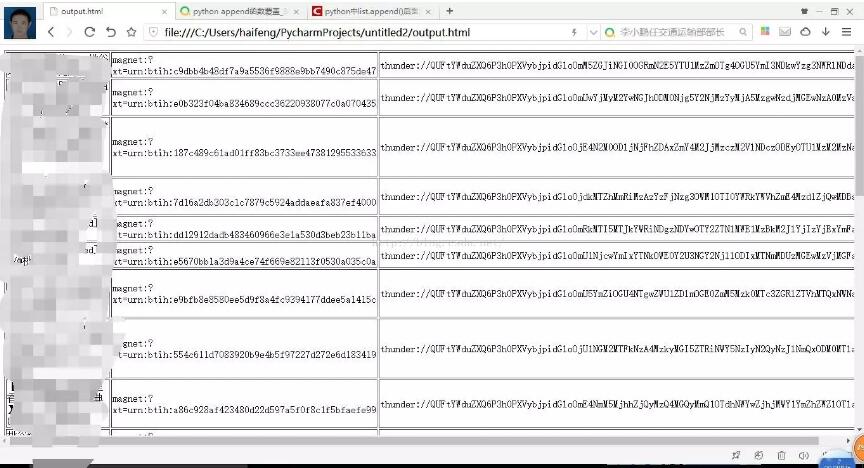
项目就结束了。源代码已上传,链接https://github.com/Ahuanghaifeng/python3-torrent,觉得有用请在github上给个star,您的鼓励将是作者创作的动力。
以上这篇python3爬取torrent种子链接实例就是小编分享给大家的全部内容了,希望能给大家一个参考,也希望大家多多支持【听图阁-专注于Python设计】。