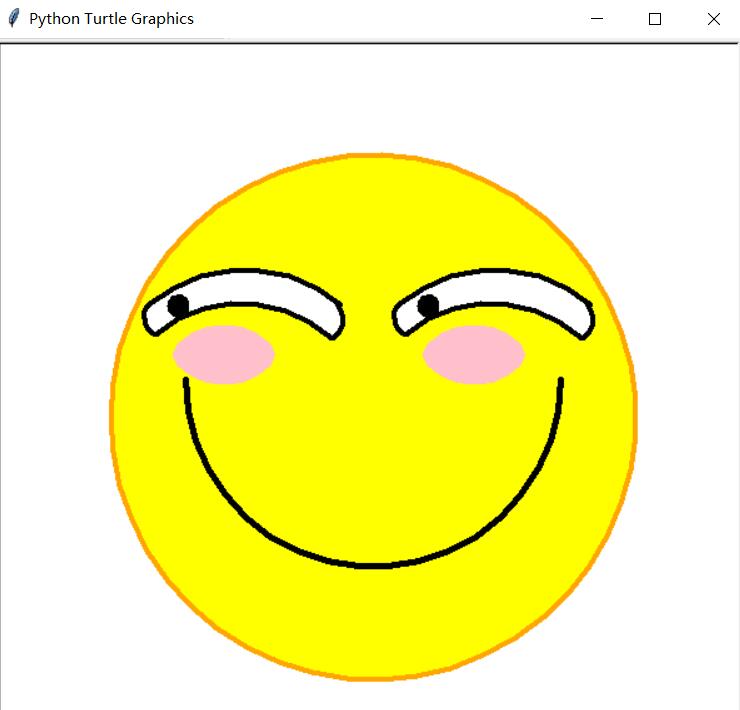
使用python的turtle绘画滑稽脸实例
这是借鉴了一位兄弟的代码,然后进行修改的,原来代码存在问题,用了2小时,自己修改,终于画出了滑稽脸,也算是对于今天学的turtle绘画库的一个小小的记录吧!(有错误希望各位看官指正啊)
编译器是:Atom
python 是3.7版本
运行位 Windows power shell
import turtle
turtle.setup(600,600,200,200)

#fcae
turtle.penup()
turtle.goto(-210,0)
turtle.seth(-90)
turtle.pendown()
turtle.pencolor(‘orange')
turtle.pensize(4)
turtle.begin_fill()
turtle.circle(210,360)
turtle.fillcolor(‘yellow')
turtle.end_fill()
turtle.pencolor(‘black')

#mouth
turtle.pensize(5)
turtle.penup()
turtle.goto(-150,30)
turtle.pendown()
turtle.seth(-90)
turtle.circle(150,180)

#left eye
turtle.penup()
turtle.pensize(4)
turtle.goto(-180,90)
turtle.pendown()
turtle.seth(40)
turtle.begin_fill()
turtle.circle(-120,80)
turtle.penup()
turtle.goto(-180,90)
turtle.pendown()
turtle.seth(-130)
turtle.circle(15,110)
turtle.seth(40)
turtle.circle(-106,83)
turtle.seth(30)
turtle.circle(18,105)
turtle.fillcolor(‘white')
turtle.end_fill()

#right eye
turtle.penup()
turtle.goto(20,90)
turtle.pendown()
turtle.seth(40)
turtle.begin_fill()
turtle.circle(-120,80)
turtle.penup()
turtle.goto(20,90)
turtle.pendown()
turtle.seth(-130)
turtle.circle(15,110)
turtle.seth(40)
turtle.circle(-106,83)
turtle.seth(30)
turtle.circle(18,105)
turtle.fillcolor(‘white')
turtle.end_fill()

#Eyeball
turtle.pensize(2)
turtle.penup()
turtle.goto(50,95)
turtle.pendown()
turtle.begin_fill()
turtle.circle(8,360)
turtle.fillcolor(‘black')
turtle.end_fill()
turtle.penup()
turtle.goto(-150,95)
turtle.pendown()
turtle.begin_fill()
turtle.circle(8,360)
turtle.fillcolor(‘black')
turtle.end_fill()

#Blush
turtle.pensize(1)
turtle.pencolor(‘pink')
turtle.begin_fill()
turtle.penup()
turtle.goto(-160,50)
turtle.pendown()
turtle.seth(-90)
for i in range(2):
for j in range(10):
turtle.forward(j)
turtle.left(9)
for j in range(10,0,-1):
turtle.forward(j)
turtle.left(9)
turtle.fillcolor(‘pink')
turtle.end_fill()
turtle.pensize(1)
turtle.pencolor(‘pink')
turtle.begin_fill()
turtle.penup()
turtle.goto(40,50)
turtle.pendown()
turtle.seth(-90)
for i in range(2):
for j in range(10):
turtle.forward(j)
turtle.left(9)
for j in range(10,0,-1):
turtle.forward(j)
turtle.left(9)
turtle.fillcolor(‘pink')
turtle.end_fill()
turtle.hideturtle()

turtle.done()
以上这篇使用python的turtle绘画滑稽脸实例就是小编分享给大家的全部内容了,希望能给大家一个参考,也希望大家多多支持【听图阁-专注于Python设计】。